Most teams spend months on a visual identity. They finalize the logo, approve the typefaces and lock in a color palette. Then they export a PDF, email it to the company, and within a few months the sales deck, the partner website and the trade show banner each show a slightly different brand. I have watched this exact scenario play out at companies of all sizes.
I have reviewed hundreds of corporate asset systems over the years. The failure point is almost never the design itself. The failure point is distribution. When a secondary color changes six months after launch, the old version keeps circulating in decks, pitch files and agency folders because nobody can tell which copy is current. Writing the rules is half the job. The other half is a way of sharing them so that employees, freelancers, agencies and partners always land on the current version.
This guide compares the common ways teams share brand guidelines, walks through a step-by-step process for setting up one source of truth, and lists what to send an agency on day one.
The Common Ways Teams Share Brand Guidelines
Before you change anything, it helps to see why the current method creates friction. Most teams use one or more of the options below, and each one trades control against convenience. I group the common sharing methods by how much control they give you.
- Emailed PDF brand book: easy to send and easy to read, but every copy is frozen the moment it leaves your outbox. A PDF can tell someone the exact blue, yet it can't hand them the logo file or the fonts, so people go looking elsewhere.
- Shared cloud folder (Google Drive, Dropbox, SharePoint): the files are there, but people have to guess your folder structure, drafts sit next to finals, and guest permissions for outside partners break or expire.
- Wiki or Notion page: good for written rules and voice guidance, weak for heavy design files. External partners often need an account or an IT request before they can see anything.
- Public page on the company website: zero friction for anyone, but no control. You can't keep sales templates, campaign concepts or internal messaging away from the open web.
- Online brand guidelines hub (a brand portal): takes some setup time, then gives you one link where the rules sit next to the downloadable files, with separate access for different audiences.
Many companies end up with all five at once, which is the real source of confusion. The goal of the steps below is to pick one home and retire the rest.
Step-by-Step: How to Share Brand Guidelines So People Use the Current Version
Sharing guidelines well is mostly a change in habits. You are training your team and partners to look in one place, every time.
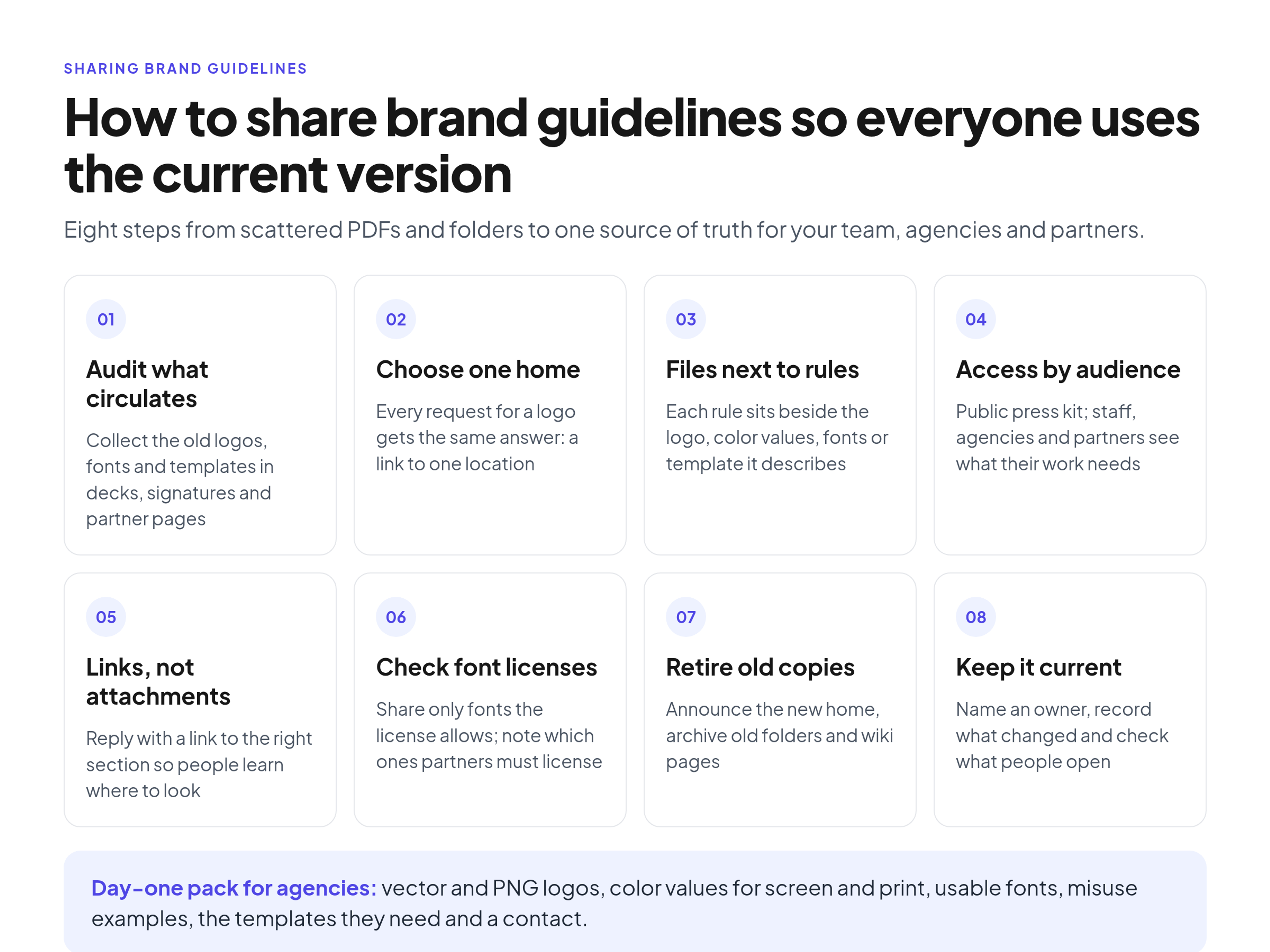
1. Audit what is already circulating
Start by finding out what people actually use. Open the last ten sales presentations sent to clients, check a few email signatures, look at the logo on partner pages and event materials. You will usually find stretched images, wrong fonts and old logos. Collect these rogue assets so you know exactly what needs replacing and where the old copies live.
2. Choose one source of truth
Pick a single digital location for the brand. From that point on, whenever someone asks for a logo in Slack, by email or in a meeting, the answer is a link to that location. If you are weighing the options, our guide on what a brand portal is and how it differs from shared folders explains the difference in more detail.
3. Put the files next to the rules
The most common mistake is separating rules from assets. A PDF says which blue to use, and the logo lives in a different folder three clicks away. Structure the guidelines so each rule has its files right beside it:
- A one-page quick-start summary for busy contractors.
- Logo files with clear examples of correct and incorrect use.
- Colors with HEX, RGB and CMYK values written out so they can be copied.
- Typography rules with links to the approved font files or web font sources.
- Brand voice and key messages.
- Templates for slide decks, social graphics and email signatures.
Writing the voice and tone part as web pages also makes it far easier to update. The Mailchimp Content Style Guide is a well-known public example of written brand guidance published on the web rather than in a PDF.
4. Decide who gets what access
Not everyone needs everything. Group your audiences by what they do with the brand:
- Internal staff: presentation templates, email signatures, approved photos.
- Agencies and freelancers: vector logos, full color and type specifications, source templates and brand strategy documents.
- Press and partners: a basic logo pack, a short company description and approved product images.
Keep the basic press kit public so journalists and partners can help themselves, and put internal messaging, campaign work and sales templates behind a password or a role.
5. Send links, not attachments
When an agency asks for the logo, don't attach a PNG to your reply. Send the link to the logo section of your guidelines. This is the most critical behavioral change I implement with teams. It feels slower the first time, but it teaches people where to look, and the next time they need an asset they open the link instead of searching old email threads.
6. Check font licenses before you share font files
Fonts are the asset teams most often share without thinking. Open source fonts can usually be passed on, but only under their license terms. The Google Fonts FAQ notes that usage and redistribution conditions are set by each font's license, most often the SIL Open Font License, while some fonts are reserved for their owner. Commercial typefaces are often licensed per user or per company, so an agency may need its own license instead of a copy of your files. Note in the guidelines which fonts can be downloaded and which ones partners must license themselves.
7. Announce the new home and retire old copies
Introduce the new location at an all-hands or team meeting and show people how to find and download a template. Then archive the old shared folders and wiki pages, and replace them with a short note pointing to the new link. If the old folder is still there, people will keep using it out of habit.
8. Keep it updated and watch usage
Assign an owner who updates the guidelines when the brand changes, and keep a record of what changed and when, so nobody wonders whether a file is current. Check every few months which sections and files people actually open. Pages nobody visits may be hard to find; files people keep requesting by email may be missing.
What to Send an Agency or Partner on Day One
External partners don't need a long essay on brand purpose before they start a production task. They need practical assets to set up their project files. On day one, send a single link that gives them:
- Vector logos (SVG or EPS) plus PNG versions with transparent backgrounds.
- Exact color values for screen and print.
- Font files they are allowed to use, or a note on which fonts they must license.
- Examples of incorrect logo use, so early drafts don't need revisions.
- The templates that apply to their work, and a contact for questions.
Add the deeper strategy material once the engagement is under way, and remove their access when the project ends.
Common Mistakes When Sharing Brand Guidelines
- Rules and files in different places. Partners read one document and download from another, and they often pick the wrong file.
- Several "official" copies. A PDF on the intranet, a folder in Drive and a page in Notion all claim to be current. Pick one and point the others to it.
- No owner. Guidelines without a named person responsible go stale within months.
- All or nothing access. Either everything is public, or partners have to wait days for an account. Separate public, internal and partner material instead.
- Ignoring mobile. People often need a logo or a color code from their phone at an event or a print shop. Check that your guidelines are readable and the files downloadable on a phone.
How a Brand Portal Supports This Process
You can follow every step above with tools you already have, as long as one location is clearly the official one. A dedicated brand portal simply makes it easier: it keeps the online guidelines and the asset library in one place, and lets you choose public or password-protected access, send share links for a single folder or file, keep version history, and set roles such as Admin, Editor and Viewer. That is how Brandportal is built, with unlimited free viewers so partners don't need paid seats. You can compare plans on the pricing page.
FAQ
Why isn't an emailed PDF brand book enough?
A PDF has no version control. Once you send it, you can't update the copy on someone's laptop, so when the brand changes the old file stays in circulation.
How do I give an outside agency quick access to our brand guidelines?
Send one link to a location they can open without an internal account, such as a password-protected guidelines page or a share link to the relevant folder. Remove access when the project ends.
What logo file formats should we share?
Share vector formats (SVG, and EPS or PDF for print) for designers and print vendors, plus high-resolution PNG files with transparent backgrounds for everyday use in slides and documents.
Should brand guidelines be public or private?
A mix usually works. Keep the basic logo pack and company description public to cut down on press requests, and keep internal messaging, campaign work and sales templates private for employees and approved partners.
Can we share our font files with agencies?
Only if the font license allows it. Open source fonts usually can be shared under their license terms, while many commercial fonts require each company or user to hold its own license.
Conclusion
Brand guidelines only protect the brand if people use the current version. Emailed PDFs and scattered folders make the wrong file easier to find than the right one. Audit what is circulating, choose one home, keep files next to the rules, give each audience the access it needs, send links instead of attachments, and retire the old copies. Done consistently, the "can you send me the logo" requests fade, and the brand looks the same wherever it shows up.