A good brand asset naming convention puts the same pieces of information in the same order every time: brand, asset type, variant, color, size, then date or version, written in lowercase and joined by hyphens. A name like acme-social-linkedin-rgb-1200x627-2026-10-15.jpg tells anyone what the file is, where it belongs and how current it is before they open it.
Almost every marketing team has a file called logo-final-v3-actual-final.png somewhere. It usually sits next to Logo NEW.png and logo (1).png, and nobody remembers which one went to the printer. The name says nothing useful, so people guess, and a wrong guess ends up in a sales deck.
In my experience auditing asset libraries for B2B teams, the teams that stay organized as they grow treat file naming as a written rule, not a personal habit. This guide gives you a seven-part naming order, the formatting rules that keep files working on any computer, a ready-to-copy template and a plan for rolling it out without renaming every file you own.
Why File Names Still Matter When You Have Folders and Tags
Folders, tags and search help people find files inside your shared drive or asset library. The file name is the only label that leaves with the file.
When a sales manager downloads a slide deck, the folder it came from stays behind. When a designer emails a logo to a print shop, your tags don't travel with the attachment. When someone drops a team photo into a chat thread, the recipient sees only the name. If that name is logo-white.svg, it says nothing about the brand or whether it's current, and the second download quietly becomes logo-white (1).svg.
A clear naming pattern fixes this at the source: every copy still explains itself.
The Seven-Part Order for Brand Asset File Names
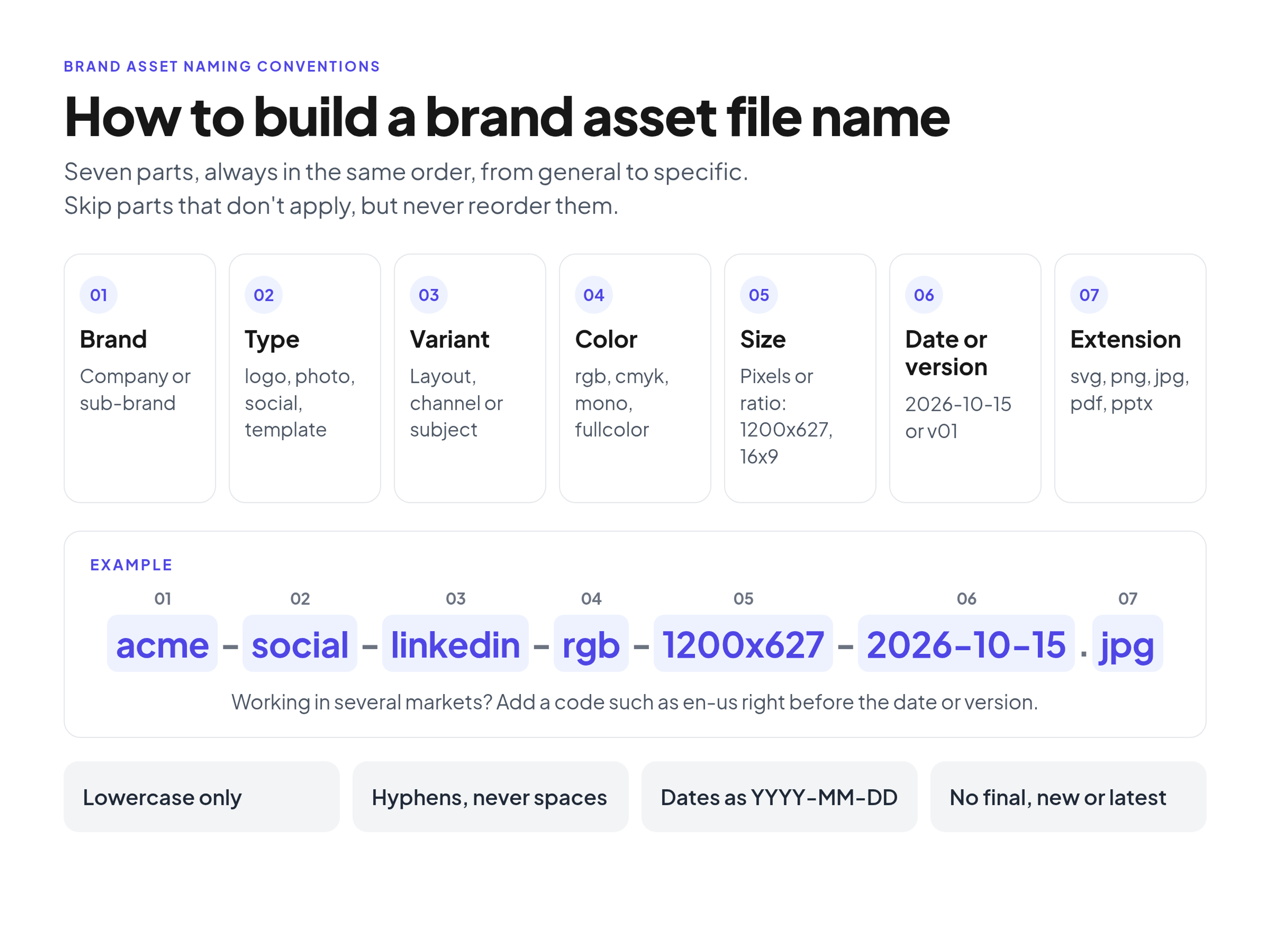
A working convention moves from general to specific. Computers sort file names character by character, so the Harvard Biomedical Data Management guide to file naming conventions advises putting the most important information first. For brand assets, the brand and the asset type matter most, so files group by brand and then by type when sorted alphabetically.
1. Brand or sub-brand
Start with the company or product name, always in the same short form. This keeps your files recognizable in an agency's folder full of other clients' logos. If you run several product lines, use the sub-brand name instead.
2. Asset type
Say what the item is, using a short, fixed list of words that everyone shares: logo, icon, illustration, photo, video, social, template, guidelines. Never swap in synonyms: if one person writes "pic" and another "photo," sorting stops working.
3. Variant or description
Add the specific context. For logos, that's the layout: horizontal, stacked, symbol or wordmark. For social graphics, it's the channel or campaign, such as linkedin or spring-launch. For photos, use a short, literal description of the subject, such as office-team or product-front. Keep it to one or two words.
4. Color
Color mode decides where a file can be used. An RGB file is for screens, a CMYK file is for print, and sending the wrong one to a printer can shift your brand colors. Use plain terms: rgb, cmyk, fullcolor, mono, white or reversed. If you need both treatment and mode, keep them in that order, for example fullcolor-rgb.
5. Size or aspect ratio
If the file is cropped or exported for a specific use, state the size. Use exact pixels such as 1200x627, or a ratio such as 16x9 or 1x1. Vector logos usually skip this part because they scale to any size.
6. Date or version
Every file needs a marker that shows how current it is. Use a date for finished assets tied to a launch, an event or a quarter. Use a version number for files that change over time, such as presentation templates. More on both below.
7. File extension
The extension (.svg, .png, .jpg, .pdf, .pptx) comes last. Don't repeat the format inside the name.
If you work in several markets, add a language or market code, such as en-us or de, right before the date or version. Skip it for assets that work everywhere.
Not every asset needs all seven parts. A vector logo has no size, and a sales deck has no color mode. Skip the parts that don't apply, but never change the order of the ones you keep.
A Ready-to-Copy Naming Template
Paste this into your brand guidelines or the description of your shared folder so designers, marketers and agencies all work from the same rule:
brand-type-variant-color-size-date.extension (or version instead of date)
- brand: acme (or your sub-brand, such as acme-pay)
- type: logo, icon, illustration, photo, video, social, template, guidelines
- variant: horizontal, stacked, symbol, wordmark, a channel such as linkedin, or a short subject such as office-team
- color: rgb, cmyk, fullcolor, mono, white, reversed
- size: pixels such as 1200x627, or a ratio such as 16x9
- market (optional): en-us, de, fr, placed right before the date or version
- date or version: 2026-10-15 for finished assets, v01, v02 for files that change over time
- extension: svg, png, jpg, pdf, pptx
Formatting Rules That Keep Files Working Everywhere
The order of words is half the system. The other half is formatting, which decides how files behave when they move between laptops, shared drives, email and websites.
- Use hyphens between words, never spaces. Spaces turn into %20 when a file lands on a web page, and some systems split or reject them. Pick hyphens and use them everywhere, both between parts and inside a two-word part, so the whole library looks the same.
- Write everything in lowercase. Systems disagree about capital letters. Microsoft's guidance on naming files, paths and namespaces tells developers not to assume case sensitivity, because Windows treats OSCAR and oscar as the same name while other file systems treat them as different files. On a website, a link to Logo-Primary.png can break when the file is actually logo-primary.png. Lowercase removes the problem.
- Leave out special characters. The same Microsoft guidance lists characters Windows reserves and won't accept in file names, including the slash, backslash, colon, question mark, asterisk, quotation marks, pipe and angle brackets. Ampersands, commas and accented letters cause trouble in links too. Stick to plain letters, numbers and hyphens.
- Pad version numbers with a zero. Write v01, v02 and v03, not v1, v2 and v3. Without the leading zero, v10 sorts right after v1 and your middle versions sink to the bottom of the list. The Harvard guide gives the same advice for numbered sequences.
- Write dates as YYYY-MM-DD. This is the ISO 8601 format, and it's the only common date format that sorts in true date order when files are listed by name. 2026-01-15 always lands before 2026-10-15. 01-15-2026 and 15.01.2026 don't sort that way.
- Keep names short. If you need more than seven or eight words, the extra detail belongs in tags.
The Words to Ban: Final, New and Latest
Some words look helpful and make things worse. Ban these from file names completely: final, new, latest, updated, copy and use-this-one.
There is always another final version. Once a file is called final, the next round becomes final-v2, then final-final, and nobody can tell which one is real. "New" stops being true the day after you save it. Dates and version numbers do the same job without lying: the highest version or the most recent date is the current file, and anyone can see that at a glance.
Before and After: Examples of Brand Asset Names
Here is how the rules change real file names:
- Primary logo: Acme Logo_Final.eps becomes acme-logo-horizontal-fullcolor-cmyk-2026-01-15.eps
- Social graphic: LinkedIn Post NEW.png becomes acme-social-linkedin-rgb-1200x627-2026-10-15.png
- Sales deck template: Sales Pitch v2 final.pptx becomes acme-template-sales-deck-16x9-v02.pptx
- Team photo: IMG_4821 (edited).jpg becomes acme-photo-office-team-rgb-2026-09-30.jpg
- Brand guidelines PDF: Brand Guidelines 2026 FINAL.pdf becomes acme-guidelines-brand-identity-2026-01-15.pdf
Each new name sorts next to its siblings and shows where it can be used and how current it is.
File Names vs. Folders vs. Tags
Teams often try to squeeze too much into a file name: the designer's name, an internal project code, the client who requested it, a sentence about the photo. Each of the three ways to organize assets has its own job:
- File name: the facts someone needs after the file leaves your library, such as brand, type, variant, color, size and date or version.
- Folders: the browsing structure. Keep top-level folders by asset category, such as Logos, Typography, Templates, Photography and Social, so people can click their way to the right place. You don't need to repeat the whole folder path inside the file name.
- Tags and metadata: everything people might search for but don't need in the name, such as the photo's subject, location, people, campaign, usage rights and the person who approved it. A photo can carry tags like office, team and san-francisco while its name stays short.
If you're comparing a shared drive with a dedicated asset library, this split is a good test: a drive mostly gives you folders and names, while a brand library also gives you tags, metadata and version history. Our explainer on how a brand portal keeps guidelines and files in one place covers that difference in more detail.
How to Roll Out a Naming Convention
You don't need to fix years of messy files at once. Focus on the files people actually use.
- Write the rule into your brand guidelines. Add one short section with the order, the formatting rules, the banned words and three or four real examples. If it isn't written down, it isn't a rule.
- Rename the core assets first. Start with the files people download most: logos, presentation templates, email signature files and current product photos. Leave a social graphic from three years ago alone.
- Archive instead of overwriting. When a logo or template changes, save the new file with a new date or version and move the old one to an archive folder. Don't rename archived files with special prefixes; the folder and the date already show they're old.
- Brief agencies and freelancers before the next project. Send the convention with the brief and ask for deliverables named to match. If you're working out how partners get access in the first place, see our guide to sharing brand guidelines with agencies, freelancers and partners.
- Assign one owner. One person checks new uploads now and then and fixes names that drift. Without an owner, the convention fades within a few months.
Where a Brand Portal Fits
A naming convention works in any shared drive, but it's easier to keep when the library is built around it. Brandportal combines your online brand guidelines and asset library in one place, with folders for browsing, metadata and tagging for search, version history so the current file is always clear, share links for a single folder or file, and roles (Admin, Editor, Viewer) so only the right people upload and rename. Portals can be public or password-protected, and viewers are free. If you want to try it with your own files, you can see plans and the 14-day free trial.
FAQ
What is a brand asset naming convention?
It's a written rule for how your team names logos, images, templates and other brand files. It sets which information goes into the name, in what order, and how it's formatted, so anyone can tell what a file is without opening it.
Should I use hyphens or underscores in file names?
Either works if you use it everywhere, but hyphens are the simpler choice for brand assets that end up on websites, because they read cleanly in links. The important part is consistency: one separator across the whole library.
Should I rename old files when I move them to a new library?
Rename only the core assets people still use: logos, current templates and active product photos. Archive the rest as they are, and apply the convention strictly to everything new.
When should I use a date and when a version number?
Use a date (YYYY-MM-DD) for finished assets tied to a point in time, such as an event photo or a quarterly campaign graphic. Use a version number (v01, v02) for files that change over time, such as a presentation template.
What should never go into a file name?
Words like final, new and latest, spaces, special characters, personal names and long descriptions. Put the extra detail into tags or metadata instead.
Conclusion
A file name is the one piece of context that follows a brand asset everywhere. Pick a fixed order (brand, type, variant, color, size, date or version), write it in lowercase with hyphens, use ISO dates and zero-padded versions, and ban words like final and new. Put the rule into your brand guidelines, rename the files people use most, and let tags carry the rest. Within a few weeks, the "which logo is the right one?" question gets much rarer.