Brand asset metadata tagging gives each file defined fields and tags from an agreed list, so people find the approved version and know how to use it.
On November 20, 2026, I read the guides that rank for this query (Claravine, Brandfolder, Veritone, Startup Design Weekly and Adobe's AEM taxonomy guide) together with the IPTC and Dublin Core standards pages. They agree on the basics: use a controlled vocabulary, let AI suggest tags but have a person confirm them, and give the vocabulary an owner. None of them gives a field spec a brand team can copy, checks what happens to tags stored inside a file when someone re-exports it, or offers a simple test that shows whether tagging works. Those three things are the core of this guide.
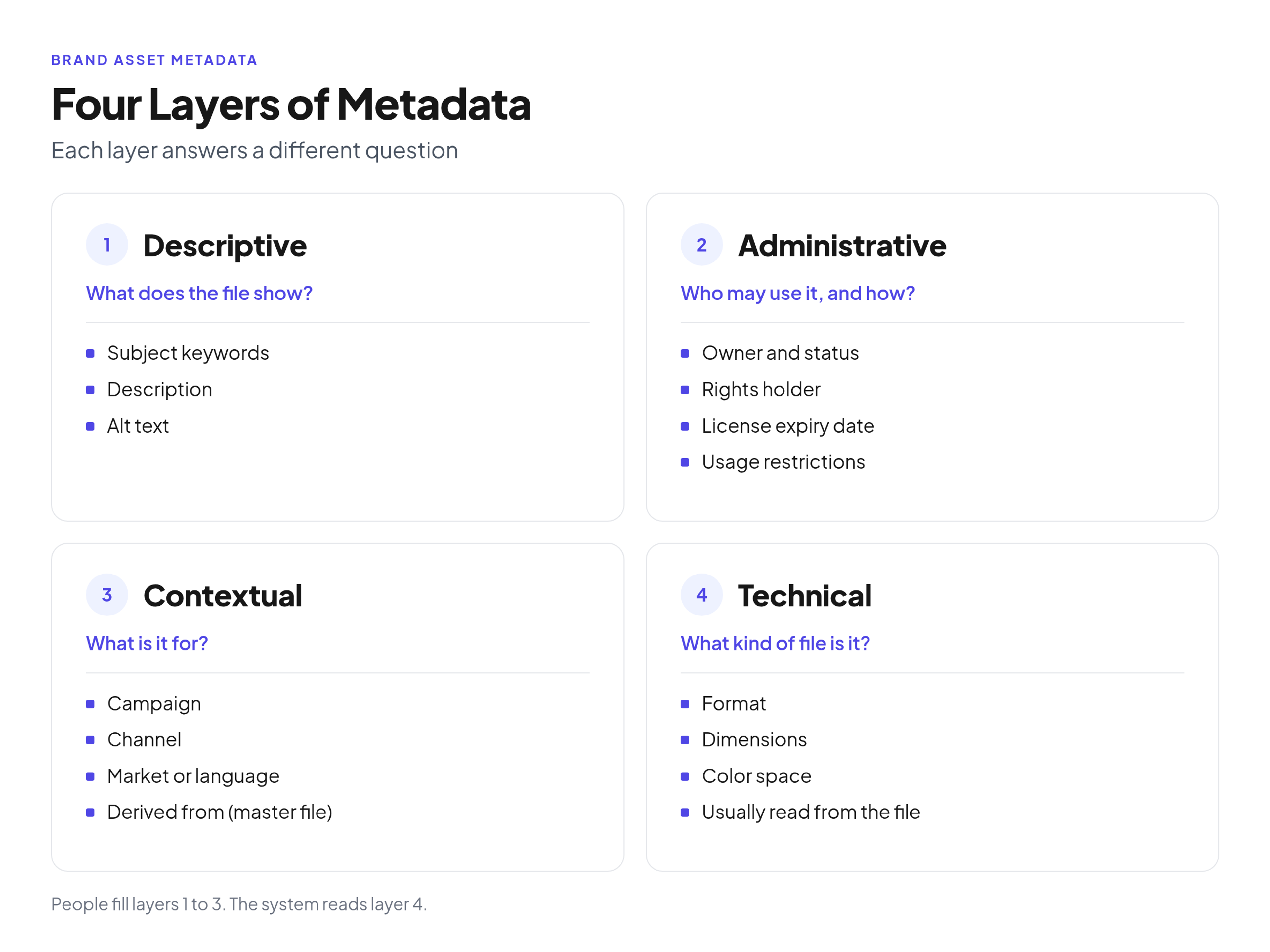
The four layers of brand asset metadata, with typical fields for each.
What Metadata Tagging Is
Metadata tagging is the practice of attaching structured fields and labels to a file so it can be searched, filtered and checked before use. Claravine's guide to what asset tagging is puts it as "the practice of attaching descriptive labels and structured metadata to an asset so it can be found, reused and reported on."
Four terms get mixed up, so it helps to pin them down:
- Metadata is the full record about a file: its fields and their values, such as owner, status, campaign or license expiry.
- A tag is a single label applied to a file, such as "packaging" or "holiday".
- A taxonomy is the agreed structure the labels come from: which fields exist, which values each field allows and how they relate (for example, Product > Tea > Green tea).
- A controlled vocabulary is the approved list of values for a field. People pick from it instead of typing their own word.
Tags and metadata are the third tool, after file names and folders. File names should carry the facts that matter once a file leaves the library; there is a separate guide to file names that still make sense once a file leaves the library. Folders give a browsing structure, and a shallow folder tree that leaves the detail to tags shows where folders should stop.
The Types of Brand Asset Metadata
Brand asset metadata comes in four types: descriptive, administrative, contextual and technical. Each type answers a different question, which is why a library needs all four.
- Descriptive metadata: what does the file show? Subject, keywords, a short description and alt text. This is what search matches against.
- Administrative metadata: who may use it, and how? Owner, status, approval, rights holder, license expiry date and usage restrictions. This layer keeps people from running an expired photo or a retired logo.
- Contextual or structural metadata: what is it for, and what is it related to? Campaign, channel, market or language, product, and links between a master file and the exports made from it.
- Technical metadata: what kind of file is it? Format, dimensions, resolution and color space. The library usually reads these from the file itself, so nobody needs to type them.
Claravine sorts tags into three similar dimensions (descriptive, administrative and contextual). I'd keep technical metadata as its own layer because it is filled differently: by the system, not by a person.
When people ask about "types of asset tagging", they often mean the method rather than the content. There are five common ways tags get onto a file:
- Picklist tags: the uploader chooses from a fixed list of values. Best for anything people filter on.
- Free-text keywords: typed words for details a list cannot predict. Useful, but they drift.
- Hierarchical taxonomy: values nested from broad to narrow, so a person can browse from "Product" down to one product line.
- Automated or AI tags: keywords a model suggests from what is visible in the file.
- Embedded metadata: fields stored inside the file itself, such as the IPTC and XMP fields in a photo.
Two public standards are worth knowing even if you never implement them in full. The IPTC Photo Metadata Standard is, in IPTC's words, "the most widely used standard to describe photos", with fields for creators, people, locations, products and rights. The DCMI Metadata Terms from the Dublin Core Metadata Initiative define properties such as creator, date, description, format, audience and access rights. Borrowing their field names saves you from inventing your own.
Build a Field Spec Before Anyone Tags
A field spec is a short document that sets, for every metadata field, its type, allowed values, whether it is required, who fills it and when. Write it before the first upload, because retagging a full library later is far more work than tagging it right once.
If you only need the minimum set of required fields and where they sit in the wider system, the organizing guide covers the full library setup, from inventory to owners and review dates. The spec below goes one level deeper. Here is the version I'd start from for a typical brand library:
- Asset type. Single-select picklist: logo, icon, illustration, photo, video, template, document, presentation. Required. Filled by the uploader at upload.
- Brand or product. Multi-select picklist with your master brand, sub-brands and product lines. Required. Uploader, at upload.
- Status. Single-select picklist: current, archived, expired. Required. Set by the brand team at approval and changed at retirement.
- Owner. Person field (one named person, not a team). Required. Brand team, at approval.
- Campaign. Single-select picklist of campaign names, plus "evergreen". Optional. Uploader, at upload.
- Channel. Multi-select picklist: web, social, email, print, presentation, events. Optional. Uploader, at upload.
- Market or language. Multi-select picklist: global plus the markets and language codes you actually produce for. Optional. Uploader, at upload.
- Subject keywords. Multi-select from the controlled vocabulary; free text only in a separate "other keywords" field. Optional. Uploader at upload, reviewed by the brand team.
- Description and alt text. Free text, one or two plain sentences describing what is visible. Optional for most files, required for photos used on the web. Uploader, at upload.
- Rights holder. Single-select picklist: internal, plus each agency, photographer or stock provider you license from. Required for photos and video. Brand team or legal, at approval.
- License expiry date. Date field, left empty for owned work. Required when the rights holder is external. Legal or brand team, at approval and again at each renewal.
- Usage restrictions. Short free text, for example "web and social only" or "no paid ads". Optional. Legal or brand team, at approval.
- Derived from. Link to the master file an export was made from. Optional. Uploader or system, at upload.
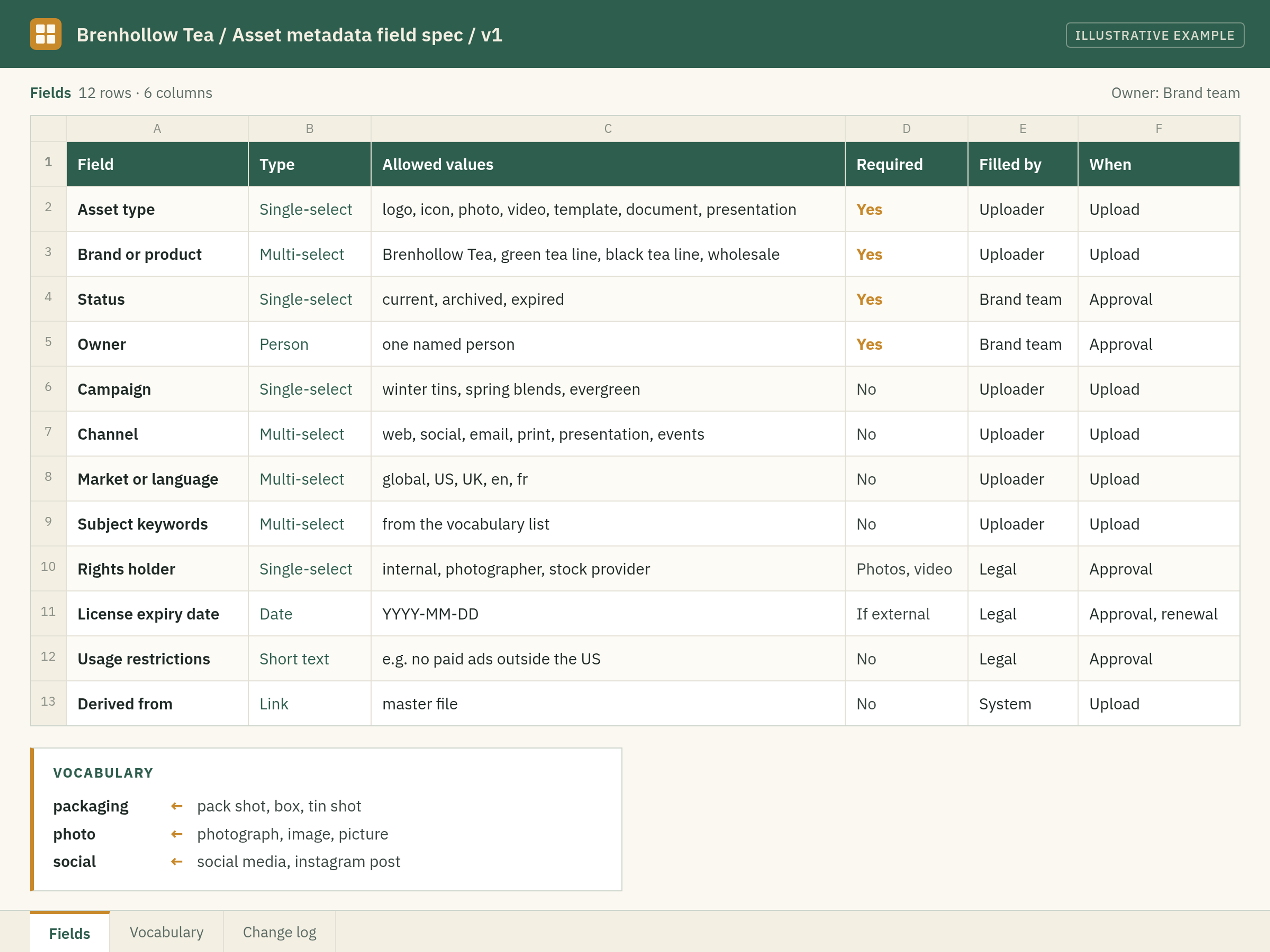
Illustrative example: a field spec and vocabulary sheet for Brenhollow Tea, a fictional company.
Rules for a Controlled Vocabulary
A controlled vocabulary keeps one approved value per concept, maps synonyms to it and has one owner who adds or retires values. Without it, "photo", "photograph" and "image" split the same search three ways.
These rules keep the list usable:
- Use picklists for anything people filter on. If a field appears as a filter, it must be a list, not free text.
- Pick one preferred term and map synonyms to it. If the preferred term is "packaging", searches for "pack shot" or "box" should still find the file. Adobe's guidance on taxonomy and tagging best practices recommends synonyms for exactly this reason: to catch common search errors.
- Set one casing rule and use singular nouns. "laptop", not "Laptops" or "LAPTOP".
- Do not repeat the folder path as tags. Adobe's guide says taxonomy and tagging should be "additive, not duplicative of your folder structure and metadata." If a file already sits in a Logos folder, a "logo" tag adds nothing.
- Name one vocabulary owner. That person approves new values. Everyone else suggests them through one route, such as a short request form or a shared channel.
- Retire values by merging them. When a term goes out of use, merge it into the current term instead of deleting it, so older files keep their tags.
- Review the list on a schedule. Adobe notes that tags may change as an organization's vocabulary changes, while folders stay more stable. A quarterly look is usually enough.
Tagging Examples by Asset Type
The two illustrative examples below show what a finished record looks like for common brand assets. Brenhollow Tea is a fictional company; the field names follow the spec above.
Illustrative example 1: product photo
- Asset type: photo
- Brand or product: Brenhollow Tea, green tea line
- Campaign: winter tins
- Channel: web, social
- Market or language: global
- Subject keywords: packaging, tea tin, steam, kitchen table
- Description and alt text: a green tea tin and a steaming cup on a wooden kitchen table
- Rights holder: the commissioning photographer
- License expiry date: set to the end date in the photographer's contract
- Usage restrictions: no paid ads outside the US
Illustrative example 2: sales deck
- Asset type: presentation
- Brand or product: Brenhollow Tea, wholesale
- Market or language: US, English
- Status: current
- Owner: sales enablement lead
- Usage restrictions: internal and prospect meetings only; do not publish
Notice what the examples leave out. Neither repeats the folder, and the sales deck has no subject keywords at all because nobody searches for decks by what they show.
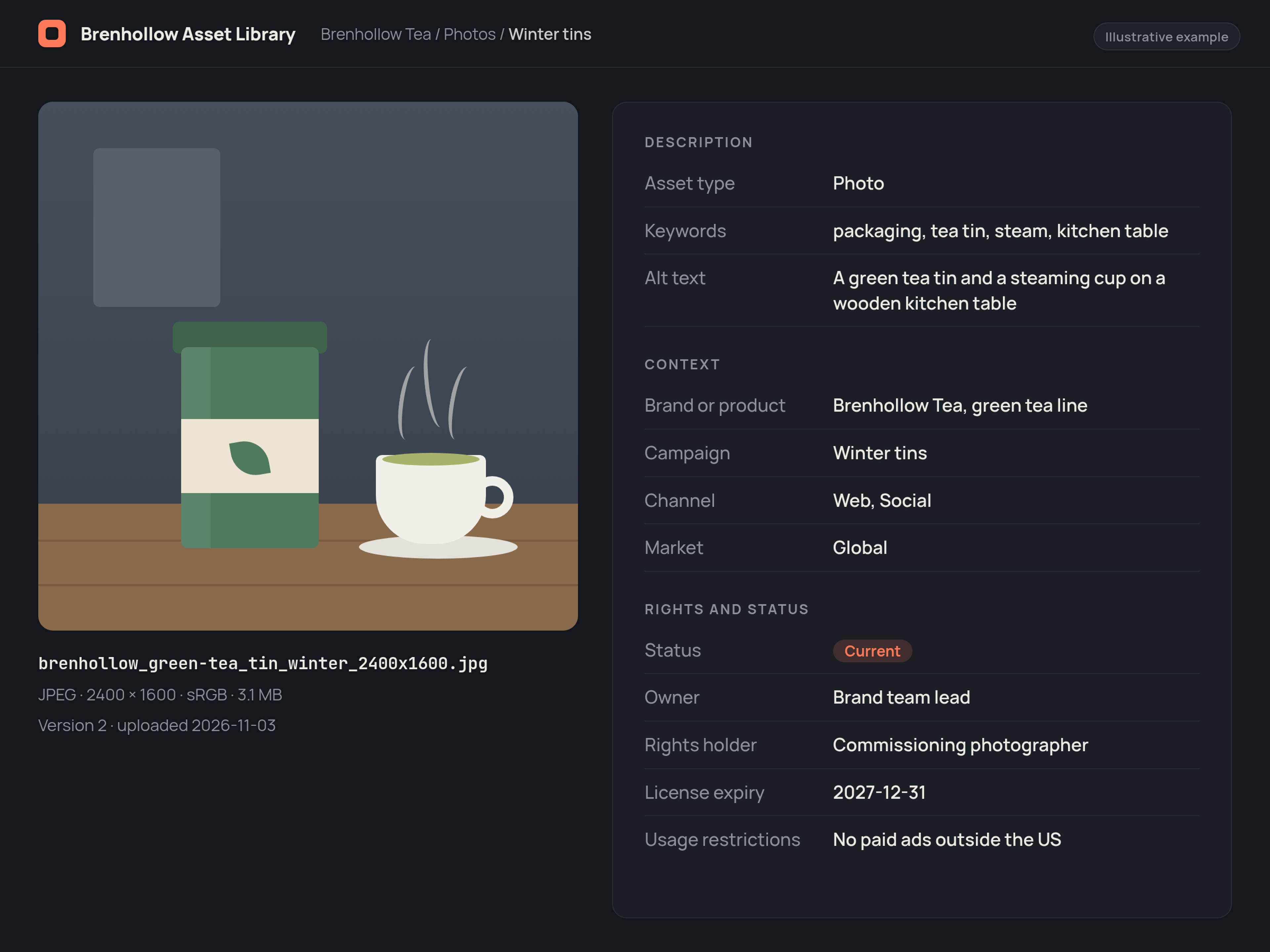
Illustrative example: a tagged asset record for a Brenhollow Tea product photo, with rights and status fields filled.
What AI Tagging Can and Cannot Do
AI tagging is good at describing what is visible in a file and bad at everything a business knows about it. Treat its output as suggestions: the AI proposes, a person confirms.
Automated tagging can suggest objects, scenes, dominant colors and text that appears in an image, and some tools also transcribe speech in video. That saves typing on large batches, such as an event shoot.
What it cannot see is often what matters most to a brand team:
- the campaign the file was made for
- the market or language it is cleared for
- the rights holder, license terms and expiry date
- whether the file is approved and current
- who owns it
Three habits keep AI tags from degrading the library:
- Keep machine keywords in their own field. Do not let them write into the controlled fields people filter on.
- Review a sample. After each large batch, someone from the brand team checks a handful of files and fixes or removes wrong suggestions.
- Never let AI fill rights or status. Those fields come from contracts and approvals, not from pixels.
Embedded Metadata: What Survives When a File Leaves the Library
Photos can carry metadata inside the file, in IPTC and XMP fields, but whether it survives depends on how the file is exported. In my test, one export path kept every field and four others removed everything.
I ran a quick test on November 20, 2026, to see how well embedded metadata holds up when a file leaves the library.
I downloaded IPTC's 2025.1 reference image, a public test photo that includes every field of the standard. With exiftool 13.25, the original showed 170 XMP tags, 17 IPTC-IIM tags and 11 EXIF tags, including Creator, Rights (the copyright notice), Keywords, Description, Web Statement of Rights and Alt Text. Then I re-saved it in common ways with ImageMagick 7.1.1-43 and Pillow 13.0.0, a Python imaging library, and counted again:
- ImageMagick, resized to 1200 px, saved as JPEG: 170 XMP, 17 IPTC-IIM and 11 EXIF tags. Creator, rights, keywords and the web statement were all kept.
- ImageMagick, resized with the -strip option (a common "optimize for web" setting): 0, 0 and 0. Everything was gone.
- Pillow, saved as JPEG with default settings: 0, 0 and 0.
- Pillow, saved as PNG and as WebP: 0, 0 and 0 in both cases.
- ImageMagick, converted to WebP: all 170 XMP tags and the 11 EXIF tags kept, the 17 IPTC-IIM tags dropped. Keywords and rights survived through XMP.
- ImageMagick, converted to PNG: no XMP or IPTC-IIM blocks, but the 11 EXIF tags, including artist, copyright and description, were kept. Other values, such as the web statement, survived only as nonstandard PNG text chunks placed after the image data, which exiftool warned "may be ignored by some readers".
The limits matter: this was one image, three tools and default settings. It was not a test of any asset library, website builder or of Brandportal. Still, the pattern is clear enough to act on:
- Treat the library record as the master. Rights, status and owner should live in the library, where they can be updated.
- Embed a few fields in files that leave the library. Creator, copyright notice and a rights statement URL are worth embedding in photos you send to partners or press.
- Check your own export path once. Run one file through the way your team really exports (design tool, image optimizer, website upload) and open the result in a free metadata viewer. IPTC publishes reference images for exactly this kind of check.
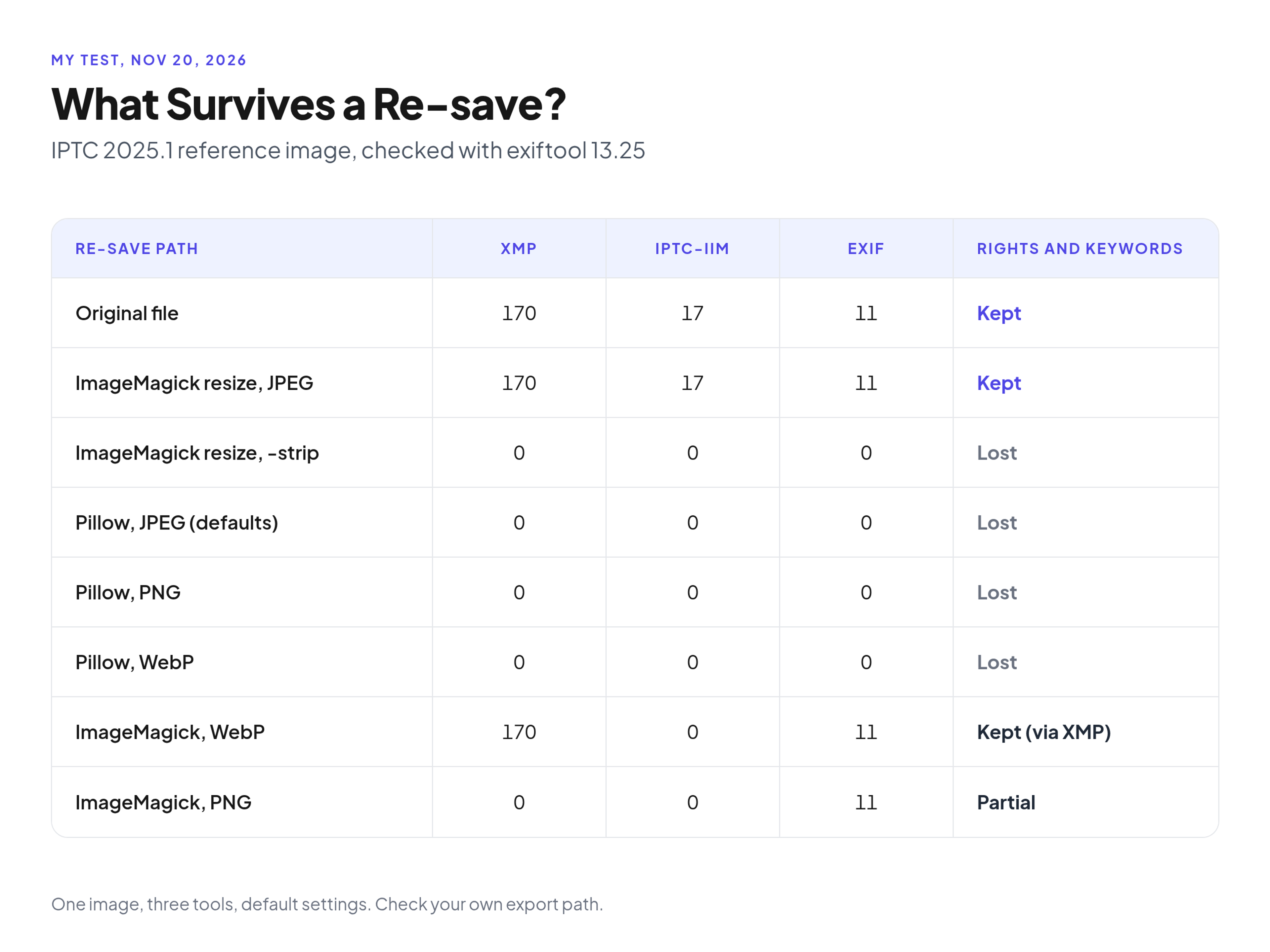
My test on November 20, 2026: which re-save paths kept or dropped the metadata in IPTC's 2025.1 reference image.
How to Check That Tagging Works
The quickest proof that tagging works is a findability test: take 10 real requests, search for each one and count how often the right current file shows up on the first screen. Pair it with a quarterly audit of the tags themselves.
The 10-search findability test
- Write down 10 real requests the brand team received recently, in the words people used, such as a request for the logo version for dark backgrounds or for product photos cleared for social.
- Search the library for each one, using those words.
- Mark a search as passed if the current, approved file appears on the first screen of results.
- Decide your pass rule before you start, for example all but one, and write it down.
- For every failed search, note why: a missing tag, a missing synonym, a wrong status or a file that does not exist yet.
The quarterly tag audit
Claravine recommends checking how many assets have empty required fields, how many values fall outside the list and which tags nobody uses. I'd add a fourth check that brand teams care about most:
- the fill rate of each required field
- values that sit outside the controlled vocabulary
- tags no one searches for or applies, which are candidates to merge or retire
- files whose license has expired but whose status still says current
Where a Brand Portal Fits
A brand portal puts the tagged library next to the brand guidelines, so the person who finds a file also sees the rules for using it. The tagging rules in this guide work in any library; a portal keeps them in one place.
Brandportal combines online brand guidelines and a brand asset library, with folders, metadata and tagging, version history, share links, Admin, Editor and Viewer roles, and public or password-protected portals with unlimited free viewers. If you want to try your field spec on a real library, check pricing; paid plans come with a 14-day free trial.
Common Mistakes
- No vocabulary owner. When nobody owns the list, everyone adds their own terms and the list grows into synonyms nobody manages.
- Tagging only new files. Old files stay invisible. Veritone's guide to metadata tagging best practices lists a tagging standard for past and future content and milestones for tagging past content among the first steps of an indexing strategy, so the backlog gets done in stages.
FAQ
What are the best practices for metadata tagging?
Write a field spec before anyone tags, keep the required fields few, use picklists for every field people filter on, map synonyms to one preferred term, and name one owner for the vocabulary. Let AI suggest descriptive keywords but have a person confirm them, and never let it fill rights or status. Then test the result with real searches and audit the tags every quarter.
Can you provide an example of asset tagging?
A product photo for a fictional tea brand might carry: asset type "photo", product "green tea line", campaign "winter tins", channel "web, social", market "global", keywords "packaging, tea tin, steam", rights holder "the commissioning photographer", a license expiry date and the restriction "no paid ads outside the US". Someone searching for "tea tin photos for social" can then find it, and see whether they may use it.
What is metadata tagging?
Metadata tagging is attaching structured fields and labels to a file, such as its type, campaign, owner, status and license terms, so people can search, filter and check it before use. In a brand library, the values come from an agreed list rather than from whatever each person types.
What are the different types of asset tagging?
By content, there are four types of metadata: descriptive (what the file shows), administrative (owner, status, rights), contextual (campaign, channel, market, related files) and technical (format, size, color space). By method, tags are applied from picklists, as free-text keywords, through a hierarchical taxonomy, by AI suggestions or as metadata embedded in the file.
Conclusion
Good brand asset metadata tagging is mostly decided before the first upload: a short field spec, a controlled vocabulary with one owner, and clear rules for what people and AI each fill in. After that, a 10-search test and a quarterly tag audit show whether it works. I'd start by writing the spec for your five most-requested asset types this week, then run the findability test on the requests your team got last month.