Brand asset usage rights are the written permissions that say who may use an asset, where, in what form and until what date. Every licensed photo, font, video clip and creator post in your library carries them, and so does your own logo when a partner or a journalist asks to use it.
Rights run in two directions. Inbound rights are the permissions you hold over work other people created: stock images, commissioned photography, fonts, music, customer posts. Outbound rights are the permissions you grant others over your own brand assets: resellers, franchisees, sponsors, press. A brand team that tracks only one direction ends up with the same problem from the other side: a photo running after its license ended, or a partner stretching your logo because nobody told them not to.
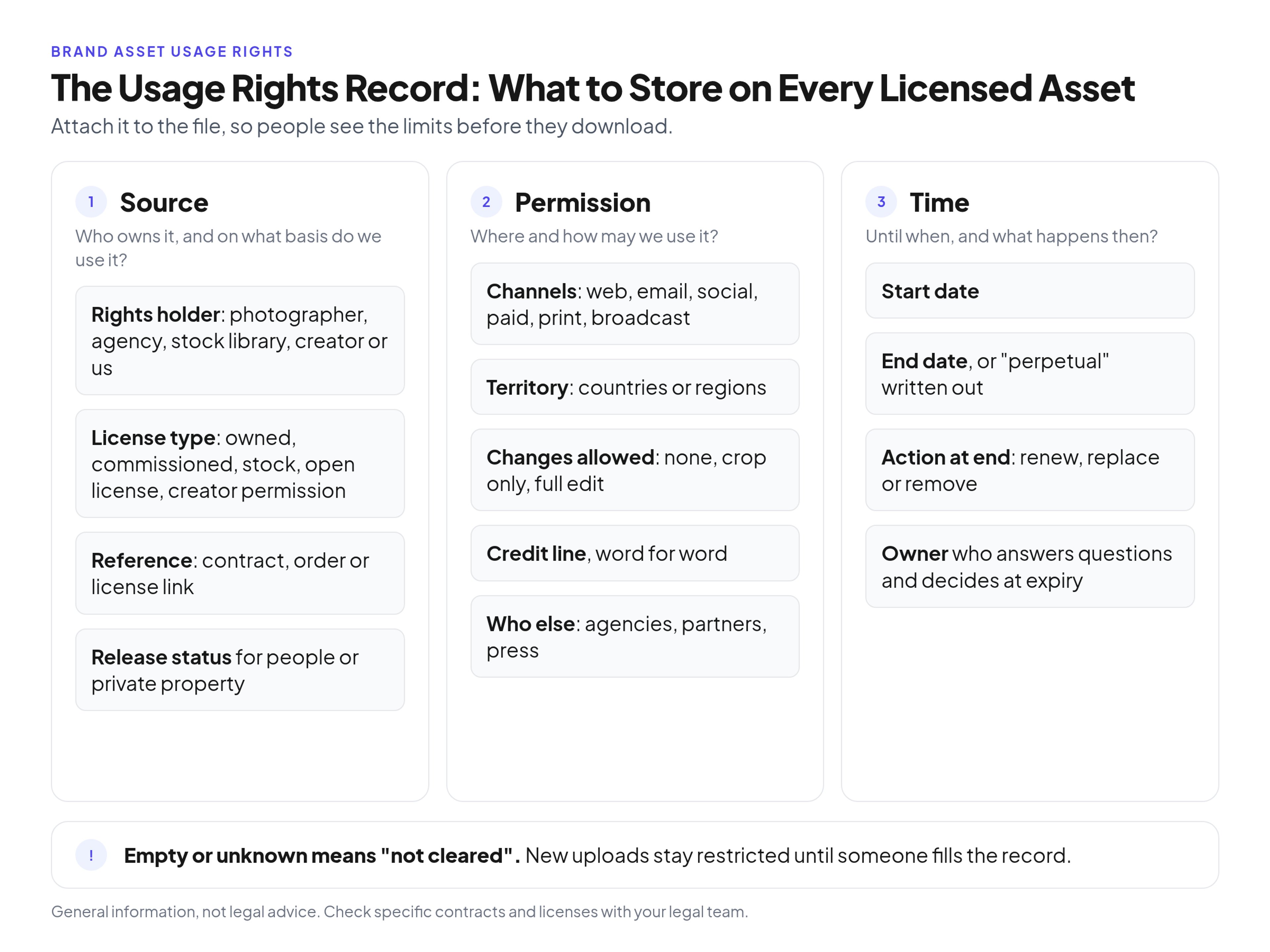
Store these fields on every asset that someone else owns or that carries limits.
This guide covers both directions: how usage rights relate to copyright and licenses, the terms every license defines, what to expect from each asset type, how to clear creator and customer content, the rights record to keep on each file, what to do when rights expire, and what your own usage terms for partners should say.
Usage rights vs copyright vs license
Copyright is ownership of a creative work, a license is the permission the owner gives you, and usage rights are the specific terms of that permission: channels, territory, term and changes allowed.
These three words get used as if they meant the same thing, and that confusion is where most rights problems start.
- Copyright usually stays with the person or company that created the work. A photographer who shoots your campaign typically owns the photos unless a signed contract transfers ownership to you.
- A license is the permission to use the work. When you buy a stock photo, you buy a license, not the photo. When an agency delivers a video, what you may do with it depends on the license or transfer written into the contract.
- Usage rights are the practical limits inside that license. The license says you may use the image. The usage rights say: web and email only, United States and Canada, until May 1, 2028, cropping allowed, credit line required.
The practical rule for a brand team: paying for a file is not the same as owning the rights to it. Until someone has read the license or contract, you know what the file looks like, not what you may do with it.
The seven terms every license defines
Almost every license or usage agreement answers seven questions: where the asset may appear, for how long, in which countries, whether you may change it, how to credit it, whether others may use it too, and who may use it on your behalf.
- Channels and scope. The media the asset is cleared for: website, email, organic social, paid social, print, packaging, out-of-home, broadcast, internal use. Organic and paid use are often priced and licensed separately, so a post you may share organically is not automatically cleared for an ad.
- Term and end date. How long the permission lasts. Some licenses run for a fixed period, some until a stated date, and some are perpetual. Write down the actual end date, not "two years".
- Territory. Where the asset may be used. "Worldwide" and "United States only" are very different licenses, and a regional team reusing a global campaign file can break the territory without knowing it.
- Modification. Whether you may crop, retouch, recolor, add text or combine the asset with other material. Some licenses forbid any change to the original.
- Attribution. Whether a credit line is required, its exact wording and where it must appear.
- Exclusivity. Whether the rights holder may license the same work to others during the term, including your competitors. Standard stock licenses are usually nonexclusive.
- Who may use it on your behalf. Whether agencies, freelancers, printers and partners working for you are covered, or whether each of them needs its own license. This is the term teams forget most often, because the file moves faster than the paperwork.
If a contract is silent on one of these, treat that term as not granted and ask the rights holder before the asset goes into a campaign.
Usage rights by asset type
Who holds the rights, and what you need on file, changes with the asset type: you grant rights to your own logo, a contract decides commissioned work, a license tier decides stock, and a signed release covers people in photos.
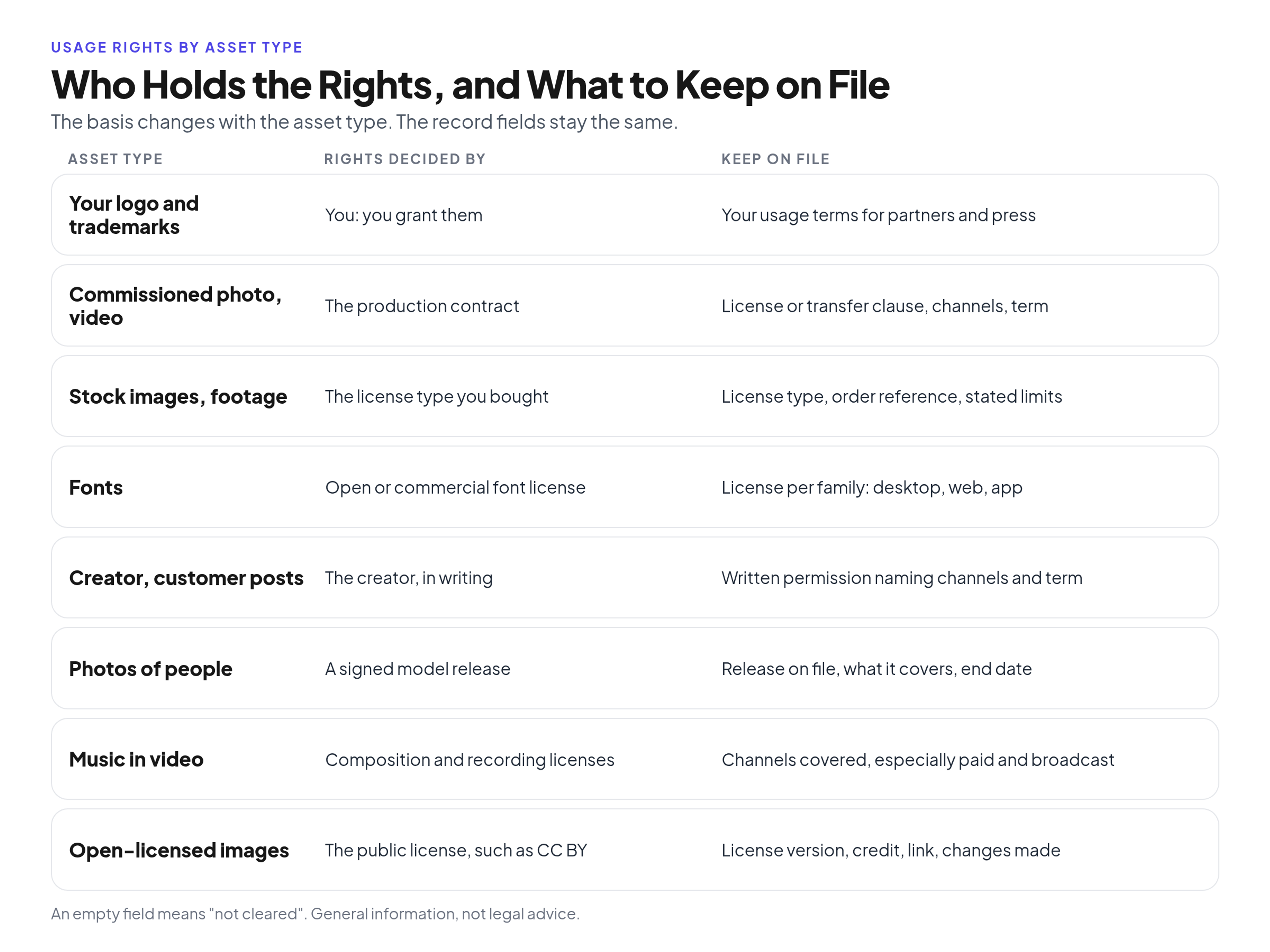
The owner and the limits change with the asset type; the record fields stay the same.
- Your logo and trademarks. You own them and you grant the rights. What you need on file is your own usage terms for outside parties (covered below).
- Commissioned photography and video. The production contract or statement of work decides who owns the files and what you may do with them. Record the license or transfer clause, the channels and the term. If the contract does not cover a channel, it is not covered.
- Stock images and video. The license type you bought decides the scope. Royalty-free means you pay once instead of per use, not that the file is free of limits. Rights-managed licenses clear a stated use, term and territory rather than a one-time fee, and Creative Commons is a separate public license (covered below), not a stock license category. Record the license type, the order or invoice reference and any limits on print runs, merchandise or sensitive subjects stated in that license.
- Fonts. Open licenses such as the SIL Open Font License allow use in logos, print and websites without an acknowledgement, while commercial fonts are usually licensed per desktop, web or app use. Record which license each family uses.
- Creator and customer content. The person who made the post owns it. Being tagged in a post is not permission to reuse it. Get written permission that names the channels and the term, and store it with the file (covered below).
- Photos and video of identifiable people. You need a signed model release. Cornell Law School's Legal Information Institute explains that the right of publicity protects against unauthorized commercial use of a person's name, likeness or other recognizable aspects of their persona, and that in the United States it is mostly a matter of state law. Record whether a release is on file, what it covers and when it ends.
- Music in video. A track in a brand video usually involves rights to both the composition and the recording, so check that the license covers the channel where the video will run, especially paid media and broadcast.
- Openly licensed images. Creative Commons licenses set the terms in public. The CC BY 4.0 license allows commercial use, but you must give appropriate credit, link to the license and indicate if you made changes, without suggesting the licensor endorses you. Other CC licenses add limits such as noncommercial use only.
Usage rights for creator and customer content (UGC)
Creator and customer content is licensed by a written permission from the person who made it; organic reuse, paid ads and short terms such as 30 days are separate grants, and each one needs a date and a channel on the rights record.
Organic use and paid use are separate grants for this content, even when the file is the same post. Organic use is publishing or resharing it on your own channels without paying to place it. Paid use is a different permission: running that post as an ad on your accounts, or whitelisting it so you can run creator-licensed ads from the creator's handle. If the writing says "repost" or "share on social" and does not mention ads or whitelisting, treat paid use as not cleared.
Many creator permissions are short. "1 month usage rights" or a 30-day term means you may use the content for that period, starting from the date named in the permission (or from the date it was granted, if no start date is written). When the month ends, new uses have to stop, and live organic posts and ads that still use the content usually have to come down unless you renew in writing. A month does not renew itself.
Exclusivity is a separate line. Nonexclusive permission lets the creator license the same post to others, including a competitor, during your term. Exclusive permission is only granted if the writing says so, and only for the channels and dates it names.
Put the agreement in writing, for example an email, a signed form or a saved message that names the channels (organic social, paid social, whitelisting, website, email) and the term. Then log it in the rights record: the rights holder is the creator or customer, the license type is creator permission, the reference links to that writing, allowed channels include or exclude paid use and whitelisting, and the end date is a calendar date, not the words "1 month". The action at the end date is renew or remove.
The usage rights record: fields to store on every licensed asset
A usage rights record is a short set of fields attached to the file itself that answers "may I use this here, now, like this?" without opening the contract; the core is rights holder, license, channels, territory, changes, credit and dates.
Contracts live in legal folders and inboxes. People find files in the brand library. Put the answer where people look. Group the fields in three blocks.
Source
- Rights holder (photographer, agency, stock library, creator or your company)
- License type (owned, commissioned, stock, open license, creator permission)
- Contract, order or license reference, with a link to the document
- Release status for any identifiable person or private property in the image
Permission
- Allowed channels
- Territory
- Modification allowed (none, crop only, full edit)
- Credit line, word for word, and where it goes
- Who else may use it (internal only, agencies, partners, press)
Time
- Start date and end date (or "perpetual", written out)
- Action at the end date: renew, replace or remove
- Owner: the person who answers questions and makes the call at expiry
One rule makes the record work: an empty or unknown field means "not cleared", never "free to use". If the territory is blank, nobody uses the file outside the home market until someone finds the contract. If the end date is unknown, the file is restricted until it is confirmed. New uploads start as "not cleared" and move to "cleared" only after someone fills the record.
If you tag images with embedded metadata, the PLUS Coalition publishes standards for communicating image license information, such as a "Licensor URL" field that Google Images can use to mark an image as licensable. Embedded fields help rights information travel with the file, but keep the record in the library too, because embedded data can be stripped when files are exported or uploaded elsewhere.
The record is one of the fields in a wider tagging scheme; for the rest of that scheme, see tagging and versioning a library so people find the current, cleared file.
Example: a completed rights record for one campaign photo
Here is what the record looks like when it is filled in for one licensed photo; it is an illustrative example with a fictional company, photographer and terms.
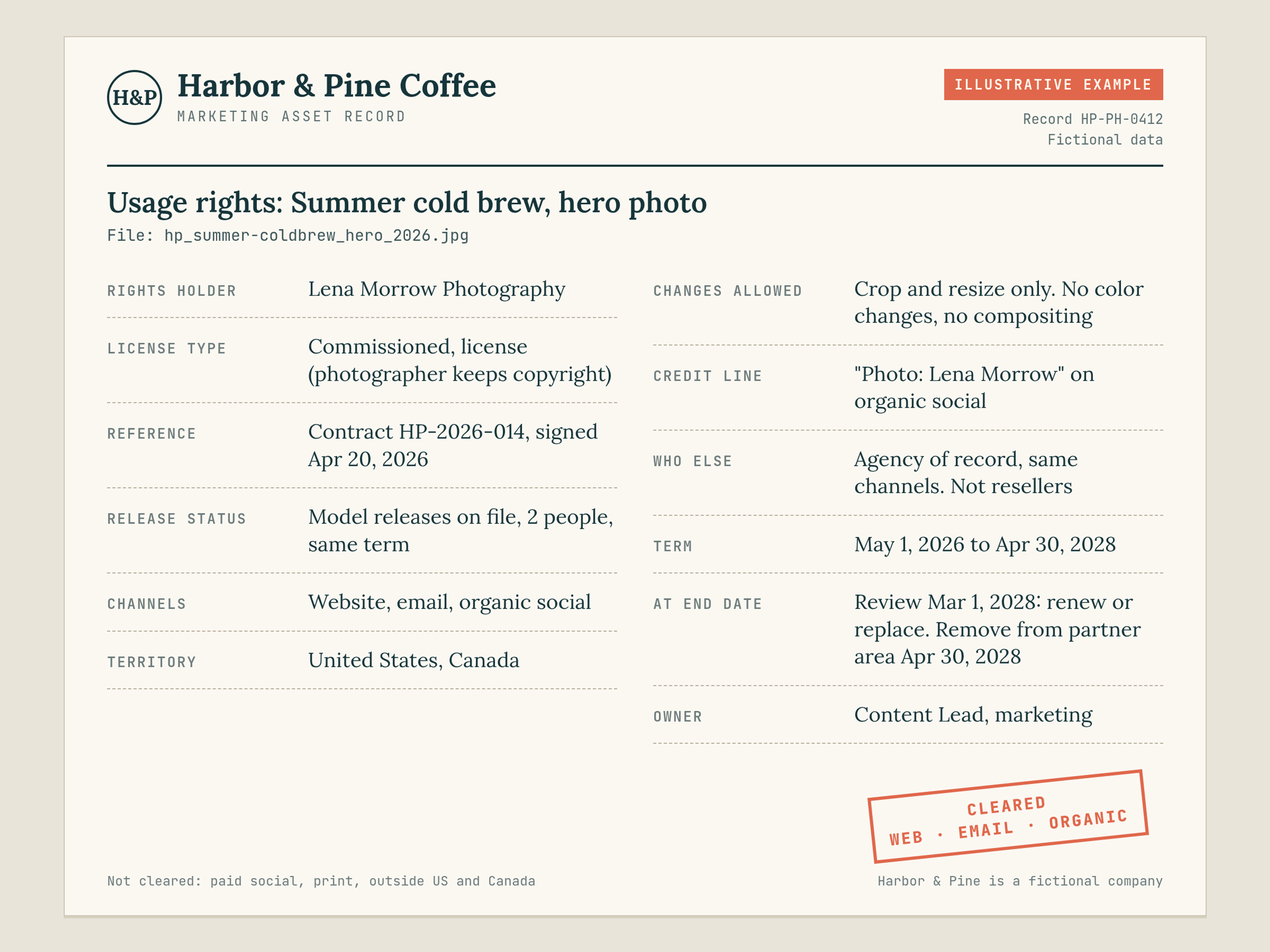
Illustrative example. Fictional company, photographer and terms.
Harbor & Pine Coffee, a fictional roaster, commissioned a summer cold brew shoot. The record on the hero photo reads:
- Rights holder: Lena Morrow Photography (fictional)
- License type: commissioned, license (photographer keeps copyright)
- Reference: contract HP-2026-014, signed April 20, 2026
- Release status: model releases on file for both people in the photo, same term as the license
- Allowed channels: website, email, organic social
- Territory: United States and Canada
- Modification allowed: crop and resize only; no color changes, no compositing
- Credit line: "Photo: Lena Morrow" on organic social posts
- Who else may use it: our agency of record for the channels above; not resellers
- Term: May 1, 2026 to April 30, 2028
- Action at end date: review March 1, 2028; renew or replace; remove from the partner area on April 30, 2028
- Owner: Content Lead, Harbor & Pine marketing
With that record, anyone in the library can answer the common questions in seconds. A regional manager in the United Kingdom cannot use it. Paid social is not covered. The sales team can put it on the website but not on a printed trade-show banner. And the person to ask is named.
How to handle usage rights expiration
Expiry needs a decision before the end date, an action on the date and a cleanup afterward; a first review about 60 days ahead is a sensible default, not an industry standard.
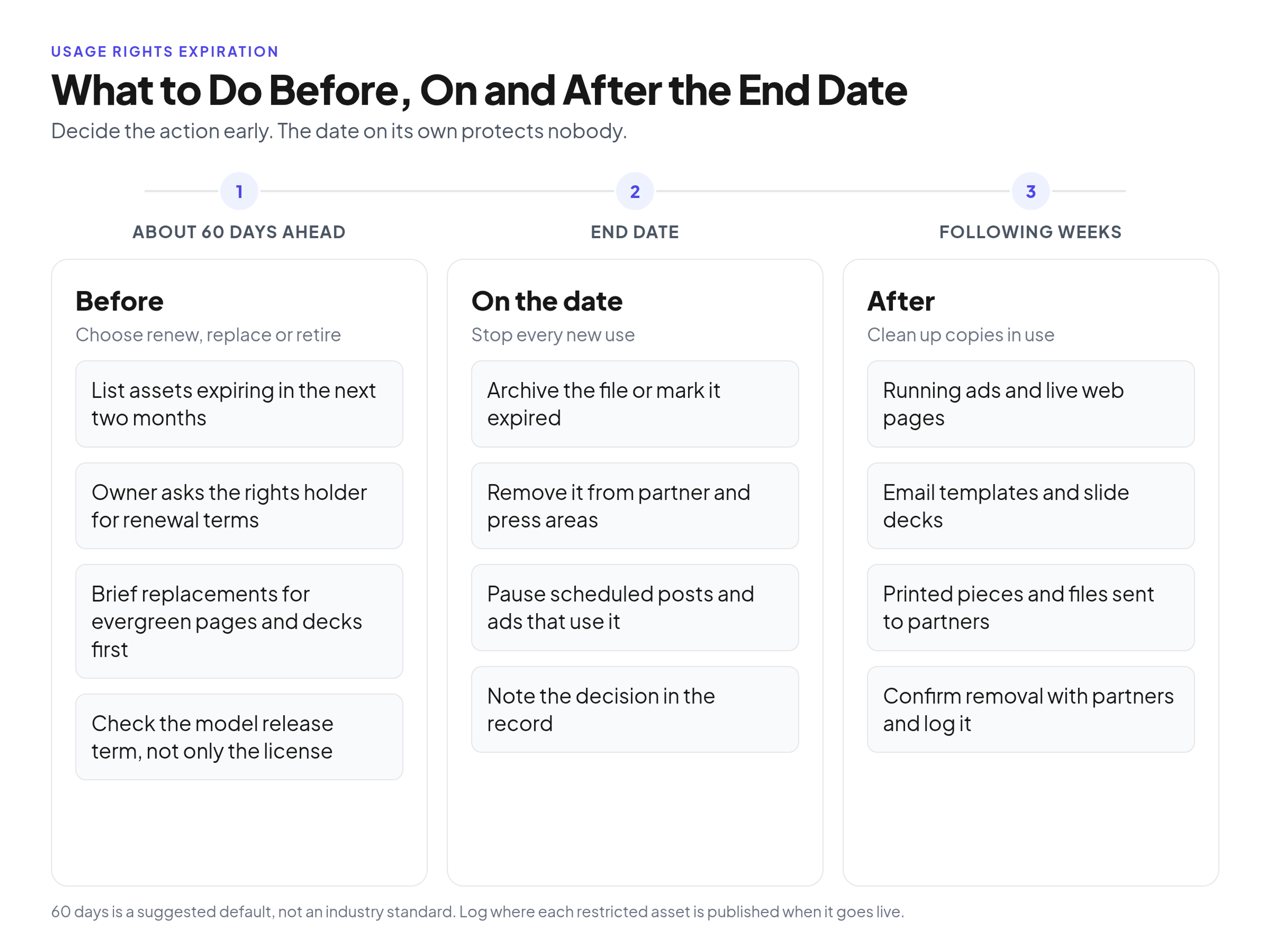
Decide the action before the date arrives; the date alone protects nobody.
Before the end date
Pull a list of assets that expire in the next two months. For each one, the owner decides: renew (ask the rights holder for a quote and new terms), replace (brief a new shoot or pick a new image) or retire. If the asset sits in an evergreen place such as a product page or a sales deck, start early, because replacements take longer than renewals.
On the end date
Stop new uses. Move the file out of the active library into an archive, or mark it "expired" so nobody downloads it for a new project. Remove it from partner and press areas the same day.
After the end date
The library is the easy part. The hard part is copies already in use: running ads, live web pages, email templates, slide decks, printed material still being handed out, and files you sent to partners. Keep a short note of where each restricted asset was published when it goes live, so the cleanup is a checklist instead of a search.
Who archives expired files and who signs off on the cleanup belongs in your governance plan; see who approves new uploads and retires expired files.
Usage terms you grant partners, resellers and press
Your own usage terms are a short public or partner-only page that grants a limited permission to use your logo and approved assets, lists what is not allowed and names who to ask; many large brands publish one.
For example, Wendy's brand asset usage guidelines grant a limited, revocable, nonexclusive license to use its images for informational purposes, require the images to be used unaltered and with a credit line, and rule out commercial use and any suggestion of endorsement. Your page does not need legal-sounding length, but it should cover the same ground.
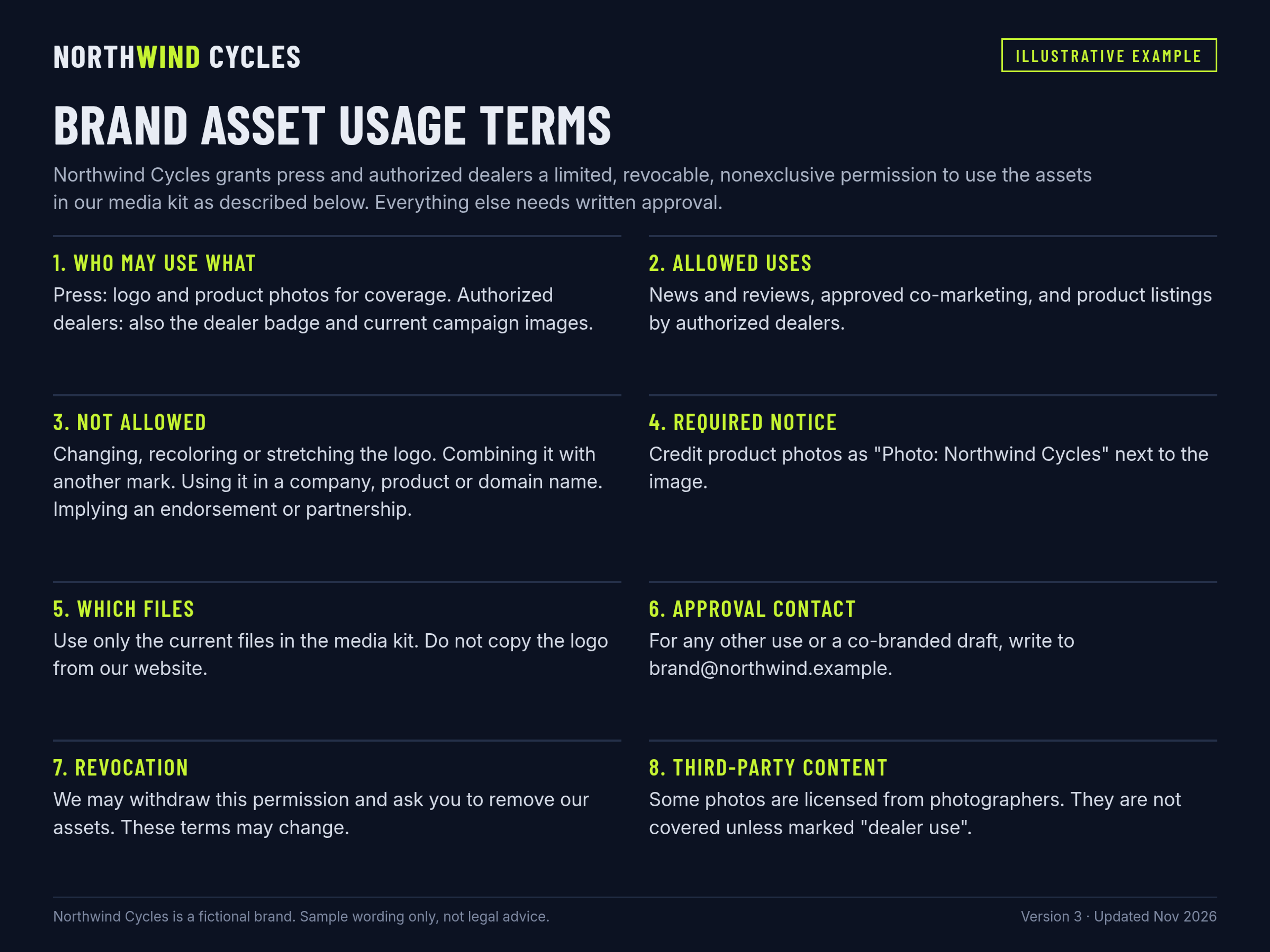
Illustrative example. Fictional brand; adapt the wording with your legal team.
What to include:
- Who may use which assets. Press may use the logo and product photos for coverage. Authorized resellers may also use the partner badge and campaign images. Everyone else asks first.
- Allowed uses. News and editorial coverage, approved co-marketing, product listings by authorized sellers.
- Prohibited uses. Altering, recoloring or stretching the logo; combining it with another mark; using it in a company, product or domain name; implying endorsement or partnership that does not exist.
- Required notice. The credit line or trademark notice, word for word.
- Which files to use. A link to the current approved files, so nobody copies the logo from your website.
- Approval contact. One address for requests outside the listed uses and for reviewing co-branded drafts.
- Revocation. You may withdraw permission and ask for assets to be removed, and the terms may change over time.
- Third-party assets. A clear line that photos or content you licensed from others are not covered unless stated. This is where inbound and outbound rights meet: you cannot grant a partner more than your own license allows.
How long each partner keeps access, and how you send them the files, is a separate decision; see setting access and link expiry for agencies, resellers and press.
Common usage rights mistakes
Most usage rights problems come from six habits, and each one is fixed by a field in the record or a line in your usage terms.
- Reading "royalty-free" as "rights-free". Royalty-free describes how you pay, not what you may do. The license still has limits.
- Reposting customer content because you were tagged. A tag is not permission. Get it in writing, for the channel you plan to use.
- Handing licensed files to an agency the license does not cover. Check the "who else may use it" term before the files leave the company.
- Keeping expired files downloadable. If a file is in the shared library, people assume it is cleared. Archive it or mark it expired on the end date.
- Sending font files the license does not allow. Many commercial font licenses do not cover outside designers; they license the font themselves.
- Running a person's photo after the release ends. The release term matters as much as the license term, and the shorter of the two wins.
Keeping rights next to the files
The simplest working setup keeps the rights record in the same place people download the file, so the answer appears before the file is used.
In Brandportal, that means using metadata and tagging for the record fields, keeping expired files out of public or password-protected portals, and using version history when a renewed or replacement image goes in. Roles (Admin, Editor, Viewer) keep uploads and edits with the people who maintain the records, while unlimited free viewers let agencies and partners open the approved set instead of asking for files by email. If you want to set this up for your own library, the online brand guidelines and asset library runs in the browser, and you can see plans and the 14-day free trial.
FAQ
What are usage rights?
Usage rights are the terms of a license that say how, where and for how long you may use a creative work you do not own, such as a photo, video, font, track or creator post. They usually cover channels, term, territory, changes allowed, credit and exclusivity.
What are the different types of usage rights?
Usage rights are grouped in a few common ways. Royalty-free licenses are paid once and then used within stated limits, without a fee per placement. Rights-managed licenses are cleared for a defined use, term and territory. Creative Commons licenses are public terms the rights holder has already published, often with credit or noncommercial conditions. Separately, inbound rights are permissions you hold over other people's work, and outbound rights are permissions you grant over your own brand assets. Organic and paid use are also different types of permission, especially for creator content.
How long do usage rights last?
As long as the license or contract says. Some run for a fixed number of months or years, some until a stated date, and some are perpetual. There is no default length, so record the actual end date for each asset.
What does 1 month usage rights mean?
"1 month usage rights" means the permission lasts one month from the start date in the agreement, or 30 days if that is what the writing says. You may use the content only during that window, on the channels it names. When the term ends, stop new uses and take down live posts and ads that still use the content, unless you have a written renewal. Write the end date as a real date in the rights record, not as "1 month".
What happens when usage rights expire?
You lose permission to make new uses, and existing uses usually have to come down unless you renew. Archive or mark the file as expired in your library, then replace it in live ads, web pages, decks and partner kits.
Can our agency reuse photos we licensed?
Only if the license covers people working on your behalf, and only for your work. An agency using your licensed photo in another client's project, or in its own portfolio, needs separate permission from the rights holder.
Do we need permission to repost customer content?
Yes. The customer owns the photo or video they posted. Ask for written permission that names where you will use it (for example organic social only, or also ads and the website) and for how long, and keep that permission with the file.
Conclusion
Usage rights stop being a legal mystery once each restricted file carries a short record: who owns it, what you may do with it, where, until when, and who decides at the end date. Add an expiry routine and a clear usage terms page for partners, and both directions are covered. This article is general information, not legal advice; check specific contracts and licenses with your legal team.