Brand portal governance is the set of roles, rules and review routines that decide who can add, approve, change, share and remove what in your brand portal, so the files and the access list stay trustworthy long after launch. In practice, it means one accountable owner, a small group of contributors with clear upload and approval rules, a lifecycle for every asset from draft to archive, and scheduled access reviews and audits.
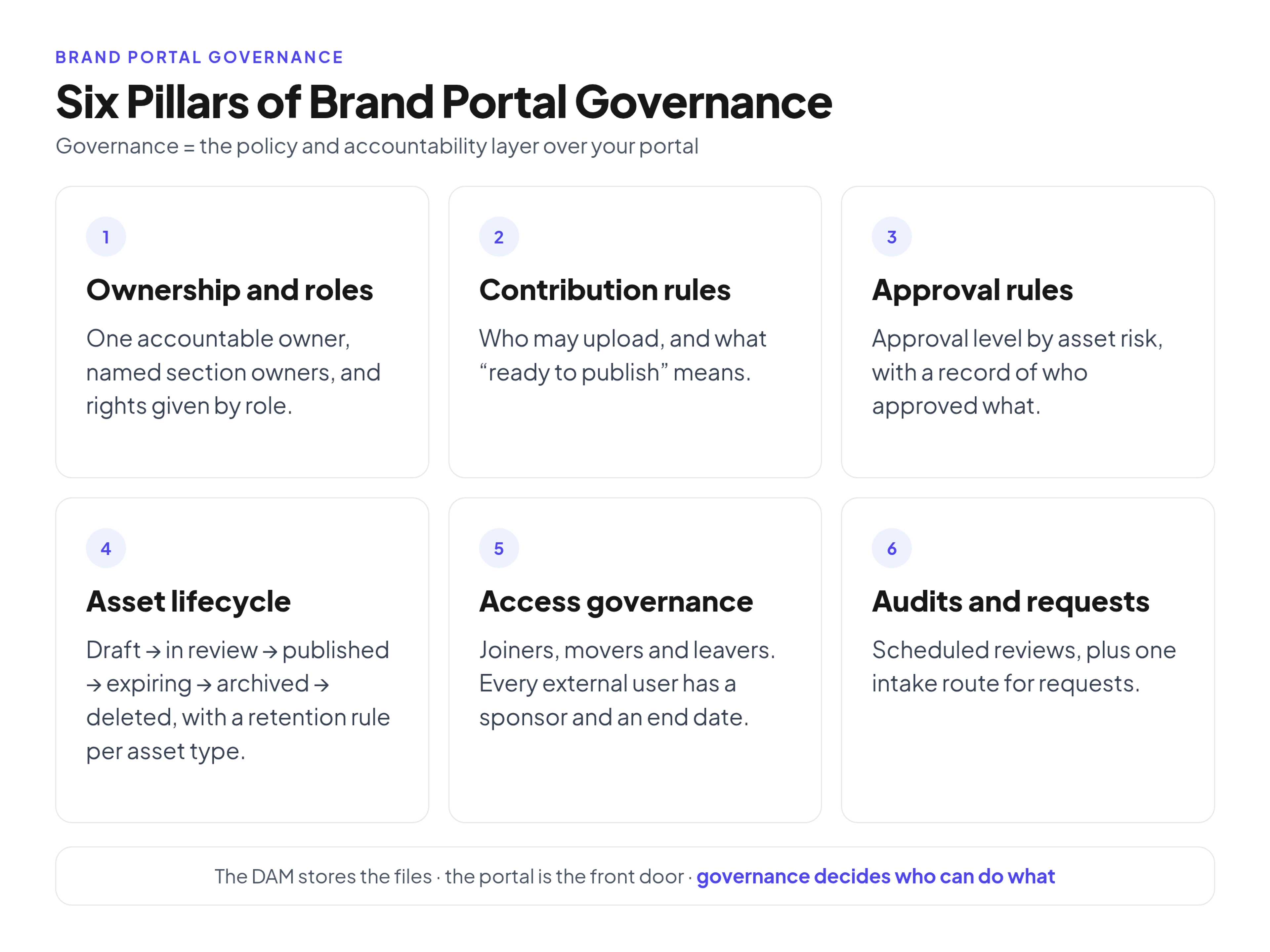
Governance rests on six pillars:
- Ownership and roles: one accountable owner, named section owners, and rights given by role
- Contribution rules: who may upload, and what "ready to publish" means
- Approval rules: the approval level depends on the asset's risk, and every decision leaves a record
- Asset lifecycle: files move from draft to published to archived, with a retention rule per asset type
- Access governance: joiners, movers and leavers, plus a sponsor and an end date for every external user
- Audits and requests: scheduled reviews and one intake route for requests
Portals rarely fail at launch. They fail a year later, when a former agency can still download everything, an old logo turns up in a sales deck, and five people have edit rights but nobody feels responsible. This guide explains each pillar and gives you a RACI matrix, a review calendar and a charter template to copy.
Brand portal governance vs the brand portal vs the DAM
The three terms often live in one system, so they get mixed up:
- The DAM (digital asset management) stores and manages the files, their formats, metadata and versions.
- The brand portal is the front door employees, agencies and partners use to find the current guidelines and download approved files.
- Governance is the policy and accountability layer over both: who can do what, when files leave, and how the rules are checked.
You can buy the first two. The third you have to write down and run yourself.
What is brand governance?
Brand governance is the broader set of rules for how a brand is defined, used and protected: the strategy, the guidelines and the checks that finished work follows them. Brand portal governance is the narrower part that runs the system that distributes the brand, keeping the library current and the access list clean. Checking whether a finished ad is on-brand belongs to brand compliance.
How to set up brand portal governance
If your portal is not live yet, start with the setup steps that come before governance. Governance starts where setup ends: the folders and access options exist, and someone has to keep them in order.
1. Name one owner and assign roles
Name one accountable portal owner: a person, not a department or a shared inbox, plus a deputy who covers vacations or a departure. Then name the other roles:
- Section owners each look after one collection, such as product imagery or partner materials.
- Contributors are designers, agencies and campaign owners who upload finished work.
- Approvers are usually the brand lead, plus legal for trademark use, licensed material and regulated claims.
- Admins manage users and settings.
- Viewers are everyone else who needs to find and download files.
Give rights by role, not by person. NIST describes role-based access control as a model where permitted actions are identified with roles rather than with individual identities, so permissions reflect the functions people perform in the organization. In a portal with Admin, Editor and Viewer roles, a common mapping is the owner and admins as Admin, section owners and contributors as Editor, and everyone else as Viewer.
2. Map who does what with a RACI matrix
Roles alone leave gaps, such as who removes an agency's access when its project ends. A RACI matrix closes them. RACI stands for Responsible, Accountable, Consulted and Informed: the Accountable person has final approval authority, and the RACI matrix guidance from Western University's compliance office recommends exactly one Accountable owner per task.
A sample matrix to adapt (R = does the work, A = final approval, C = gives input first, I = told when it changes):
- Approve core identity files: A Portal owner; R Section owner; C Contributor; I Legal, Admin, Viewers
- Upload campaign assets: A Section owner; R Contributor; I Portal owner, Admin
- Publish to the portal: A Portal owner; R Section owner; C Contributor; I Admin, Viewers
- Grant external access: A Portal owner; R Admin; I Section owner
- Run the access review: A Portal owner; R Admin; C Section owner
- Archive or delete expired assets: A Portal owner; R Section owner; I Contributor, Admin
- Run the portal audit: A Portal owner; R Section owner; C Admin
- Answer asset requests: A Portal owner; R Section owner; C Contributor; I Admin, Viewers
- Change the governance charter: A Portal owner; C Section owner, Legal; I Contributor, Admin, Viewers
The matrix also shows overload: if one person is R on every line, work queues behind them, so move the R to section owners where you can.
3. Write contribution rules
Decide who may upload, and define "ready to publish" so contributors can check it before they upload. A file is ready when:
- it is an approved final export, not a working file
- it is named with a naming formula contributors follow on every upload
- the required tags are filled in
- the usage rights and any end date are recorded
- the audience is set (internal only, partners, or public)
Work in progress belongs in your design or project files, never in the published area. Also write down who publishes, so uploads don't go live just because someone had Editor rights.
4. Set approval rules and keep a record
Match approval to risk, so the brand lead doesn't sign off on every photo:
- Low risk, such as a new photo in an approved set: the section owner approves.
- Core identity, such as logo, color and typography masters: the brand lead approves.
- Legal exposure, such as trademark use, licensed photography or regulated claims: legal approves as well.
The uploader should not be the only approver of a high-risk file. Every approval, access grant and removal should leave a short written record: who, what, when and why. A shared change log is enough if everyone uses it. Changes to the guidelines document follow their own path; see the release workflow for changes to the guidelines themselves.
The asset lifecycle and retention rules
Every file should have a state and a person who moves it on: draft, in review, published, expiring, archived and deleted. Drafts and files in review stay hidden from viewers. "Expiring" covers license end dates, campaign end dates and seasonal files.
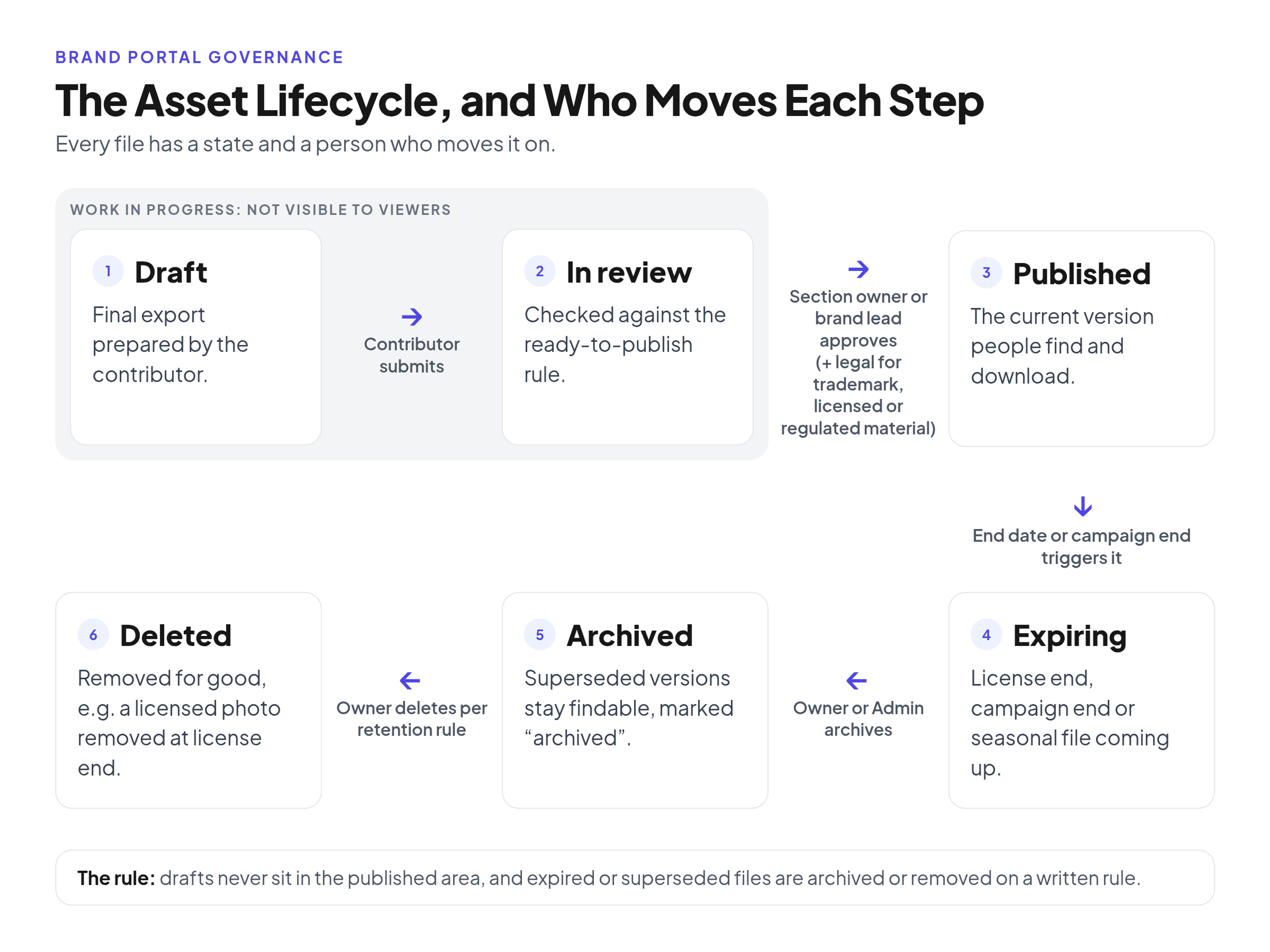
Then write a short retention rule for each asset type: how long it stays published, and whether it is archived or deleted at the end. Records managers do something similar with a records schedule, which states how long records must be kept and what their final disposition is once they are no longer needed for current business. Brand files are not government records, but the idea carries over:
- Campaign files: archive at campaign end, or on a set date after it.
- Licensed photos: remove on the license end date.
- Core identity files: never delete; keep superseded versions findable and clearly marked as archived.
Access governance and access reviews
Your access list changes whenever people join, change teams or leave, so treat it as a process. Decide what happens for joiners (default role), movers (which rights they lose) and leavers (who removes them, and when).
For external users, such as agencies, freelancers and printers, use one rule: every external account has a named internal sponsor and an end date, and access is removed when the project ends. The Center for Internet Security frames access control management the same way, as processes to create, assign, manage and revoke access credentials and privileges.
Then schedule an access review. The owner and an admin go through every Admin, Editor and external account and ask: does this person still need access, is the role still right, and is the sponsor still here? Keep the Admin and Editor groups small.
How to run a portal audit
An access review checks people. An audit checks the content. A light audit covers:
- sections without an owner
- files missing required tags or rights data
- expired or expiring files that are still published
- duplicates and outdated versions
- broken or stale share links
- guideline pages that no longer match the files
- accounts that should already be gone
- repeated searches that find nothing, if your portal reports them
Fix what you can, assign the rest to section owners, and note the findings in the change log.
How to handle asset requests
Requests should not arrive through chat messages and hallway conversations. Set up one intake route, such as a simple form, and sort requests by type: can't find it, missing asset, new asset, access request or guideline question. Name the person who answers, set an internal response target, and review repeated requests monthly: they tell you what to add next.
A sample brand portal governance calendar
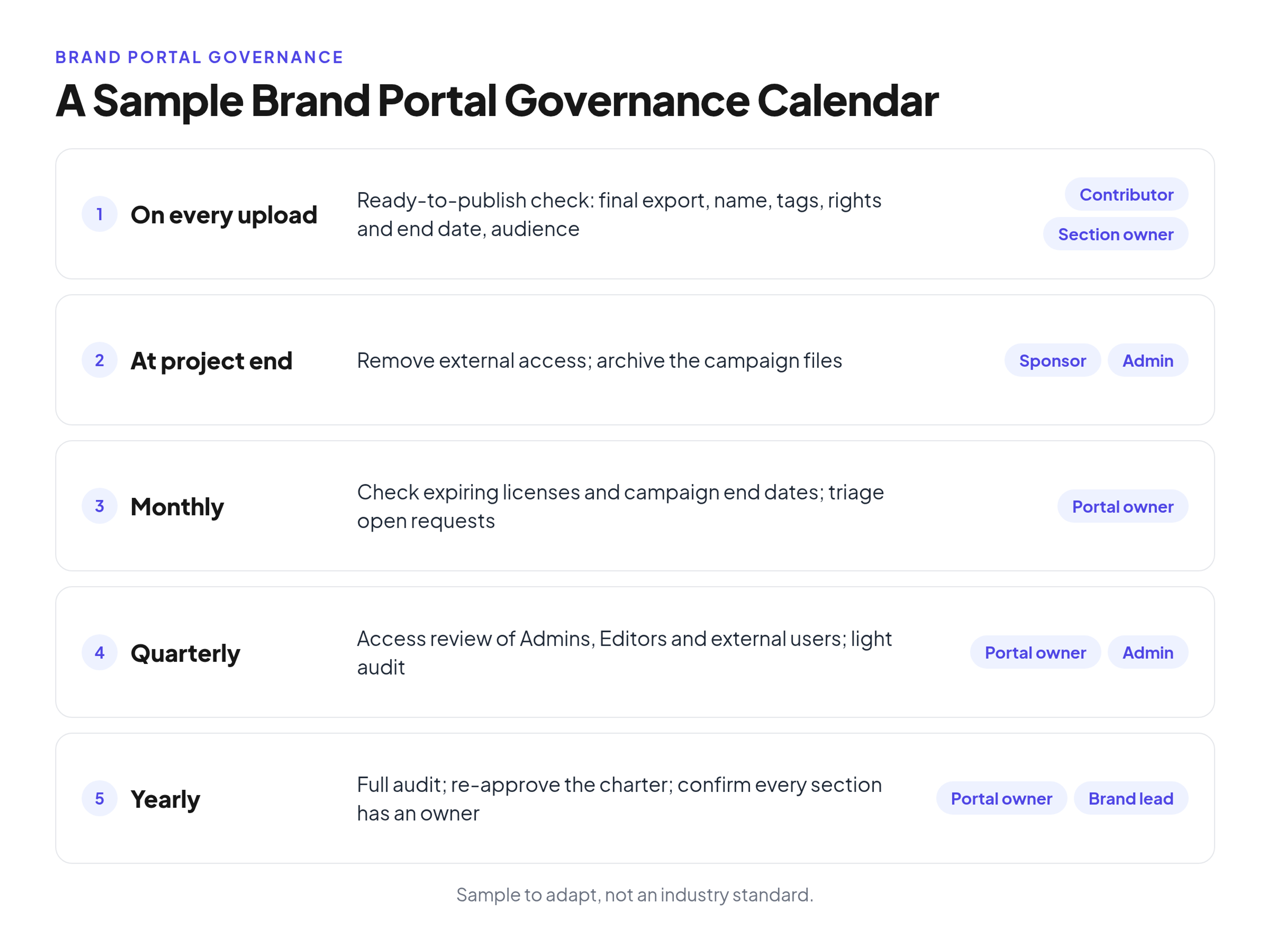
These cadences are recommendations to adapt, not an industry standard:
- On every upload: the ready-to-publish check (contributor and section owner).
- At every project end: remove external access and archive the campaign (sponsor and admin).
- Monthly: check expiring licenses and campaign end dates, and triage open requests (portal owner).
- Quarterly: access review of Admins, Editors and external users, plus a light audit (portal owner and admin).
- Yearly: a full audit, re-approval of the charter, and a check that every section still has an owner (portal owner and brand lead).
Brand portal governance template
Write the rules on one page and keep it in the portal. The illustrative example below is a finished charter for a fictional coffee roaster; its choices, such as archiving campaign files 30 days after a campaign ends, are that company's rules, not a standard.
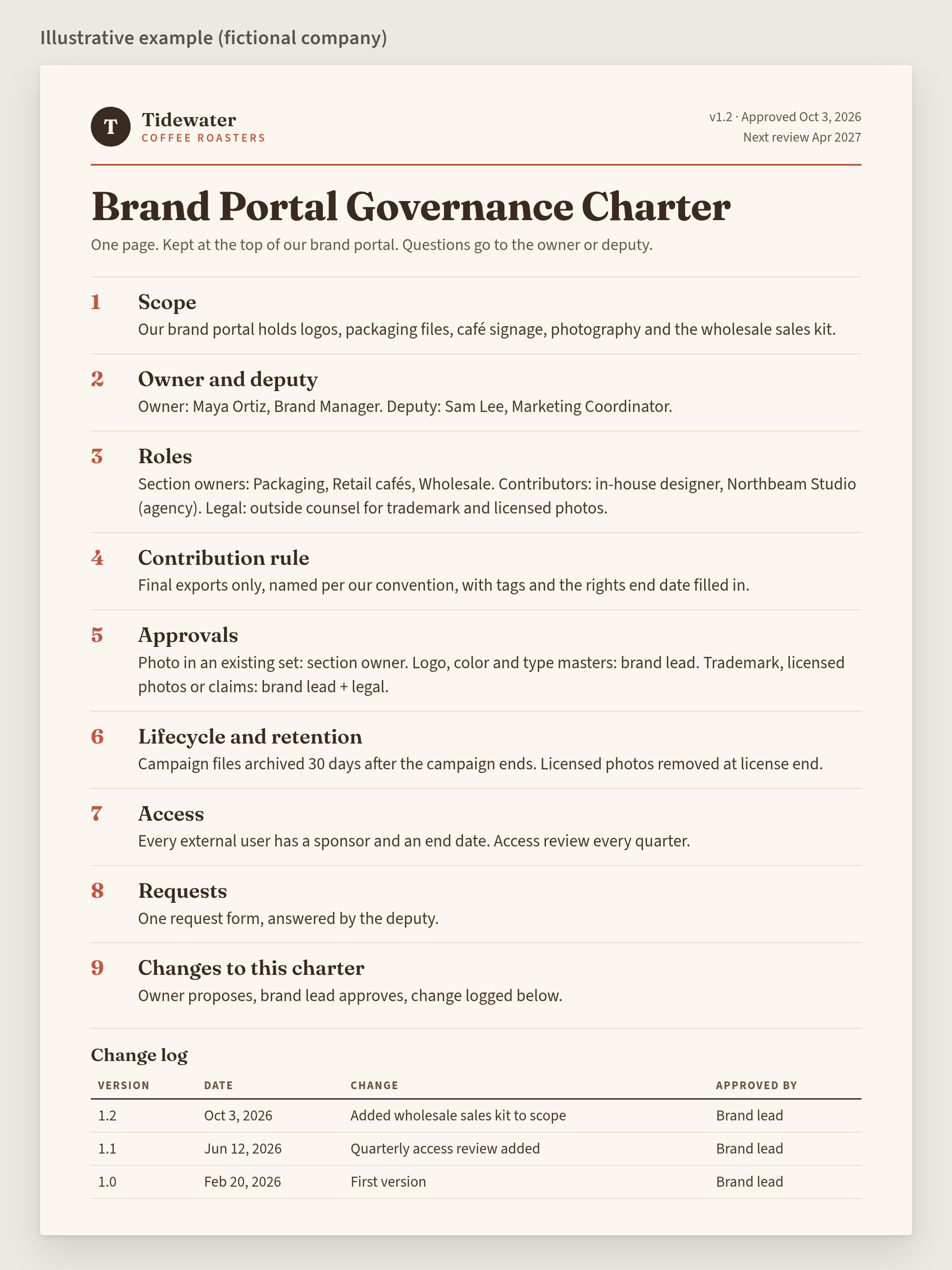
Copy this template into your own document and fill in the fields:
Brand portal governance charter
- Portal scope: [what lives in the portal, and what stays in other storage]
- Owner and deputy: [name, role] / [name, role]
- Roles and who holds them: Admins [names]; section owners [names and sections]; contributors [internal designers and approved agencies]; legal [name or firm]
- Contribution rule (ready to publish): [final export only, naming convention, required tags, rights and end date, audience]
- Approval tiers: low risk [approver]; core identity [approver]; legal exposure [approver]
- Lifecycle and retention: [rule per asset type, such as campaign files, licensed photos, core identity]
- Access rules: [default role for employees; sponsor and end date for every external user; access review cadence]
- Review calendar: [monthly, quarterly and yearly tasks and who runs them]
- Request route: [form or channel, and who answers]
- How this charter is changed: [who proposes, who approves, where the change is logged]
- Version and date: [v1.0, approval date, next review date]
Before launch, and again every quarter, check that:
- the portal has one named owner and a deputy
- every section has an owner
- every external user has an active sponsor and an end date
- the Admin and Editor groups are still small
- expired files are archived or removed
- share links still work
- the guideline pages match the files
- the charter shows the current version and the next review date
Common brand portal governance mistakes
- No single owner, so nobody archives anything.
- Everyone is an Editor, which is how drafts end up published.
- Approvals by email with no record, so nobody can later say who approved a file.
- External access with no end date.
- Nothing is ever archived, so old and current files sit side by side.
- Governance written once and never reviewed.
- An owner who is also the only designer, so every request waits for one person.
Frequently Asked Questions (FAQ)
Who should own a brand portal: marketing, brand or IT?
Usually the brand or marketing team, because they know what the files are for and which versions are current. IT can help with account setup and security policies, but day-to-day accountability belongs to the brand side.
How many people should have edit rights?
As few as the work needs: typically the section owners and a few core designers. Most of the company, and most partners, only need Viewer access.
What should happen when the portal owner leaves?
The named deputy takes over as part of the handover, and the charter is updated with the new owner and deputy. Without that step, files go stale and the access list grows unchecked.
How often should you review access?
Quarterly is a reasonable starting point, with external access removed at every project end in between.
Conclusion
Brand portal governance comes down to a few habits: one owner, clear roles, upload and approval rules, a lifecycle for every file, regular access reviews and audits, and one route for requests. Write them into a one-page charter, put the dates in a calendar, and review it yearly.
If you need a place to run these rules, Brandportal is an online brand guidelines and asset library with public or password-protected portals, folders, version history, share links, metadata and tagging, Admin, Editor and Viewer roles, and unlimited free viewers. Plans differ in how many portals they include; for example, Starter includes 1 portal and Professional includes 5. See pricing for details and the 14-day free trial on paid plans.