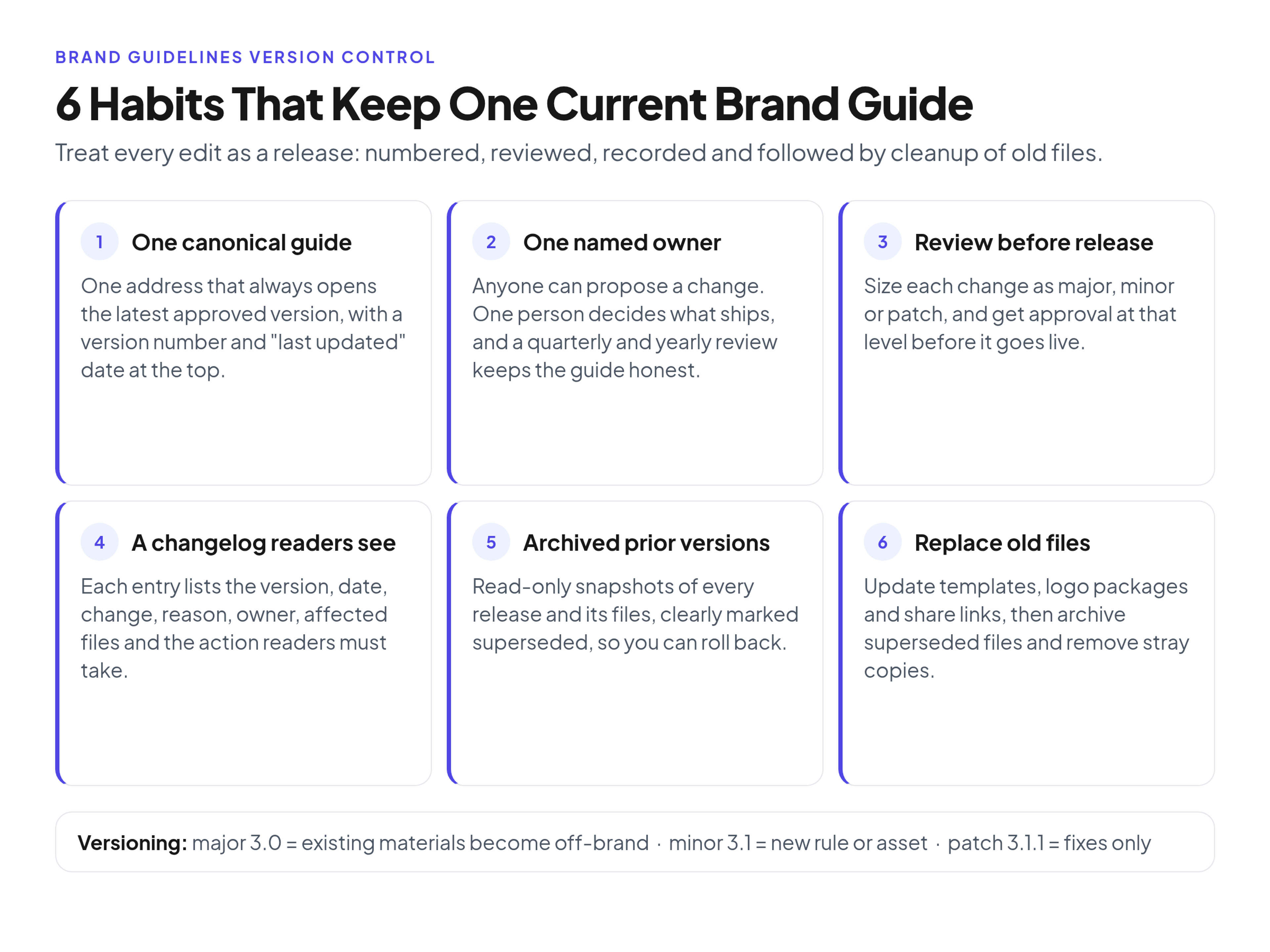
Brand guidelines version control means there is exactly one current version of your brand rules, everyone can tell which version it is, and every change is reviewed, recorded and announced before it replaces the old one. In practice it comes down to six habits: keep one canonical online guide with a version number and a "last updated" date, give it one named owner, put a review and approval step in front of every release, publish a changelog that says what changed, why and what readers must do, archive prior versions so you can roll back, and finish each release by replacing or retiring every file, template and share link that depended on the old rules.
The rest of this guide shows how to run it: a versioning scheme that sizes each change, a sample changelog, a seven-step release workflow and the events that should trigger an update.
Why unversioned brand guidelines drift
No brand team decides to have five versions of its guidelines. It happens one helpful act at a time. Someone exports a PDF for a partner, someone saves a copy to a shared drive, a designer pastes the color page into a deck. When the colors change, the original gets updated and every copy keeps living its own life.
I've watched the same pattern play out many times. The requests start with "Can you send me the logo?" and turn into "Which version is current?" Then the old logo shows up in production on a trade show banner, and someone finds a Drive folder named FINAL_v3_USE THIS ONE sitting next to a folder named FINAL_v4. Nobody did anything wrong. There was just no system saying which version wins.
The causes are always the same: copies outlive the original, changes happen silently so readers can't tell a typo fix from a new logo, and nobody owns the release. Version control fixes all three by turning "editing the guidelines" into "releasing a version."
The foundations: one version, one owner, one record
If your guide still lives in a PDF, start by turning a static PDF brand book into a living online guide, because a file you email can't be the single current version.
Make one canonical version the default everyone sees
There should be one address for the brand guidelines, and opening it should always show the latest approved version. The moment readers have to pick the right file from a list, some will pick wrong.
Put a version number and "last updated" date on the guide itself
Show both near the top of the guide, for example "Version 3.1.1, last updated March 18, 2026." A designer can then say "I'm on 3.0" and the brand manager knows they missed the March update. Only change the date when the content really changes. A date that moves on every save stops meaning anything.
Name one owner and a review cadence
One person owns the guide. Others can propose changes and draft sections, but the owner decides what ships and when. Pair ownership with a fixed review rhythm, such as a light review every quarter and a full read-through once a year, so the guide is checked even when nobody is asking for changes.
Keep a change record: what, who, when and why
Every released change needs four facts: what changed, who changed and approved it, when it went live and why. Teams skip the "why," and a year later someone reverses a good decision because nobody remembers the reason.
Archive prior versions with a clear rollback path
Never overwrite the past. Keep each released version as a read-only snapshot with its number and date, and keep the superseded logo files and templates that belonged to it. If a new color system tests badly in print, rolling back should mean "republish 3.1.1," not "rebuild from memory." Mark archived material clearly as superseded so nobody mistakes it for current, and follow file-name rules that ban words like final and latest so the files themselves carry an honest version label.
A versioning scheme mapped to brand changes
Software teams have used a three-part version number for years. The Semantic Versioning 2.0.0 specification defines MAJOR.MINOR.PATCH: increment major for incompatible changes, minor for backward-compatible additions and patch for backward-compatible fixes. The idea translates well to brand guidelines once you swap "breaks the API" for "makes existing materials off-brand."
Here's how I map it.
Major version (for example 3.0): existing materials become off-brand
Use a major version when work produced under the old rules is now wrong. Typical cases:
- A new logo, a rebrand or a brand refresh
- A new color system or primary typeface
- A rule reversal, such as "never place the logo on photography" becoming allowed, or the other way round
Approval: the guide owner plus leadership sign-off, and legal if a trademark is involved. Announcement: loud. A dated release note, a direct message to every internal team and partner who produces materials, a transition date after which old files must not be used, and a list of what needs replacing.
Minor version (for example 3.1): new rules, old materials still valid
Use a minor version when you add something and nothing already in use becomes wrong. Examples:
- A new section, such as social avatar rules or email signature rules
- A new asset type, such as a dark mode logo or an icon set
- Clearer guidance that doesn't contradict the old one
Approval: the guide owner, with a review from whoever produces that kind of work (a designer for a new logo lockup, a writer for voice guidance). Announcement: a release note plus a heads-up to the people who will use it.
Patch version (for example 3.1.1): fixes only
Use a patch for corrections that don't change any rule:
- A typo or broken link
- A wrong HEX value corrected to match the approved color
Approval: the owner alone. Announcement: a one-line changelog entry is enough.
One gray area is worth calling out. If a wrong HEX value sat in the guide for months and teams used it in live work, the fix is technically a patch, but readers have to act on it. Treat it as a minor release so the announcement matches the impact. The rule of thumb: the version level follows what readers must do, not how many words changed.
What a brand guidelines changelog should look like
A changelog is the reader-facing record of releases, kept at a fixed spot in the guide. The Keep a Changelog convention, written for software projects, makes the same points: changelogs are for humans, the latest version comes first, each release carries a date and changes are grouped by type, such as added, changed, removed and fixed.
For brand guidelines I add two fields software changelogs rarely need: the files affected and the action readers must take. Here is a sample for a fictional example guide, so the names, dates and versions are illustrative only.
Sample changelog: "Example Co. Brand Guidelines" (fictional)
Version 3.1.1, March 18, 2026
- Change: corrected the HEX value for Sea Blue in the color section.
- Reason: the listed value didn't match the approved print swatch.
- Owner: brand manager.
- Affected files: color page only; templates already used the correct value.
- Action for readers: none.
Version 3.1.0, March 2, 2026
- Change: added a dark mode logo and rules for using it.
- Reason: the product team launched a dark interface.
- Owner: brand manager; reviewed by lead product designer.
- Affected files: new logo package (SVG, PNG).
- Action for readers: use the dark mode logo on dark backgrounds from now on; nothing needs replacing.
Version 3.0.0, February 10, 2026
- Change: new logo, updated primary palette and new headline typeface.
- Reason: company rebrand.
- Owner: head of marketing; approved by leadership and legal.
- Affected files: all logo files, color page, typography page, every template.
- Action for readers: stop using 2.x files by March 10, 2026; replace logos and templates in live materials.
Version 2.4.0, November 4, 2025
- Change: added social avatar and cover image rules.
- Reason: avatars were being cropped through the logo on several networks.
- Owner: brand manager.
- Affected files: new social kit.
- Action for readers: update profile images at the next refresh.
Version 2.3.0, July 1, 2025
- Change: clarified minimum logo size for print and added an exclusion zone diagram.
- Reason: repeated misuse in event materials.
- Owner: brand manager; reviewed by senior designer.
- Affected files: logo usage page.
- Action for readers: check event templates against the new minimum size.
A partner who last checked in December reads the top three entries and knows exactly what to do.
How to update brand guidelines: a 7-step release workflow
Version control usually breaks when someone edits the live guide directly. A short release workflow prevents that and protects work in progress.
Step 1: Log the change request
Write down what should change, why and who is asking, in one shared place, such as a request form, a tracker or a dedicated Slack channel. Batching requests lets you ship small changes together instead of as a trickle of silent edits.
Step 2: Draft the change away from the live guide
Make the edit in a draft or staging copy, never in the version people are using today. Decide the version level now, using the major, minor and patch rules above, because it determines who has to review it.
Step 3: Review with the people who use the rule
Get a review from someone who actually produces the affected work. A designer catches a logo rule that fails at favicon size; a sales lead catches a rule that breaks existing decks.
Step 4: Approve at the right level
Patch: owner. Minor: owner plus reviewer. Major: owner, leadership and, when trademarks are involved, legal. Record who approved it.
Step 5: Release with a version number, date and release note
Publish the new version, update the version number and "last updated" date on the guide, and add the changelog entry. Then announce it in proportion to the version level. For major releases, set a transition date so teams finishing in-flight campaigns aren't forced to rebuild work mid-launch, and say clearly when old files stop being acceptable. Announcing is part of distribution, so it helps to have a routine for getting the current guidelines in front of every team and partner.
Step 6: Replace dependent files, templates and links
A new rule isn't released until the things built on it are updated. Go through your list of dependents: logo packages, slide masters, document and email templates, social kits, share links you've sent to partners and any copies saved in shared drives. Replace files at their usual location so existing links reach current versions where possible.
Step 7: Retire and archive superseded files
Move old files into a clearly labeled archive, take down or redirect old share links and remove stray copies from shared folders you control. Snapshot the previous guide version so rollback stays possible. This is the step that stops the old logo from reappearing next quarter.
Make updates reach templates, share links and AI tools
Version control only works if the current rules reach the places where work gets made.
Templates matter most, because most branded output starts from a template, not the guide. Keep a list of which templates depend on which sections so step 6 takes minutes.
Share links come next. Sending people a link to the live guide instead of an attachment means they open the current page rather than a frozen copy. In Brandportal, the guidelines and the asset library live together with folders, version history and share links, and viewers are free, so it's practical to give everyone access to the current guide instead of forwarding files.
Finally, many teams now paste brand rules into AI writing or design assistants as instructions. Those pasted rules are copies too. Note which assistants and prompt libraries hold brand rules, and update them in step 6 like any other template.
When to update brand guidelines: update triggers
Outside the scheduled review, these events should start a change request:
- A rebrand or brand refresh
- A new product, sub-brand or acquisition that needs its own rules
- A new channel or format, such as a new social network, video format or event type
- An accessibility issue, such as text color pairs with too little contrast
- A legal or trademark change, including a new registration or a naming dispute
- Repeated misuse seen in the field, which usually means a rule is unclear rather than ignored
- The scheduled review itself, quarterly for light checks and yearly for a full pass
When several teams get the same rule wrong, the fix is usually a clearer example in the guide, not another reminder email.
FAQ
How often should you review brand guidelines?
A light review each quarter and a full review once a year works for most small and mid-size teams. The quarterly check catches broken links and pending requests; the yearly pass asks whether the rules still match how the brand actually shows up.
Should you keep old PDF versions of the brand guidelines?
Keep them in a read-only archive, labeled with their version number and the date they were superseded. They help with audits, legal questions and past decisions. Just keep them out of anywhere people look for current guidance.
What version number should the first online version get?
If you're moving from an older PDF that people already know, start the online guide as the next major version, for example 2.0 if the PDF was the first edition. That signals a clean break. If there was no meaningful earlier guide, start at 1.0 and use 0.x only for internal drafts before launch.
Do small fixes need a changelog entry?
Yes, but a short one. A one-line patch entry costs little and keeps the record complete, so nobody wonders why a value changed.
How do you tell agencies and partners about a change?
Message them directly for major releases and any minor release that affects their work, with the version number, the transition date and the files to replace. Link to the changelog instead of restating details, so there's one place to check. For patches, the changelog entry is enough.
Conclusion
Brand guidelines version control isn't a big system. It's one current guide with a visible version and date, one owner, a review before each release, a changelog that tells readers what to do, an archive you can roll back to and a final step that replaces or retires everything built on the old rules. Start with the versioning scheme and the seven-step workflow, and "which version is current?" gets an answer anyone can check. If you want the guide and the asset library in one place, see plans and the 14-day free trial.