To move brand guidelines online, start with an inventory of every brand document and file, cut what is outdated, and rebuild the rest as short web sections where each rule sits next to the file it describes. Then fill the gaps the PDF never covered, name one owner, test the guide with a few real users and retire the old PDF, so only one version is left.
Most brand books start as a polished 80-page PDF. The agency hands it over, the marketing team approves it, and someone drops the file into a shared company folder. Six months later, a sales rep is stretching a low-resolution copy of an old logo pulled from a random slide deck.
I have watched this cycle repeat across many B2B rebrands. A static document can't keep pace with a growing company. When the rules live in a PDF and the actual files are scattered across a shared drive, people take the path of least resistance. They guess.
Moving your guidelines online fixes that disconnect by putting the rules and the assets in the same place. This guide covers why PDF brand books stop working, the three common online formats and their trade-offs, a six-phase migration process, a checklist and the mistakes to avoid.
Why PDF Brand Books Stop Working
A PDF is a snapshot. The moment your company adds a product line, adjusts a color or creates a new presentation template, the document is out of date, and nobody can update the copies already saved on laptops.
In my experience auditing marketing operations, this creates three predictable problems:
- Version control disappears. People save files locally. They will confidently reference "Brand_Guidelines_v2.pdf" years after you have moved on to version five.
- Friction for non-designers. A PDF tells a marketer the primary brand blue is #0047AB. That marketer then has to highlight the hex code, hope the copy works, and paste it into an email editor or a slide. Many simply eyeball the color instead.
- Rules live apart from the files. A long section explaining how to use the logo doesn't give the reader the SVG file they need. They leave the document and hunt through a shared drive for a file that matches, and they often pick the wrong one.
An online guide solves all three: there is one current version at one link, values can be copied straight from the page, and the files sit beside the rules that govern them.
Three Online Formats and Their Trade-offs
Before you move a single file, decide where the new guidelines will live. Most teams choose between three formats. Compare them on four things: setup effort, upkeep, access control and whether the files can sit next to the rules.
- A page in an internal wiki or shared document. Setup effort is low because your team already has a workspace. Upkeep is easy for written rules such as voice and tone. The trade-offs: layouts are rigid, large design files don't sit comfortably next to the text, and giving an outside agency access often means guest accounts or an IT request.
- A custom website or microsite. You get full design control, and the guide can look exactly like your brand. Setup effort is high, because someone has to design, build and host it. Upkeep is the weak point: if every text change or new logo file needs a developer, the guide drifts out of date. Access control is whatever you build.
- A dedicated brand portal. Setup effort is medium. It is built to show brand rules next to downloadable files, and marketing can update both without code. Access is usually public, password-protected or role-based. The trade-off is a paid subscription and the time it takes to move your files in.
None of these is right for every team. A small company with a single logo and a few colors can live happily on a wiki page. Once you have several audiences, many files and outside partners, keeping rules and files in one place matters more. If you want a fuller picture of the third option, here is what goes into a brand portal and who uses it.
The Six-Phase Migration Process
Moving online is not a copy-and-paste job. You are translating a print-style document into something people will scan, search and download from.
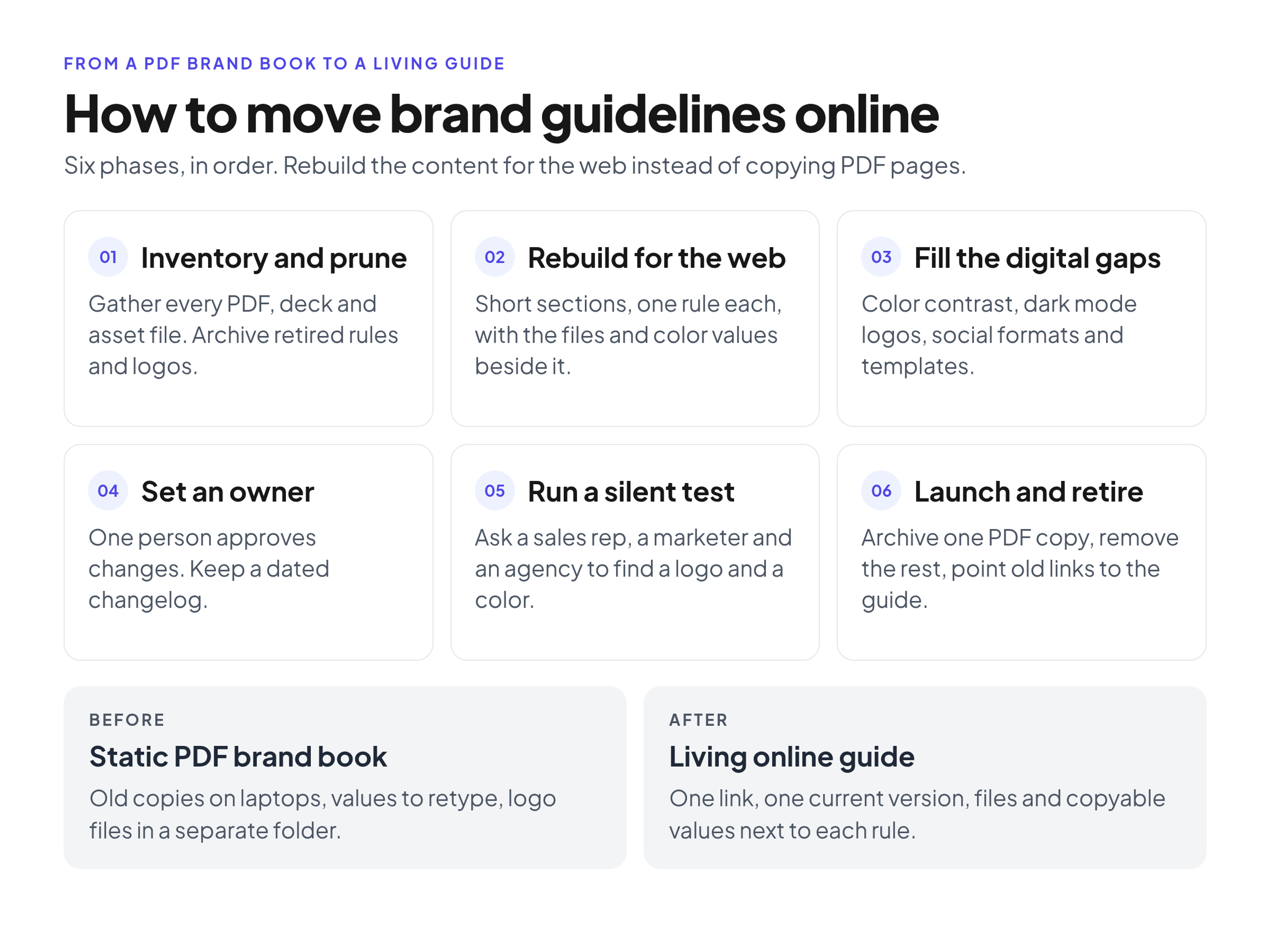
Phase 1: Inventory and prune
Gather every brand document you can find: the main PDF, older style guides, color cheat sheets someone made for sales, slide templates, email signature files and the actual asset files. Put them all in one staging folder. While you're there, it is a good moment to agree on a consistent naming convention for brand files, so the files you move are easy to find later.
Review the inventory strictly. Don't migrate a rule just because it exists in the old PDF. If your team stopped using the secondary typeface a year ago, leave it behind. Do the same with retired logos and old templates: archive them, don't migrate them. You only want to move the current truth of the brand.
Phase 2: Rebuild for the web
People read PDFs page by page, but they scan web pages. Nielsen Norman Group's analysis of how little users read estimates that on an average web page, users read about 20% of the text. Long paragraphs copied from a brand book will mostly go unread, so break them into short blocks with one rule each.
A simple structure works for most brands:
- Core identity: logo usage, color palette, typography.
- Visual assets: photography style, illustrations, icons.
- Verbal identity: tone of voice, grammar rules, words to avoid.
- Applications: presentation templates, social media layouts, print collateral.
Then pair every rule with its asset. When you explain clear space for the primary logo, put the SVG and PNG downloads directly under that rule. Show a correct example next to a misuse example, so people can see the rule instead of reading about it. Write color values out as text, with HEX, RGB and CMYK for each color, so anyone can copy them in one step.
Phase 3: Fill the digital gaps
Older brand books were often designed for print and miss what digital teams need every day. Use the migration to add those rules.
Start with accessibility. The W3C guidance on minimum color contrast (WCAG Success Criterion 1.4.3, Level AA) asks for a contrast ratio of at least 4.5:1 for normal text and 3:1 for large text. List which brand colors pass for text on white and on your dark background, and give exact approved pairings, so nobody sets light gray text on a pale brand color.
Add dark mode versions of your logo, rules for social media avatars (including padding for circular crops) and the templates people use most often. If the PDF never covered email signatures or slide decks, this is the time to include them.
Phase 4: Set ownership and versioning
A living guide only stays alive if someone looks after it. Assign one owner, usually a brand manager, art director or marketing operations lead. This person approves new additions and changes, and everyone else sends requests to them.
Keep a short changelog on the guide's home page. When you add a sub-brand or update the presentation template, note the date and what changed. A recent update date tells readers they are looking at current information, and the history shows what changed when someone asks.
Phase 5: Run a silent user test
Before you share the link with the whole company, run a silent usability test. Send the staging link to one sales rep, one content marketer and one person at an outside agency.
Ask them to find three things: the logo with a transparent background, the hex code for your primary button color and the current slide template. Don't help them. Watch how long it takes and where they get stuck. If someone has to click through four pages to find a font file, your navigation needs work. Fix it before launch, not after.
Phase 6: Launch and retire the PDF
Publish the online guide and send the link to the company. Setting up access for agencies and partners and announcing the change are a topic of their own, and our guide on how to share brand guidelines once they're online covers them. Your main job on launch day is breaking old habits.
That means retiring the PDF. Find every copy on shared drives and intranet pages, keep one archived copy for the record, and remove the rest. In the place where the old file used to live, leave a single text file named BRAND_GUIDELINES_MOVED.txt that contains the link to the new guide. Update intranet links and bookmarks so they all point to the new address.
Some print vendors or traditional partners will still ask for a PDF. Keep a short printable summary for them, or export one when needed, with the date on the cover and a line pointing back to the online version as the source of truth.
Common Migration Mistakes to Avoid
- Pasting the PDF as images. I see teams take screenshots of their PDF pages and stack them on a web page. This defeats the purpose: the text can't be searched, the hex codes can't be copied, and the files are still disconnected from the rules.
- Migrating outdated rules unchanged. Moving the old content as-is just gives you an out-of-date guide at a new address. Prune first.
- Rules without files. A detailed section on presentation design with no template attached sends people back to hunting through folders.
- No owner. Without one named person responsible, updates stop and the online guide goes stale like the PDF did.
- No plan to retire old copies. If the old PDF is still in chat channels and shared folders, people will keep using it. Remove access to outdated versions on purpose.
A Quick Migration Checklist
- Gather all PDFs, slide decks, cheat sheets and asset files in one place.
- Remove outdated rules, retired logos and old templates.
- Break long paragraphs into short sections with one rule each.
- Put downloadable files and copyable color values next to each rule.
- Add the missing digital rules: contrast, dark mode, social formats, templates.
- Name one owner and start a changelog.
- Test navigation with a sales rep, a marketer and an outside agency.
- Launch, archive one copy of the PDF and remove the rest.
How a Brand Portal Helps
You can follow every phase above with a wiki or a custom site, as long as one location is clearly the official one. A brand portal makes the structure easier to keep. Brandportal keeps your online guidelines and your asset library in one place, with folders, metadata and tagging so people can find files, version history so the current file is always clear, and share links for a single folder or file. Portals can be public or password-protected, roles (Admin, Editor, Viewer) control who can change content, and viewers are free, so partners don't need paid seats. Paid plans come with a 14-day free trial; you can compare them on the pricing page.
FAQ
How long does it take to move a PDF brand book online?
For a standard 40 to 60-page PDF, the migration usually takes one dedicated team member one to two weeks. Restructuring the text into web sections is usually the quick part. Most of the time goes into tracking down the original files, such as vector logos, font files and editable templates, so they can sit next to the rules.
Should we keep a PDF version of our brand guidelines?
Keep one archived copy of the old PDF for the record, and remove the others from circulation. For vendors who need a PDF, provide a short printable summary or an export with a date on it, and treat the online guide as the only source of truth.
What if a vendor or print agency insists on a PDF?
Send them a dated, simplified print reference with the logo files, color values and typography they need, along with the link to the online guide. When the brand changes, update the online version first and then reissue the summary.
Who should own the online brand guidelines?
The person who holds final approval over visual output. In mid-size companies that is often a brand manager or creative director. In smaller companies it often falls to the head of marketing or a lead designer.
Do we have to rewrite all of our guidelines when we move them online?
No. Keep the rules that are still current, cut the ones nobody follows, and rewrite the rest in shorter, scannable sections. Most of the work is restructuring and attaching files, not inventing new rules.
Conclusion
Moving your brand guidelines online is less about new technology and more about removing friction for your team. Inventory and prune, rebuild the content for scanning, put files and copyable values next to every rule, add the digital rules the PDF never had, and give the guide one owner. Test it with real people, then retire the old PDF so there is only one place to look. When the right asset sits next to a clear instruction, people stop guessing and start using the brand you spent so much time building.