Brand portal adoption comes from making the portal the easiest way to get the current file, then closing the old routes people used before.
In practice that takes five moves: a short launch campaign with a live demo, a few champions in every team, a default habit of replying with the link instead of the file, a rollout audience by audience for partners and branches, and five metrics that show whether it's working. A brand portal is an online home for your brand guidelines and approved brand files. This guide starts on launch day and runs to day 90; if you haven't built and tested the portal yet, start with the setup and pilot steps that come before launch day.
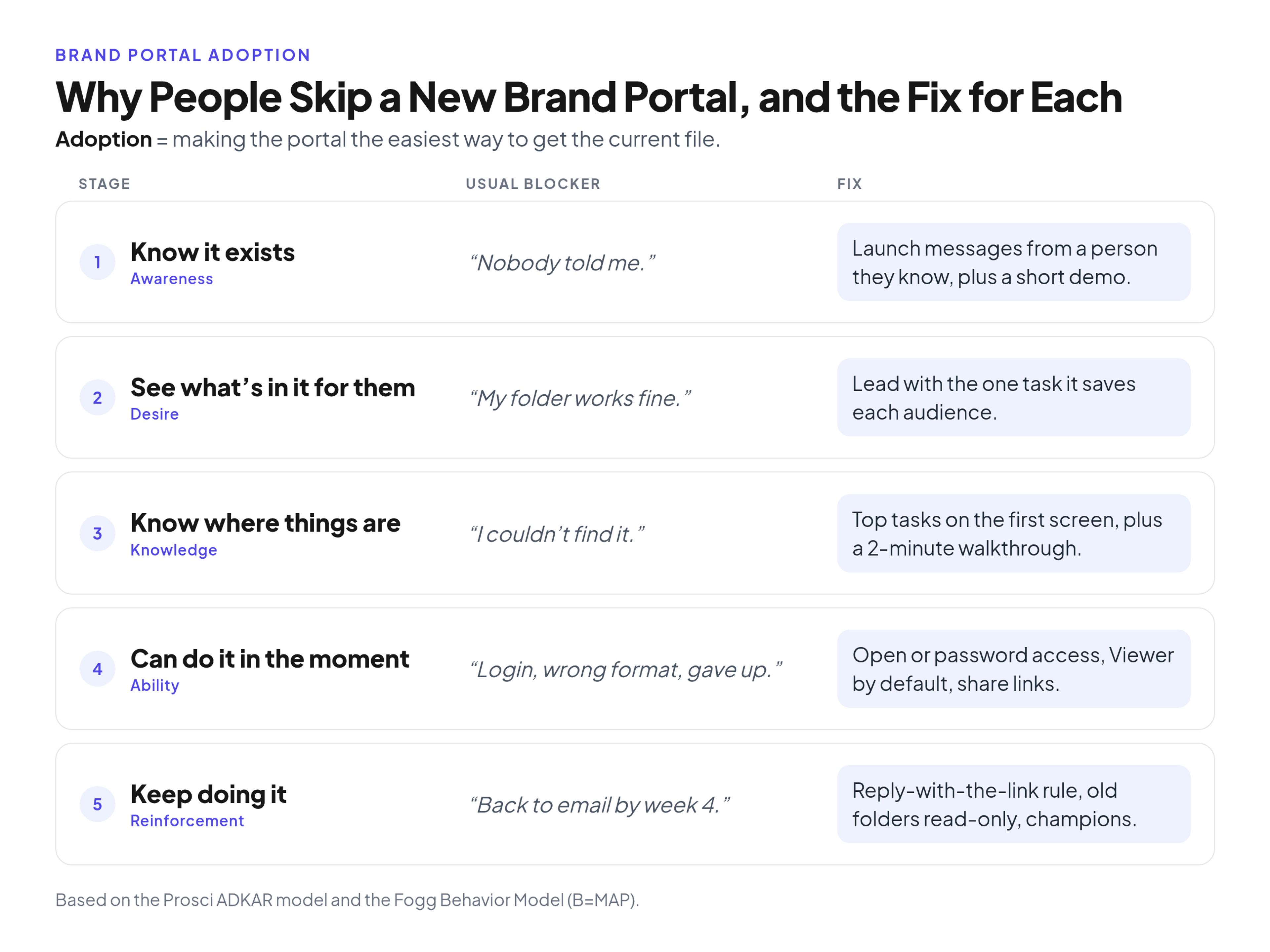
Most stalled rollouts are missing one of five things: people don't know, don't care yet, can't find it, hit friction, or slide back. Each has a different fix.
Why people skip a new brand portal
People skip a new brand portal when one of five adoption stages is missing and the old habit still feels faster. Three established models show which piece is missing.
Prosci's ADKAR model breaks change into five elements: Awareness (why the change is needed), Desire, Knowledge (how to change), Ability and Reinforcement (sustaining the new way and preventing backsliding). Prosci notes that organizational change happens one person at a time: the portal is adopted when each sales rep, clinic manager and agency designer reaches for it first.
The Fogg Behavior Model (B=MAP) says a behavior happens when motivation, ability and a prompt come together at the same moment; when it doesn't happen, one of the three is missing. That's why "Can you send me the logo?" keeps arriving: asking you is easier than opening the portal, and nothing prompted them at the moment of need.
The Technology Acceptance Model (Davis, 1989) adds that acceptance depends on perceived usefulness for the task and perceived ease of use. So "we have a new brand portal" is a weak pitch. "The current sales deck is one click from this link" names a task and promises low effort.
The symptoms you hear point to the missing stage:
- "I didn't know we had one." Awareness. Fix: launch messages from a person they know, plus a demo.
- "My folder works fine." Desire. Fix: lead with the one task the portal saves this audience.
- "I couldn't find it." Knowledge. Fix: top tasks on the first screen and a two-minute walkthrough.
- "It asked for a login and I gave up." Ability. Fix: open or password access, Viewer by default, share links.
- "I went back to email after launch week." Reinforcement. Fix: the reply-with-the-link rule, champions and read-only old folders.
Make the portal easier than the workaround
The portal wins only when it beats the workaround on effort, so pick the top three to five tasks for each audience and put them on the first screen people see.
Start from the requests you already get: sales wants the deck template, a regional office wants signage, an agency wants the logo set, colors and fonts. These lists shape the first screen, the demo and the champion briefing.
Then test findability: tag files in the words people use ("deck", "signage"), and ask someone outside marketing to find the dark-background logo.
Finally, show that downloads are current. The "FINAL_v3_USE THIS ONE" folder exists because people don't trust the shared copy; version history and dated guideline pages answer that. If the first screen is still a maze, revisit the setup guide linked above.
Remove access barriers
Every login screen, request form and per-person cost sends people back to email, so use the lightest access that still protects the material: open for broad audiences, a password for restricted ones.
Public access suits material meant to travel, like the core logo set; a password fits unreleased campaigns.
Give most people the Viewer role; keep Admin and Editor rights small. With a brand portal with unlimited free viewers, you can open access to every employee, branch and partner without counting seats; only admin and editor seats are limited (2 on Starter, 5 on Professional, 20 on Enterprise).
For one-off handoffs, send share links instead of attachments, so a later update doesn't strand an old copy in someone's inbox. Brandportal's Starter plan includes 50 share links a month; Professional has unlimited share links plus a subdomain and advanced branding, which help people recognize the official source.
Launch with a campaign, not an announcement
A single all-staff email tends to produce a login spike in launch week and a slide back by week four. Plan four or five short messages over 30 days, each with one sender, one channel and one job.
A sample sequence, written by the brand team and sent through the channels it already uses:
- Day 0, from a leader people know, by email and team chat: why and where, with the one link.
- Day 2 or 3, from the brand team, in team chat: "how to find the current logo and deck in 30 seconds", with a short screen recording.
- Week 1, a live 15-minute demo at a team meeting, recorded for replay: each audience's top tasks, then questions.
- Day 14, from the same leader, by email: the date old shared folders become read-only, and where to ask for anything missing.
- Day 30, from the brand team: a short wins update naming the teams that switched.
The demo matters most: watching a colleague find the deck template in seconds beats any email.
Recruit champions first, then coach teams
Pick one or two respected people per department, branch or region and brief them a week before launch. Kotter calls this a guiding coalition, and diffusion research explains why it works.
Choose the people others already ask, not the most senior. Dearing's review of diffusion of innovation research describes early adopters, including opinion leaders, taking up an innovation after judging it, while the later majority adopts because others have.
Ask champions to:
- answer portal questions in their team
- reply to file requests with the portal link, never the file
- report what people couldn't find
- pass along small wins (a deck found, a print job done from the right file)
Kotter's 8 Steps call for a coalition drawn from the organization's own ranks and for short-term wins that are recognized, collected and communicated early and often. Use the wins in your day-30 message.
Champions are an informal help network, not a governance role. They don't approve files or manage access; decide separately who owns the portal and approves new files.
Make the portal the default habit
Adoption sticks when using the portal takes no decision, so put prompts where file requests happen and set a date when old folders go read-only. Kotter's advice: tie the new behavior to results until it replaces the old habit.
- Reply with the link. Everyone who used to send files, starting with the brand team, answers requests with the portal link.
- Prompts at the point of need. A pinned link in team chat, a line in the brand team's email signature and auto-reply, and the link inside templates people already open. In B=MAP terms, these are prompts placed where motivation already exists.
- A read-only date. Announce it on day 14 and switch old shared folders to read-only once people know the new home and their files are in it.
Stray copies on desktops fade more slowly; champions can point people to the portal version.
How to get agencies, branches and partners to use the portal
Partners and branches adopt when the portal is the only place they're sent, so give each audience a first task, a simple access route, a named person who tells them and a clear test of "adopted".
- Outside agency. First task: pull the logo set, fonts and colors for a brief. Access: password-protected portal or share link. Told by: the brand manager, via the link in the brief template instead of attachments. Adopted when: two briefs in a row need no file request.
- Freelancer. First task: one project's assets. Access: a share link from whoever hires them. Adopted when: they stop asking by email.
- Printer or vendor. First task: download print-ready files. Access: share link or public portal. Told by: whoever places the order, with the link in the order email. Adopted when: proofs arrive with the current logo.
- Branch or franchise location. First task: find local signage and templates. Access: public or password-protected portal. Told by: a local champion. Adopted when: the location prints from portal files, not saved copies.
- Sales team. First task: open the current deck template. Access: Viewer role. Told by: the sales champion and sales leader. Adopted when: new decks start from the portal template.
Start with the audience that sends the most requests. For the welcome package itself, see what to send an agency or partner on their first day.
A 90-day brand portal adoption plan
A workable plan has four phases, from two weeks before launch to day 90, and each phase serves one or two ADKAR stages. Treat the dates as a sample to adapt, not a standard.
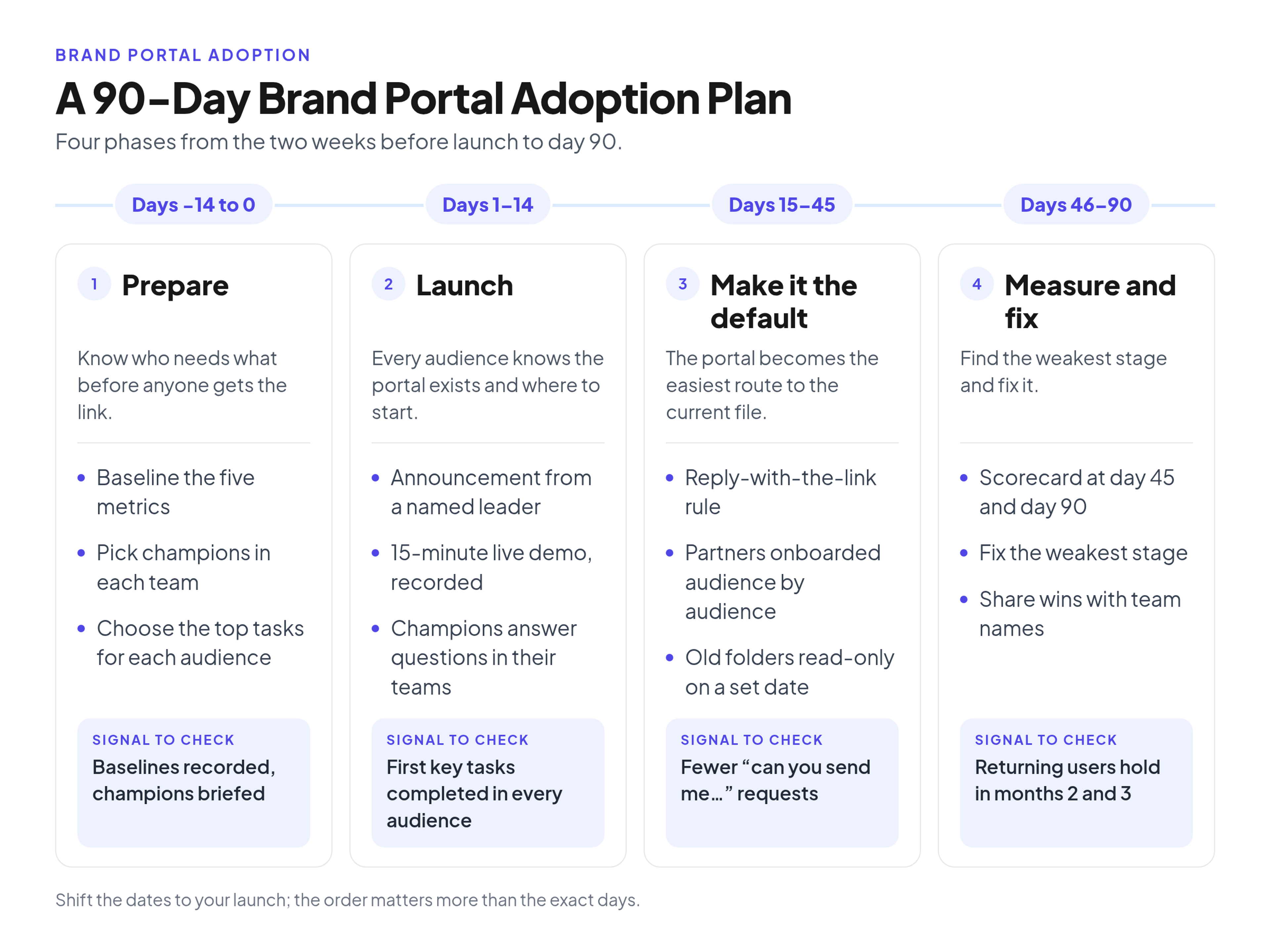
A sample 90-day plan. Shift the dates to your launch; the order matters more than the exact days. The copy-ready version:
- Days -14 to 0: Prepare
- Goal: know who needs what before anyone gets the link (sets up Awareness and Desire).
- What the brand team does: baselines the five metrics, picks champions, chooses top tasks per audience.
- Message: champion briefing a week before launch.
- Signal to check: baselines recorded, champions briefed.
- Days 1 to 14: Launch
- Goal: every audience knows the portal exists and where to start (Awareness and Knowledge).
- What the brand team does: day-0 announcement from a named leader, a recorded 15-minute live demo, champions answering questions.
- Message: day 0, day 2 or 3, week 1 demo, day 14 read-only date.
- Signal to check: first key tasks completed in every audience.
- Days 15 to 45: Make it the default
- Goal: the portal becomes the easiest route to the current file (Ability).
- What the brand team does: the reply-with-the-link rule, partners onboarded audience by audience, old folders read-only on the set date.
- Message: day 30 wins update.
- Signal to check: fewer "can you send me..." requests.
- Days 46 to 90: Measure and fix
- Goal: find the weakest stage and fix it (Reinforcement).
- What the brand team does: scorecard at day 45 and day 90, fix the weakest stage, share wins with team names.
- Message: a short results note after day 90.
- Signal to check: returning users hold in months 2 and 3.
Brand portal adoption checklist
Run it before launch and again at day 45:
- The top tasks for each audience are on the first screen.
- The most-requested files are in the portal and current.
- Each audience has an access route (public, password or share link).
- Most people have the Viewer role.
- Champions are briefed in every team.
- All five metrics have a pre-launch baseline.
- The read-only date for old folders is announced.
- The brand team answers file requests with links.
- The portal link sits in team chat, email signatures, templates and agency briefs.
How to measure brand portal adoption
Measure adoption with five task-based metrics and a baseline taken before launch, not with logins. The method follows Google's HEART framework, which separates adoption, retention and task success.
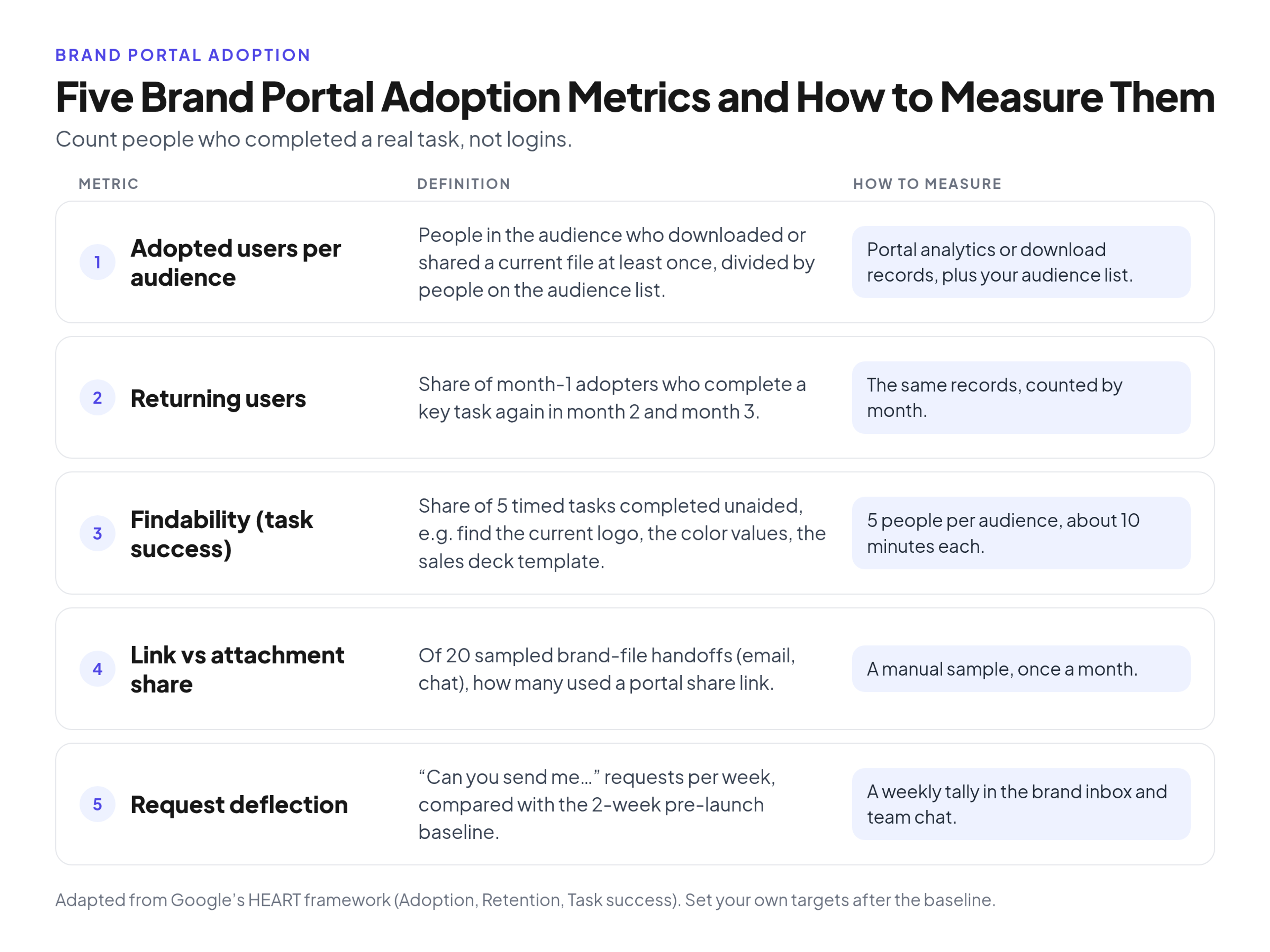
Count people who completed a real task, not logins, and baseline each metric before launch so you can see the change. In the HEART framework (Rodden, Hutchinson and Fu, CHI 2010), adoption counts new users starting in a period, retention counts users still present later, and a team may count someone as adopted only after a key task. Engagement may matter less in enterprise products used as part of the job, like a brand portal, so task success counts more than time spent.
- Adopted users per audience: people in the audience who downloaded or shared a current file at least once, divided by people on the audience list. Method: portal analytics or download records, where your plan shows them, plus your audience list.
- Returning users: share of month-one adopters who complete a key task again in month two and month three. Method: the same records, counted by month.
- Findability (task success): share of five timed tasks completed unaided, such as finding the current logo, the color values and the sales deck template. Method: about five people per audience, about 10 minutes each.
- Link vs attachment share: of about 20 sampled brand-file handoffs in email and chat, how many used a portal share link. Method: a manual sample, once a month.
- Request deflection: "can you send me..." requests per week, compared with a two-week pre-launch baseline. Method: a weekly tally in the brand inbox and team chat.
Logins and page views alone are vanity numbers. Set your own targets after the baseline; no outside number is an industry standard for yours.
Example: reading a day-45 scorecard
Read a day-45 scorecard by audience to see which group is stuck and which stage is missing. This example is illustrative: Larkspur Dental Partners is fictional, and its numbers are hypothetical.
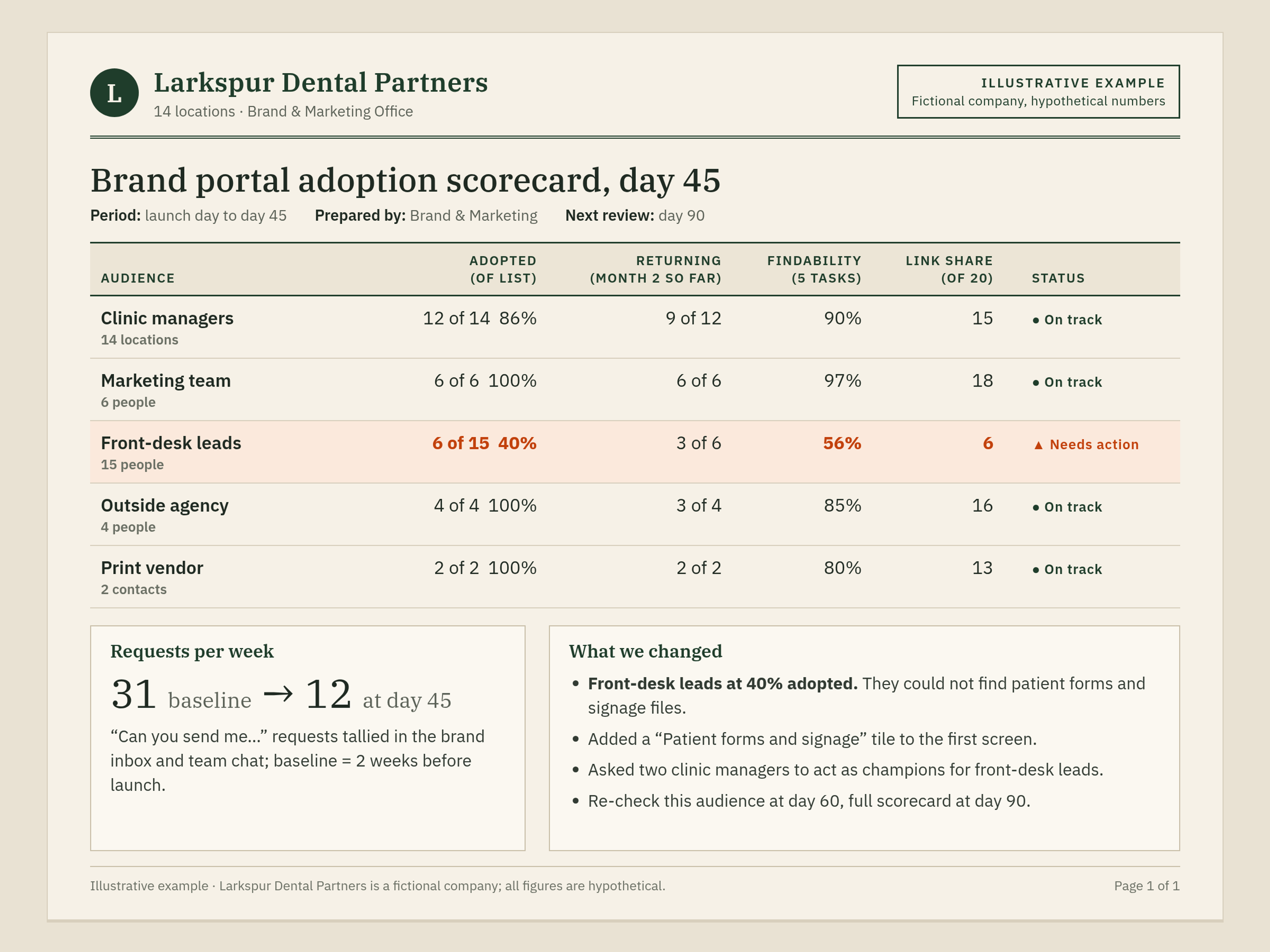
Illustrative example: a fictional 14-location dental group's day-45 scorecard. Numbers are hypothetical; the point is reading it by audience and fixing the weakest stage.
Four audiences look healthy (clinic managers at 12 of 14 adopted), and requests per week fell from 31 at baseline to 12.
Front-desk leads lag: 6 of 15 adopted (40%), 56% findability and 6 of 20 handoffs by link. The findability test showed why: patient forms and signage files sat deep in a print folder. That's a Knowledge gap, not a motivation problem.
So the team added a "Patient forms and signage" tile to the first screen and asked two clinic managers to act as champions for front-desk leads, with a re-check of that audience at day 60 and the full scorecard at day 90.
What to do when usage stalls
When usage stalls after week three or four, find the missing stage before sending another reminder, because a reminder only fixes Awareness. Let the metrics point to the gap:
- An audience has almost no adopted users: they never heard. Have that audience's leader send the link and a champion demo it.
- Adoption looks fine but requests haven't dropped: they see no reason, because asking still works. Start the reply-with-the-link rule.
- Findability fails on specific tasks: they can't find things. Move those tasks to the first screen and fix the tags.
- People start but don't finish: something blocks them. Check that audience's access route and file formats.
- Month-two returning users drop: nothing keeps them. Enforce the read-only date and share a new round of wins.
Common brand portal adoption mistakes
These seven mistakes are the ones to rule out first, and each is a launch decision the brand team controls:
- Launching with one all-staff email. It covers Awareness and nothing else.
- Training everyone on admin features. Viewers need their top tasks, not settings.
- Opening before the most-requested files are in. An empty first visit sends people back to email.
- Keeping the old folder writable "just in case". People keep saving there.
- Counting logins. They measure the announcement.
- Treating partners as an afterthought. They need their own first task and access route.
- A brand team that still sends attachments. Everyone copies the brand team.
Frequently Asked Questions (FAQ)
How long does brand portal adoption take?
Plan on 90 days to a stable picture. The first two weeks show whether people know the portal exists, day 45 shows which audiences are stuck, and month-two and month-three returning users show whether the habit holds. Day 90 is a review point, not a finish line.
Should you force people to use the brand portal?
Close old routes only after people know the new one and their files are in it. Go read-only before deleting anything, and announce the date in advance. Never closing them leaves two sources of truth.
Do people need training to use a brand portal?
Most viewers need a short walkthrough of their top tasks, which the demo recording covers; contributors need more. If viewers need a long course to find the logo, fix the structure.
Conclusion
Brand portal adoption is a 90-day job: make the portal easier than the workaround, launch with a short campaign and champions, make the link the default reply, bring partners in one audience at a time, and measure completed tasks, not logins. Take your baseline this week. When you're ready to try the plan on your own files, see plans and the 14-day free trial.