A brand portal rollout plan moves people onto a portal that is already set up, in five phases with a go/no-go gate before the pilot and before launch.
Setup and rollout are different jobs. Setup is configuring the portal. Rollout is getting real people to switch from the old shared drive, the old PDF and the old email habits. On November 21, 2026, I compared the implementation guides I could read (vendor and agency guides plus a university IT toolkit) and went through our own guides. Most of them explain what to set up. None of the ones I read gave me a go/no-go gate, a rule for each old file location (redirect, read-only or retire), or a handoff to the person who runs the portal day to day. Canto says to retire legacy storage on a firm date, and Stanford sequences messages around go-live, but neither goes further.
This article fills those gaps. It is a plan built from those pages, not a report from a rollout I ran, so treat the numbers as yours to set.
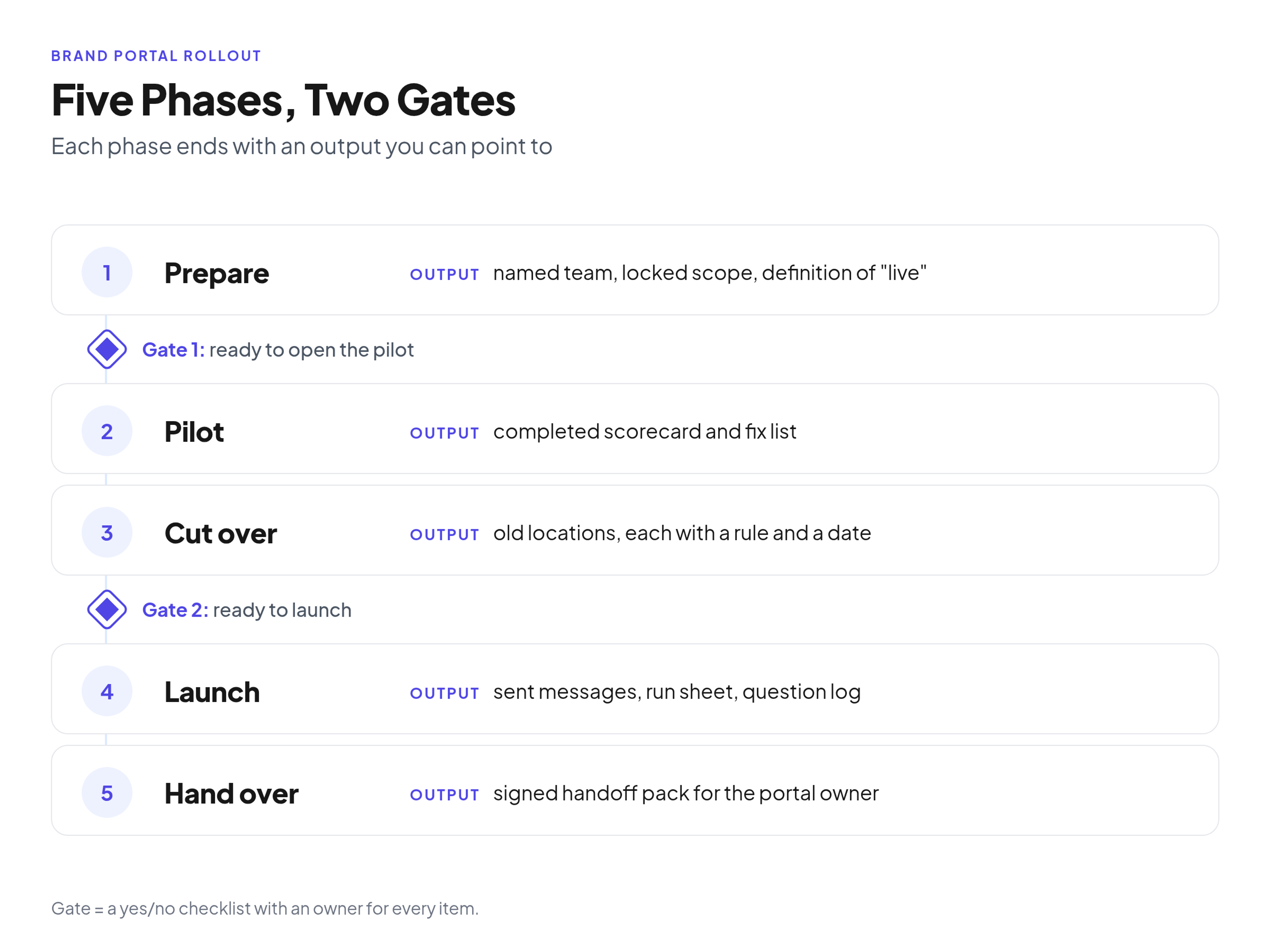
The five phases of a brand portal rollout, the output of each phase, and the two readiness gates: one before the pilot and one before launch.
The rollout in five phases
Run the rollout as five phases (prepare, pilot, cut over, launch, hand over), and do not start a phase until the previous one has produced its output. This plan assumes the portal is already built, so if it is not, start with the eight setup steps this plan assumes are done.
Two gates sit between them. The first decides whether the pilot can open. The second decides whether you can announce the portal to everyone.
On its DAM implementation page, Canto says "A phased rollout is almost always preferable to a big-bang launch." I agree, and for a small team the reason is practical. If every department switches on the same day, every problem lands on the same two or three people at once.
On timing, Canto's June 2026 page gives a whole-project timeline for organizations with under 50 users of 4 to 8 weeks, assuming dedicated internal project ownership. It says to add 30 to 50 percent if the project runs as a side project. That figure comes from a vendor page about DAM implementation and covers the entire project, not just the rollout after setup. Use it as a rough reference and set your own dates backward from a launch date you can defend.
Phase 1: Prepare the project and the team
Preparation produces three things: a named team, a locked scope and a written definition of what "live" means. If you skip them, the pilot has no pass mark and the launch has no finish line.
The team. Canto's page lists three conditions (a visible executive sponsor, a dedicated internal project owner and a defined governance model) and elsewhere says to lock scope and get sign-off on naming conventions. For a small marketing team, I'd turn that into roles:
- Sponsor: the person who can say the old shared drive closes on a set date and have it stick.
- Project lead: runs the rollout. In a small team this is usually the future portal owner, which makes the handoff easier.
- Access manager: whoever in IT or operations controls who gets logins.
- Legal or rights contact: the person who can answer questions about usage rights and expiry dates.
- Department leads: one person per audience, such as sales enablement, a regional office or the design team.
The scope. Decide which assets and which guidelines pages are in the first release. Current logos, current templates, active guidelines and active campaign assets are enough.
The definition of live. Write one sentence that the team signs off. Mine would be: live means people in the pilot audiences get brand files and guidelines from the portal, and requests that used to go to the design team by email now start with a portal link. Your sentence can differ, but write it down before the pilot, because you will use it in the gates.
The readiness gate: go or no-go before the pilot and before launch
A readiness gate is a yes/no checklist, with an owner for each item, that you run before the pilot opens and again before launch. If an item is a no, the date moves or the item gets a dated fix. You do not talk yourself into it.
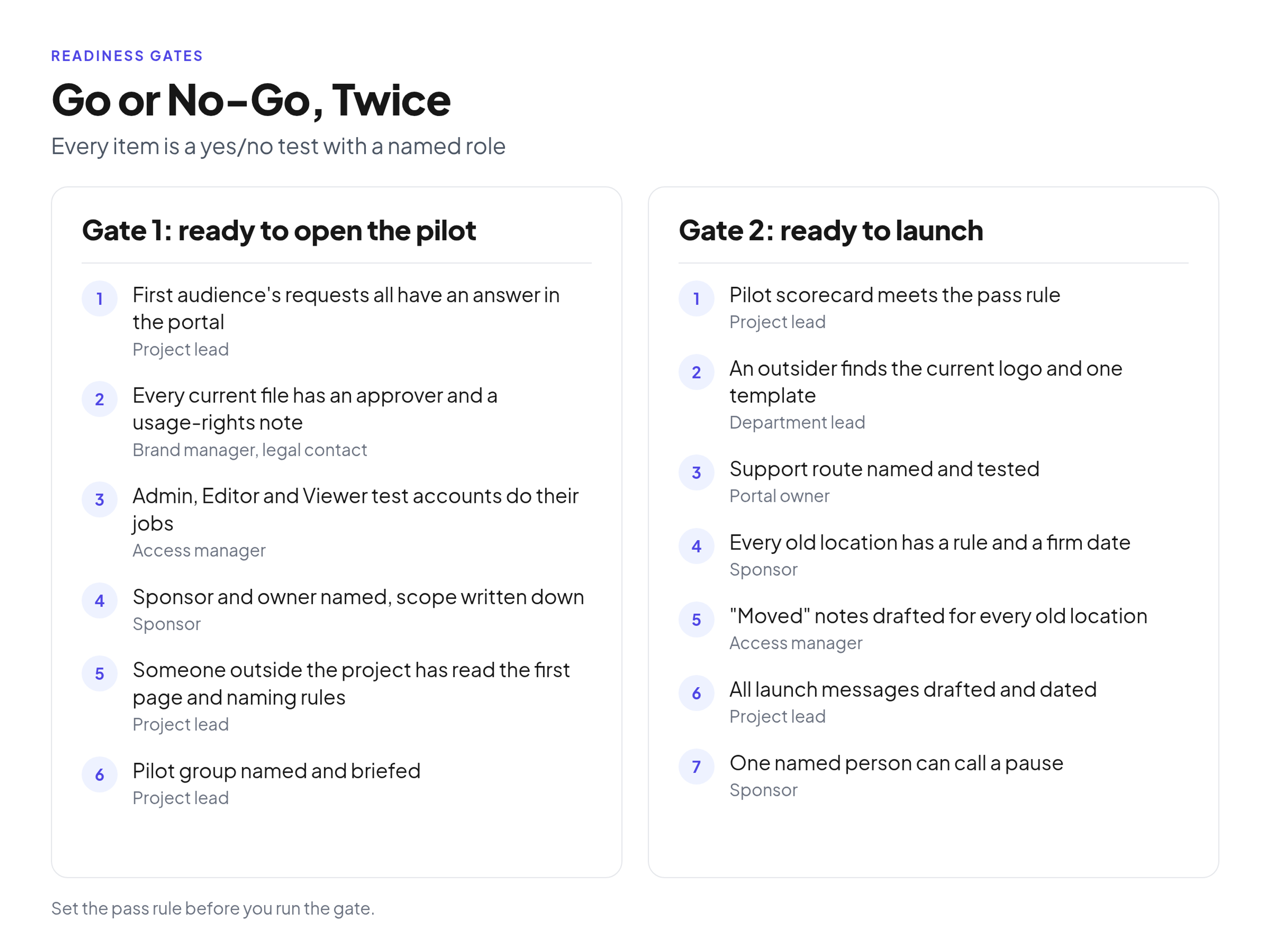
The two readiness checklists. Every item is a yes/no test with a named role to check it, and the team sets the pass rule before it runs the gate.
Set the pass rule before you run either gate. Decide which items must be a plain yes (for example, access roles and the support route) and which can be a yes with a dated fix. Write that rule at the top of the checklist so nobody renegotiates it on the day.
Gate 1: ready to open the pilot
- Every task on the first audience's request list has an answer in the portal. (Project lead)
- Every file marked current has a named approver and a usage-rights note. (Brand manager and legal contact)
- Test accounts for Admin, Editor and Viewer each do what the role should do, and nothing more. (Access manager)
- The sponsor and the project owner are named, and the scope is written down. (Sponsor)
- The first-page introduction and the naming rules have been read by someone outside the project, and their questions are answered. (Project lead)
- The pilot group is named and briefed, and they know where to report problems. (Project lead)
Gate 2: ready to launch
- The pilot scorecard meets the pass rule you set before the pilot began. (Project lead)
- Someone who was not in the project can find the current logo and one template without help. (A department lead)
- The support route is named and has been tested with a real question. (Portal owner)
- Every old location has a rule and a firm date, and the sponsor has approved the list. (Sponsor)
- The "moved" notes are drafted for every old location. (Access manager)
- All launch messages are drafted and scheduled against dates. (Project lead)
- One named person can call a pause if launch day goes wrong. (Sponsor)
Run the gate as a short meeting with the checklist on screen, not as an email thread. Each owner says yes or no out loud, and the result goes into the handoff pack later.
Phase 2: Run the pilot
A pilot works when a small group does real tasks in the portal and you record what happens, not when you ask a few friendly colleagues what they think. The output is a scorecard and a fix list.
Canto's page recommends starting with a pilot group of power users, typically the team that drove the implementation project. It also says to collect structured feedback on search, upload and workflow issues and to fix problems before you expand access. Its rollout advice is to open access by team or department rather than all at once. I'd follow that order.
Rules for the pilot:
- Log every attempt. For each task, record the task, the time it took, where the person got stuck, and whether the request still ended up in email or chat.
- Count an email fallback as a fail. If the person had to ask a human, the portal did not answer the question.
- Set your pass rule before you start. For example: every task must be completed without help, or have a logged fix with an owner and a date. Choose your own rule and write it down before the first task.
Illustrative example. Orrowby Foods is a fictional company, so these numbers are made up. Its brand team runs a pilot with the sales team's request list and logs eight tasks. Six are completed in the portal without help. Two fall back to email, one because a template had no usage note and one because the search term the salesperson typed did not match the file name. The team's own rule was "no email fallbacks at launch", so it logs both fixes, assigns owners, and re-tests those two tasks before Gate 2.
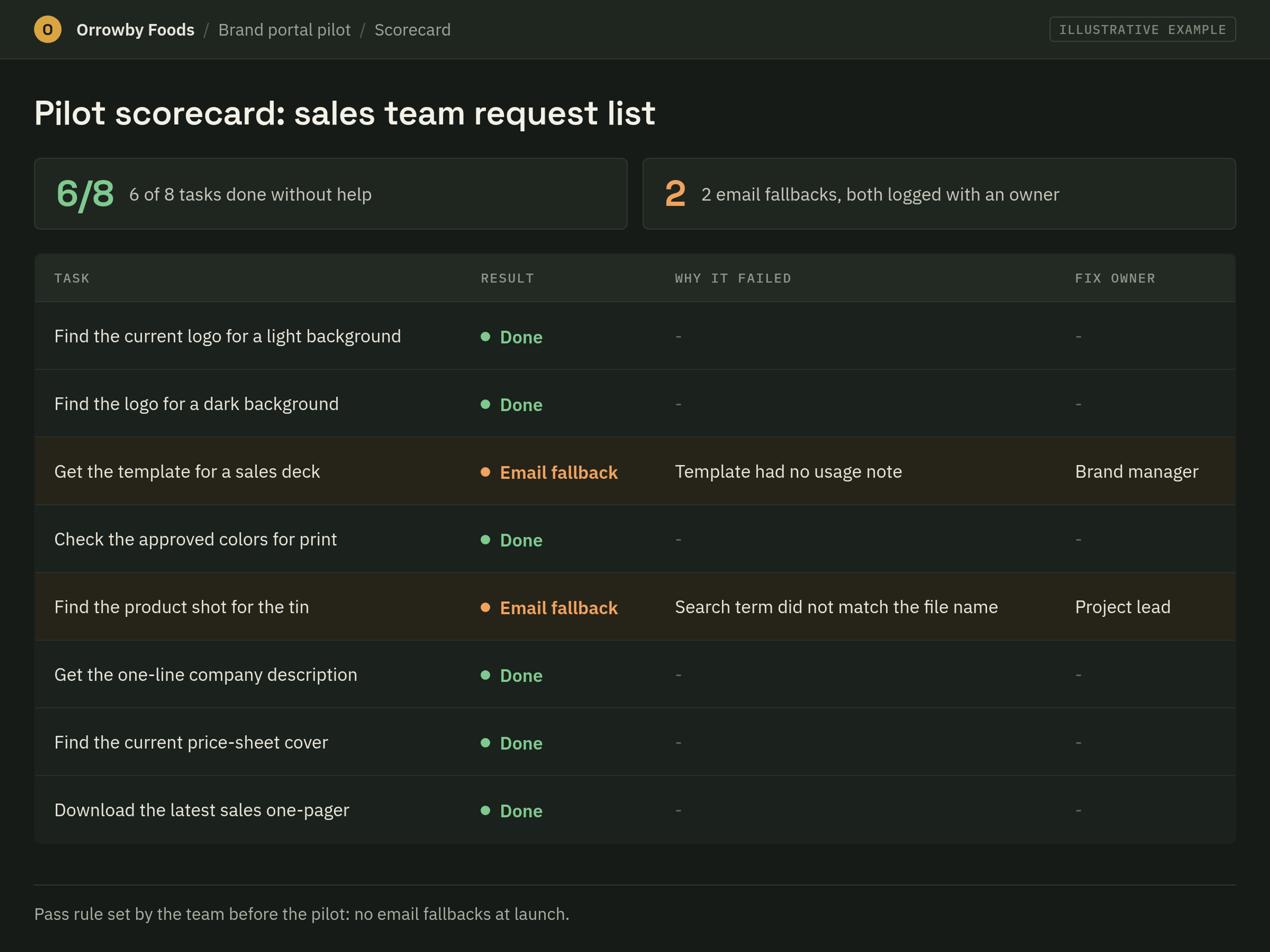
Illustrative example: a pilot scorecard for Orrowby Foods with sample numbers, showing the task list, the result for each task, the failure reason and the fix owner.
Phase 3: Cut over from the old locations
Cutting over means every old location gets one of three rules (redirect, make read-only, or retire), a single firm date, and a "moved" note that points to the new page. If the old locations stay open, people will keep using them, and the portal becomes one more place to check.
Canto's page makes the same point as a fix for a common pitfall: "retire or remove permissions on legacy storage locations on a firm date". I'd put that date on the calendar before the pilot starts, so nobody treats it as optional.
Step one: make the inventory. List every place where people find brand files or guidance today: shared drive folders, pinned messages in team chat, intranet pages, the PDF brand book and agency email threads. Ask each department lead what is missing from the list.
Step two: apply a rule per location.
- Shared drive folders: make them read-only on the date you set, then retire them after a short overlap. Put a "moved" note at the top level that says what happened and links to the new portal page.
- Chat pins: unpin the old file or folder link and pin the portal link in its place. Post one message in the channel explaining the change.
- Intranet pages: redirect or replace. If your intranet lets you set a redirect, set it from the old page to the matching portal page. Redirects are something you do in your own systems, and I am not claiming Brandportal does them for you. If you cannot redirect, replace the page content with a short "moved" note and a link.
- The PDF brand book: retire it from shared locations and mark any copies you keep as superseded. Link to the live online guidelines wherever the PDF used to be. Keep one dated copy in the archive.
- Agency email threads: tell your agencies in writing which link is now the current source. Ask them to stop reusing files from old attachments, and send new requests as links.
Step three: archive before you retire. Keep a dated copy of the old folders in a location only the portal owner can open. Record where it is in the handoff pack. You will need it the first time someone asks where the old file went.
Step four: use the straggler rule. After the cutover date, people will still ask for files by email. The rule is simple: send the portal link, not the file. Every attachment you send keeps the old habit alive. A link teaches the new one, and it takes about the same effort.
Phase 4: Launch
The communication calendar
Plan launch messages on a dated calendar: getting ready, one month before, one week before, launch day and afterwards. Write each one before the gate meeting.
I took the time-based pattern from Stanford University IT's ServiceNow communications and training toolkit. It is an IT system migration (to ServiceNow), not a brand portal, but the sequence transfers well.
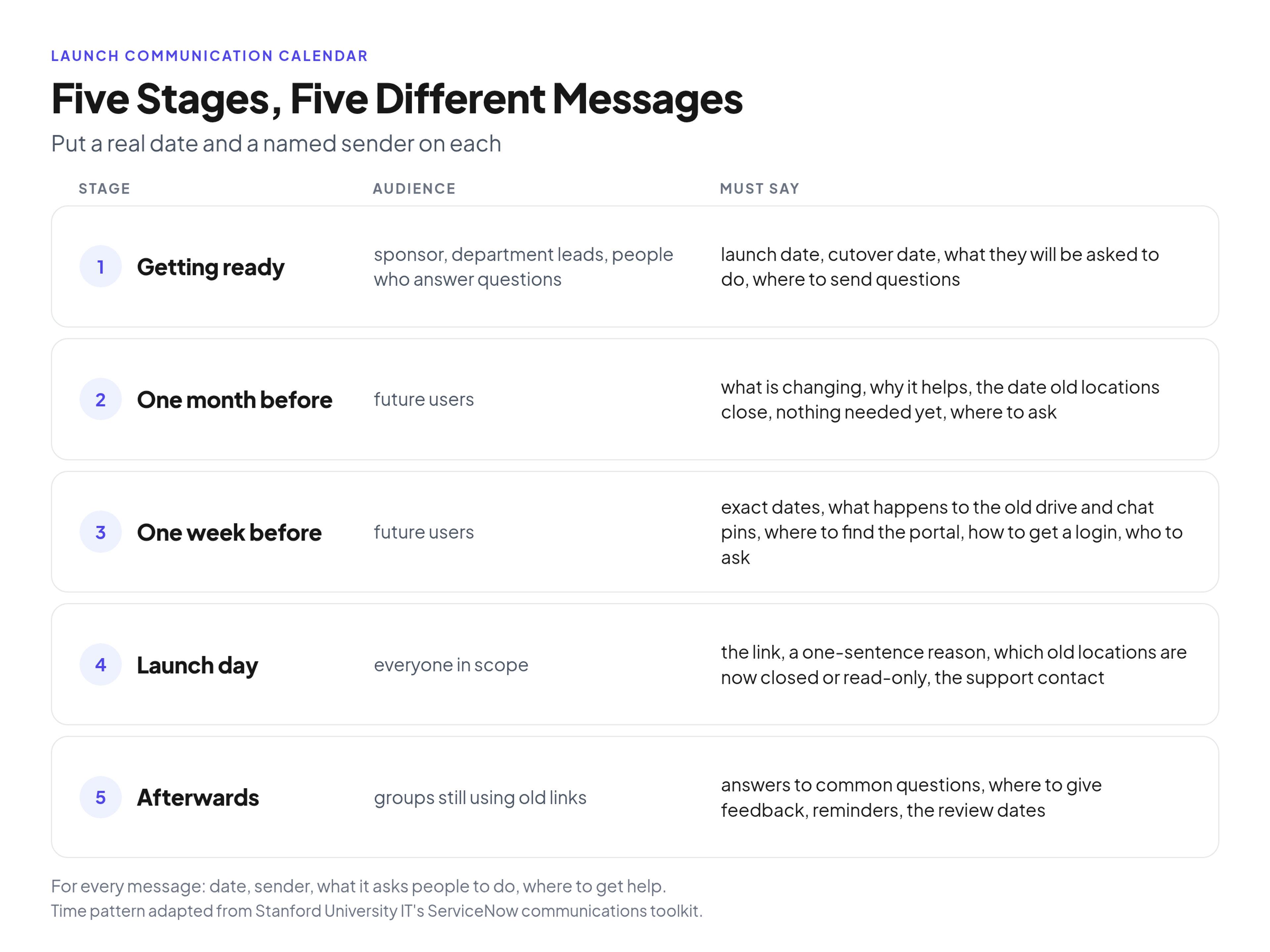
A dated launch calendar with five stages and what each message must say.
Give each stage a real date and a named sender, working back from launch day.
- Getting ready: brief the sponsor, the department leads and the people who answer questions on the launch date, the cutover date and where questions go.
- One month before: send future users one short note on what is changing, why it helps them and the date the old locations close.
- One week before: send what Stanford's toolkit suggests, detailed reminders of what will differ and what support exists, plus the exact dates.
- Launch day: Stanford's guidance for go-live day is a simple email that answers what happens now and where to get support, so send the link, the closed locations and the support contact.
- Afterwards: keep the tip from Stanford's one-week section, "Give users a venue where they can ask questions and give feedback." Then send short reminders to groups still using old links.
Launch day and the first weeks
Launch day needs a run sheet and one person watching the incoming questions. The output is a question log and a short list of fixes. Treat the first day as a monitoring task, not a celebration.
The run sheet:
- Confirm the portal is open and the right roles are in place. (Portal admin)
- Send the launch message. (Project lead)
- Apply the cutover rules for the old locations: read-only flags, chat pins, intranet notes. (Access manager)
- Open the feedback venue and name the person watching it. (Project lead)
- Hold a short end-of-day check on what went wrong, and decide whether anything needs a pause. (The person named in Gate 2)
Keep a question log. Record every question in the first weeks: who asked, what they needed and what the answer was. When the same question keeps coming back, the portal is not explaining itself. Fix the cause where you can, for example by renaming a folder or adding a line to the first page. Where you cannot, add the answer to your guidelines or FAQ.
Plan the longer reviews. Canto's page says most organizations schedule reviews at 30 days and 90 days after go-live. Put both on the calendar before you launch. The first is for fixes and clutter, and the second is for whether the portal is changing habits.
Past the first weeks, the job turns into getting usage up, which is a separate project. The 90-day adoption plan that carries on after launch covers it, so I won't repeat it here.
Phase 5: Hand over to the portal owner
The rollout ends when the portal owner has everything needed to run the portal without calling the project team. The output is a handoff pack, reviewed and signed off in one meeting.
The handoff pack:
- Access list and roles: who has Admin, Editor and Viewer access, and who approves new accounts.
- Vocabulary and naming rules: the terms, tags and file naming conventions people agreed on, with examples.
- Open-issues log: every unresolved request and known problem, each with an owner and a date.
- Retired-location list: each old location, its rule (redirect, read-only or retire), the date it changed and where the archive copy lives.
- Scorecard results: the pilot scorecard and the Gate 1 and Gate 2 results, so the owner knows what was tested and what was waived.
- Review dates: the dates for the 30-day and 90-day reviews, with a named person for each.
If your owner is the project lead, the pack still matters. It turns a pile of project memory into something a colleague could pick up. The daily and weekly routine the owner takes over is the next thing they need to read.
If you are still choosing where this will live, Brandportal keeps your online brand guidelines and asset library in one place, with Admin, Editor and Viewer roles, folders, version history, share links, unlimited free viewers and basic and advanced analytics. You can see plans and the 14-day free trial on paid plans.
Common rollout mistakes
Most rollouts go wrong in the gaps between the phases, not inside them. These are the three I'd watch for.
- Launching to everyone at once. A big-bang launch puts every question on the same few people on the same day. Open access by audience instead.
- Skipping the gate. Launching because a date is on the calendar, rather than because the checklist passed, costs trust you will need later.
- Leaving old locations open. If the old shared drive still works, people will use it. Set the date and keep it.
FAQ
What is the difference between setting up and rolling out a brand portal?
Setup configures the portal: structure, tags, roles and guidelines pages. Rollout moves people onto it: the pilot, the cutover of old locations, the launch messages and the handoff to the owner.
How long does a brand portal rollout take?
It depends on your team and how much time it can give the project. Canto's DAM implementation guide (June 2026) gives 4 to 8 weeks for a whole DAM project at organizations with under 50 users, assuming dedicated internal ownership, and says to add 30 to 50 percent if it runs as a side project.
What should happen to the old shared drive after launch?
Give it a rule and a firm date: make it read-only first, then retire it. Leave a "moved" note that links to the portal page, keep a dated archive that only the portal owner can open and answer late requests with the portal link, not the file.
Conclusion
A brand portal rollout is mostly a transition project. The setup gets the portal ready, but the gates, the pilot scorecard, the cutover rules, the launch calendar and the handoff pack decide whether people actually switch. Set your own pass rules, put real dates on the calendar and keep the old locations from competing with the new one. Then hand the owner a pack they can use on their first day.