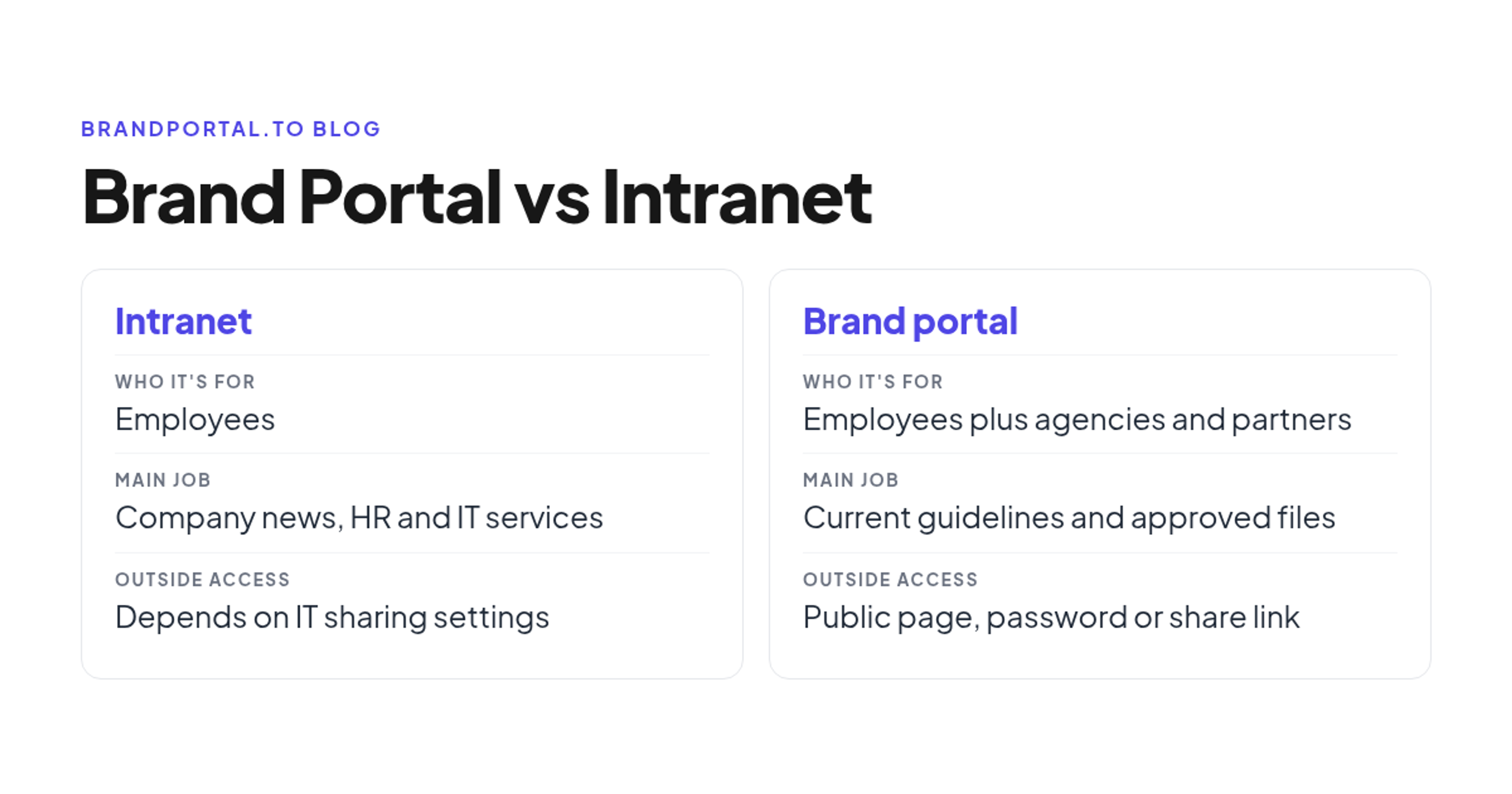
An intranet is your employees' internal hub: company news, policies, HR and IT services, the people directory and the apps people use for daily work. A brand portal is the one place for the current brand guidelines and approved, downloadable brand files, and it serves employees as well as agencies, freelancers, printers, partners, resellers and franchisees. Most companies need both, with the intranet linking to the portal instead of keeping its own copies of the files.
The question usually starts with "Can't we just put the brand stuff on the intranet?" It sounds efficient, since employees already go there every day. The trouble starts when the agency, the printer or a franchisee needs the logo, because those are exactly the people an intranet is not built for.
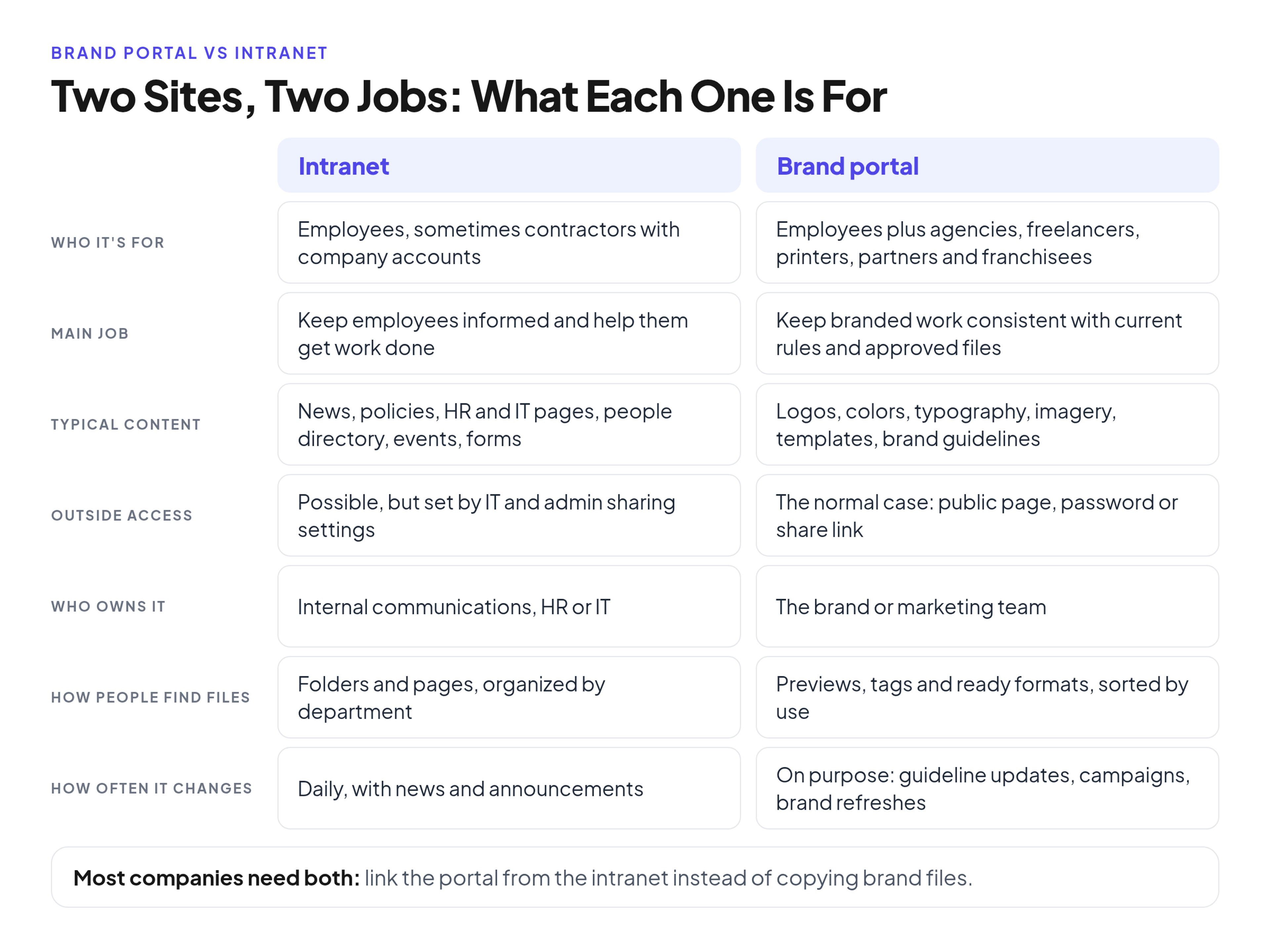
Brand portal vs intranet: the short comparison
If you need the background first, here is what a brand portal includes and how it works. In one sentence, it is a shared, always-current home for your brand rules and the files that follow them. The differences that matter to a brand team:
Who it is for
- Intranet: employees, and sometimes contractors with a company account
- Brand portal: employees plus agencies, freelancers, printers, partners, resellers and franchisees
Main job
- Intranet: keep employees informed and help them get work done
- Brand portal: keep branded work consistent by giving people the current rules and approved files
Typical content
- Intranet: company news, policies, benefits and HR pages, IT help, the people directory, events and forms
- Brand portal: logo sets, color values, typography, imagery, templates and the brand guidelines with their version history
Outside access for agencies and partners
- Intranet: possible, but it depends on how IT and admins have set up external and guest sharing, and many organizations keep it narrow
- Brand portal: outside access is the normal case, through a public page, a password or a share link
Who owns it
- Intranet: usually internal communications, HR or IT
- Brand portal: the brand or marketing team, which decides what is approved
How people find files
- Intranet: folders and pages, usually organized by department
- Brand portal: previews, tags and ready-to-use formats, organized by how files are used
How often it changes
- Intranet: daily, as news, events and announcements come in
- Brand portal: less often but on purpose, when the guidelines change, a campaign launches or the brand is refreshed
What each one looks like in practice
Here are two home pages for fictional companies, showing what each type of site usually puts first.
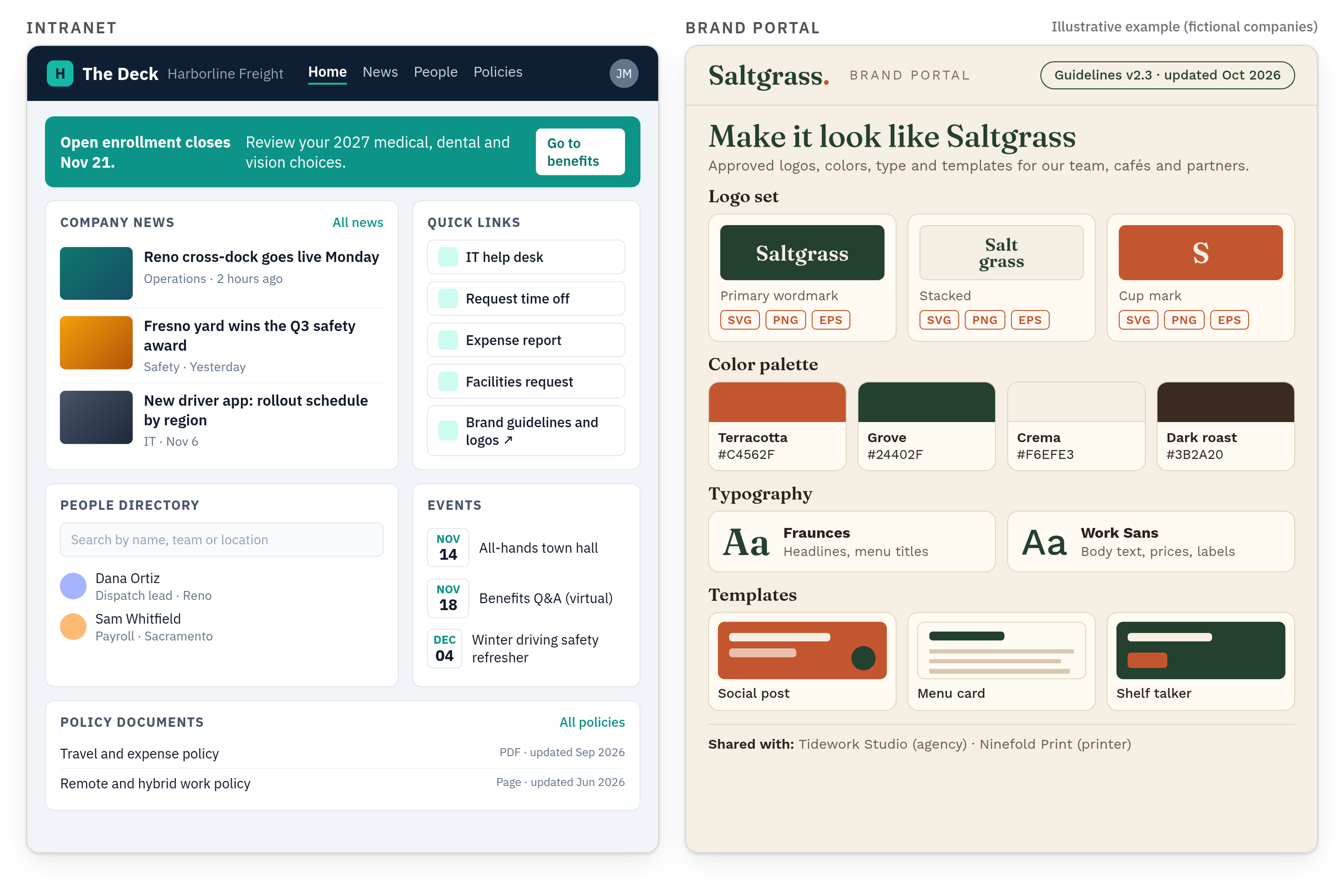
- Harborline Freight, a logistics company, calls its intranet The Deck. The home page shows company news, an HR banner about open enrollment, quick links to IT help and time off, a people directory search, upcoming events and a list of policy documents. One quick link, "Brand guidelines and logos," points to the brand portal.
- Saltgrass Coffee Roasters runs a brand portal. Its home page shows the logo set with SVG, PNG and EPS downloads, the color palette with HEX values, the typefaces, templates for social posts, menu cards and shelf talkers, a "Guidelines v2.3, updated October 2026" note, and a line showing that the portal is shared with its design agency and its printer.
Notice what is missing from each. The intranet has no logo folder of its own, only a link. The brand portal has no HR news and nothing confidential, because outsiders open it.
Why brand guidelines and logo files break down on an intranet
Intranets are designed for a different job, and brand files expose the gap in four predictable ways.
Outside people usually cannot log in
The people who need brand files most urgently are often not employees: the agency, the freelancer cutting a video, the printer, a reseller or a franchise owner. They usually have no company account, so an intranet link leads them to a sign-in screen, and the request lands back in the brand team's inbox as "Can you send me the logo?"
Guest access depends on IT and admin settings
Most intranet setups can share with outsiders in principle, but brand teams do not control that switch. In SharePoint and OneDrive, external sharing is set at the organization level and for each site, and when the two settings differ, the more restrictive one applies. In Google Workspace, admins decide whether people can share Drive files outside the organization, and they can limit sharing to approved domains. Those are reasonable security choices, but a brand manager who wants to give a printer one folder may need an IT ticket first, or ends up emailing attachments.
Folder trees hide what people need
Intranet document libraries tend to follow the org chart, because each department uploads to its own space. A sales rep looking for the logo on a dark background has to guess the folder, open files one by one and work out which of three PNGs is right. Often they give up and message a designer, who ends up doing resizes. Brand files work better when people can see a preview and pick the format they need.
Copies pile up and nobody knows which version is current
Every team that needs the logo uploads its own copy. A year later there are copies in the sales space, the HR space and a folder named "FINAL_v3_USE THIS ONE," and nobody can say which version is current. When the old logo is still running in production after a refresh, it usually came from one of those copies. There was no central source of truth, so everyone made their own.
Key terms: intranet portal, extranet and employee portal
- Intranet portal: the front door of an intranet, a home page that brings news, links, apps and search together. TechTarget's definitions of intranet and extranet describe an intranet as "a private network contained within an enterprise that is used to securely share company information and computing resources among employees." A brand portal differs because it is built for brand material and for people inside and outside the company.
- Extranet: in the same definitions, when a segment of an intranet is made accessible to customers, partners, suppliers or others outside the company, that segment becomes part of an extranet. A brand portal is not a slice of the internal network opened to guests; it is a separate site built around the brand.
- Employee portal: a self-service area where each employee handles their own items, such as benefits, time off and pay information. A brand portal holds shared, approved material meant to be used widely, not personal records.
When you need which, and when you need both
Five questions settle it for most brand teams.
- Who outside the company needs your files? If agencies, printers, partners or franchisees do, you need a place they can open without a company account.
- How often does the brand change? Campaigns and refreshes create new versions, and each needs one place where the old version is retired instead of copied.
- How many formats does each asset need? A logo in SVG, PNG and EPS, in full color, one color and reversed, is already close to a dozen files that need previews and clear names.
- Who should be able to edit? On an intranet, page owners across departments usually can. For brand files, a small group should publish and everyone else should view and download.
- Will IT open guest access for outside people? If the answer is no, or only case by case, the intranet cannot be your channel for partners.
The intranet alone can be enough when only employees use brand files, there is one logo pack and a short guide, and changes are rare. A brand portal becomes necessary when outsiders need files regularly, assets come in many formats or the brand is changing. Most companies with an intranet and outside partners need both: the intranet stays the employee front door and links to the portal for everything brand.
Brand request routing map: what goes where
This is the map I would hand to a brand team on day one. Each request gets one home, and "both" always means the intranet links to the portal rather than holding a copy.
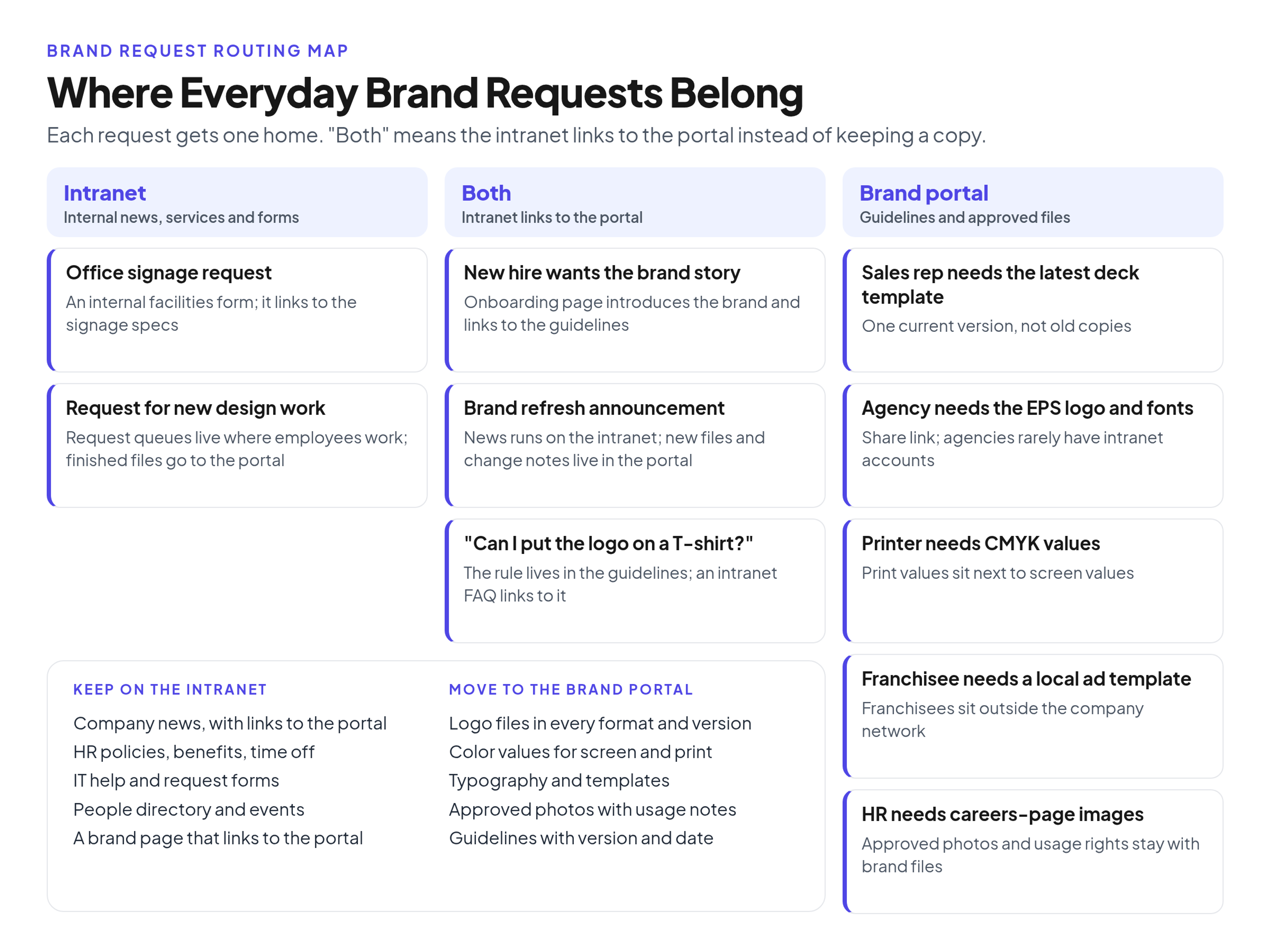
- A new hire wants the brand story. Both: the intranet onboarding page introduces the brand and links to the guidelines.
- A sales rep needs the latest deck template. Brand portal: it keeps one current version.
- An agency needs the EPS logo and the fonts. Brand portal, through a share link: agencies rarely have intranet accounts. Share fonts only if the license allows it.
- A printer needs CMYK values. Brand portal: print values sit next to screen values, not in an old PDF.
- The brand refresh is announced. Both: the news runs on the intranet, the new files and change notes live in the portal.
- Someone requests new office signage. Intranet: it is an internal facilities form, which can link to the signage specs.
- A franchisee needs a local ad template. Brand portal: franchisees sit outside the company network.
- An employee asks whether they can put the logo on a T-shirt. Both: the rule lives in the guidelines, and an intranet FAQ links to it.
- HR needs images for the careers page. Brand portal: approved photos and their usage rights belong with the brand files.
- A team wants to request new design work from the brand team. Intranet: request queues belong where employees work, and finished files go to the portal.
What to keep on the intranet vs move to the portal
Keep on the intranet:
- company news, including brand news that links to the portal
- HR policies, benefits and time off
- IT help and internal request forms, including design and signage requests
- the people directory and events
- a short brand page that says who owns the brand and links to the portal
Move to the brand portal:
- logo files in every format and color version
- color values for screen and print, typography, and font files where the license allows
- templates for slides, social posts, documents and print
- approved photography and illustrations with usage notes
- the brand guidelines, with a version number and a last-updated date
Then archive the old logo folders, PDF brand books and "final" copies where only the brand team can see them, so the portal is the only working source.
How to connect the two in practice
- Add a tile or page on the intranet that links to the portal. Give it a plain name such as "Brand guidelines and logos," so intranet search finds it.
- Post brand news on the intranet and point it to the portal. Microsoft describes a SharePoint communication site as a way to share news, reports, status, and other information in a visually compelling format. Announce changes there and link to the files.
- Give agencies and partners one URL. Send the portal address or a share link, not attachments. I cover the details in giving agencies and printers the files without an intranet login.
- Remove the copies. Replace logo files and PDF guides on intranet pages with the link, and ask each department's page owner to do the same.
- Name one owner on the brand team who approves what goes into the portal.
If you are setting up a brand portal your intranet can link to, keep the first version small: logos, colors, typography, the most used templates and the guide. Brandportal, for example, is an online brand guidelines and asset library with public or password-protected portals, folders, version history, share links, Admin, Editor and Viewer roles, and unlimited free viewers. Metadata and tagging let people find files by use rather than by folder. Paid plans include a 14-day free trial, and you can compare them on the pricing page.
Branding the intranet is a separate job
Branding the intranet itself, meaning its name, logo, colors and look, is a design project for the intranet team, usually done at launch and revisited in a redesign. Running the brand portal is ongoing work for the brand team. The two meet at one point: the intranet team should take the logo and colors from the portal like everyone else, so the next brand refresh reaches the intranet header too.
FAQ
Do companies still use intranets, and should brand files live there?
Yes, and organizations still invest in redesigning them. Nielsen Norman Group has selected the 10 best intranets each year since 2001, and in its 2023 report the winning teams averaged 21 core members, with 7 of the 10 working with outside agencies or consultants. Brand files should be reachable from the intranet but stored in the portal, so the intranet carries a link, not a copy.
What is an intranet portal, and is it the same as a brand portal?
No. "Portal" only means a single entry point; the difference is who walks through it and what they find. In budget talks the name can make a brand portal sound like a new IT project, so explain early that the brand team owns it, it sits outside the intranet, and viewers do not need company accounts.
Is an intranet outdated for sharing brand guidelines and assets?
The intranet is not outdated; it is the right place to tell employees where the brand lives. It is a weak place to distribute the files. A PDF guide uploaded to an intranet page is a snapshot from the day it was uploaded, while a portal page shows the current version.
Can a brand portal replace the intranet?
No. A brand portal does not handle HR services, IT requests, the people directory or company news, and confidential employee information does not belong in a site built for outside partners.
Conclusion
An intranet answers "What is happening at our company and how do I get things done?" for employees. A brand portal answers "What does our brand look like and where are the approved files?" for everyone who makes branded work, inside and outside the company. Keep news, services and request forms on the intranet, keep the guidelines and files in the portal, link the two, and delete the copies in between. Then "which version is current?" stops being a question.