Digital asset management is the process and technology for storing, organizing, governing and sharing a company's approved digital files in one searchable library. For a brand team, that usually means logos, templates, photos and guidelines that everyone can find and trust.
I read the explainers that rank for this query (IBM's explainer, Bynder's guide, Acquia's guide and Wikipedia's article) and compared them side by side. They agree on the definition, the usual steps, and how DAM differs from a CMS and cloud storage. None of them shows what one asset record looks like in a concrete example, or gives a brand team a way to check whether it needs a full DAM or something lighter. This guide covers both.
What digital asset management is (and what it is not)
IBM defines digital asset management as "a process for storing, organizing, managing, retrieving and distributing digital files." The practical takeaway: it is a routine your team follows, not just something you buy.
Bynder, which sells DAM and wrote its guide from that angle, describes it as the "process and technology by which organizations centrally store, organize, govern, and distribute their digital content." It says this solves the "where is the file?" problem. Acquia is also a DAM vendor, so read its framing with the same caution.
Wikipedia adds a useful contrast: DAM is business and governance oriented, unlike plain repositories such as Google Drive. A pile of files with a search box is not enough. The files need owners, rules and rights information.
One more note: "digital asset" is also used for crypto and NFTs. That is a different subject, and the FAQ below separates the two.
What counts as a digital asset
Per IBM, a digital asset is a file of value that is "searchable via metadata and includes access and usage rights." Before you evaluate anything, list which of your files meet that bar.
IBM's examples of file types include documents, images, audio, video, presentations, animations, media files and graphics. A file with no context or rules is hard for anyone outside the person who made it to use safely.
For a brand team, the set is usually narrower and more specific: logos, color palette files, typography files, templates, product photos, campaign images, pitch decks and the brand guidelines themselves.
What a DAM system does, step by step
A DAM takes a file through six stages: ingest, organize, search, govern, distribute and report. Map your current process against them to see which stage is missing. (Bynder's guide walks through seven steps, splitting the same ground a little differently.)
- Ingest. Files come in from creators, agencies or local drives and land in one central library.
- Organize. Each file gets tags, categories and a description, so people can filter instead of guessing at file names.
- Search. Users find files with keywords and filters instead of clicking through nested folders.
- Govern. Permissions, version history and usage rights decide who sees and uses which file.
- Distribute. People share files through links or portals, or pass them to other systems through integrations.
- Report. Administrators review analytics to see what gets downloaded and what nobody touches.
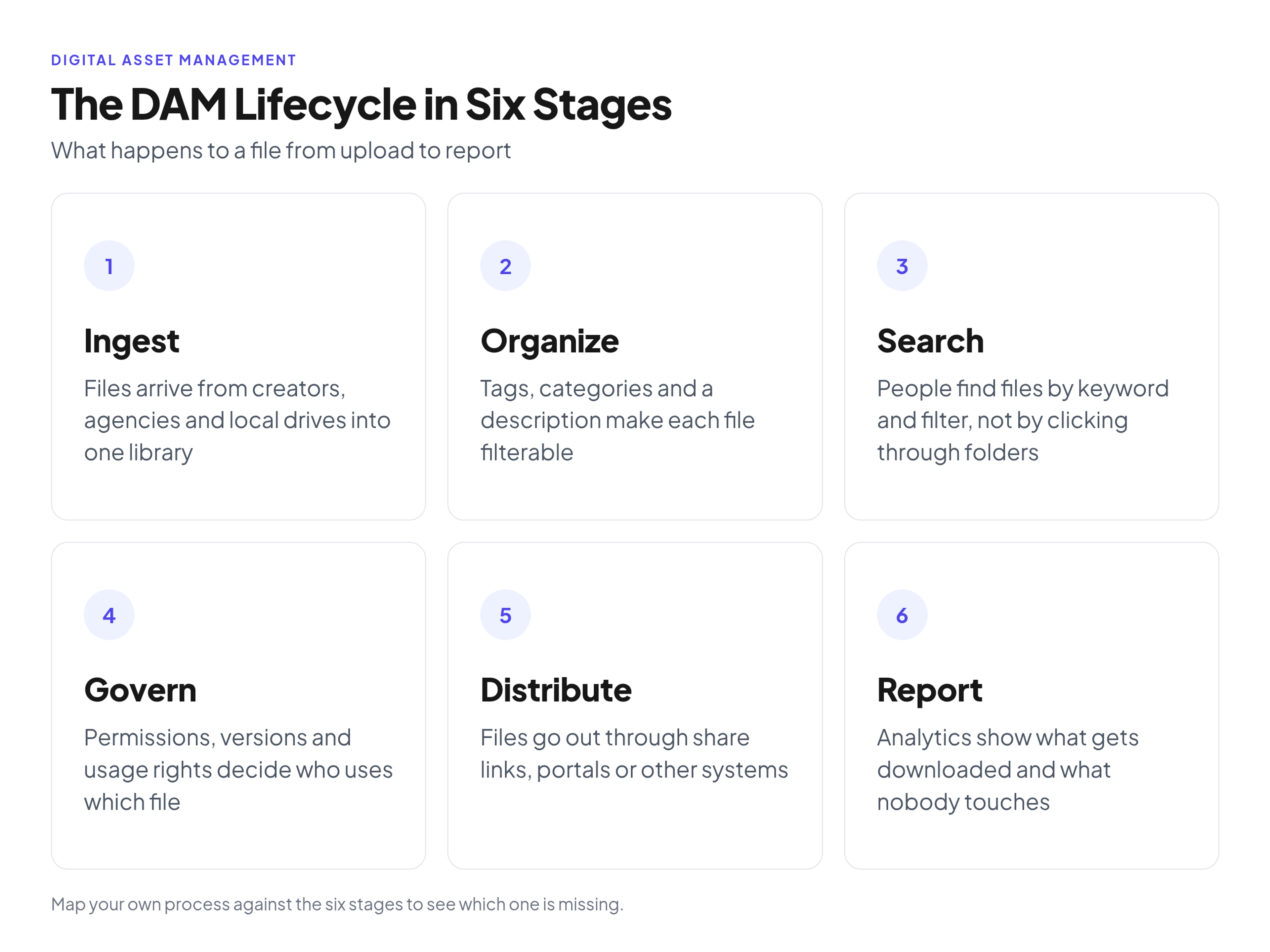
The DAM lifecycle: ingest, organize, search, govern, distribute, report.
DAM features a brand team should care about
For a brand team, the features that matter most are metadata and search, version history, permissions and a way to share files outside the company. They are what keep people on the current logo. When you look at any system, ask to see each of them working with your own file names.
Acquia's feature list (again, a vendor) names a centralized library, metadata and search, version control, permissions, creative workflow and approvals, brand portals and distribution, integrations, AI-powered capabilities, content transformation, and security and compliance. Here is how I'd read it for a brand team:
- Metadata and search. A consistent set of tags lets people find a file by campaign or product instead of remembering its name.
- Version control. History shows which file is current and what it replaced.
- Permissions and roles. Drafts stay with the design team, and final assets are visible to everyone who needs them.
- Workflow and approvals. Someone signs off before an asset becomes available. Check how much of this you need before paying for it.
- Sharing and portals. Agencies, press and partners get approved files without access to everything else.
- Integrations. Files can flow into design or content systems without manual download and re-upload.
- Analytics. You can see which assets are used and which are ignored.
- AI tagging and visual search. Vendors list these as features. I'd treat any auto-generated tag as a suggestion, and the library owner still decides which tags are official.
One asset, fully described
A usable asset record is the file plus a handful of fields that answer: what is this, is it current, who owns it, and where can I use it? Here is one record for a fictional company, so you can see what each field is for.
Everything in this example is fictional: the company, the file and the dates.
- File name: Copseholt_PrimaryLogo_RGB_2026.png. Follows a naming rule (Company_Asset_ColorMode_Year), so the name alone tells you what you are holding.
- Type: Image, PNG. Tells people what the file can be used for and what it cannot.
- Version: 3.0 (replaces 2.1). Shows this is the current file and keeps the history.
- Status: Approved on Sep 3, 2026. Separates final files from drafts.
- Owner: Brand Design Team. Gives people someone to ask for changes.
- Usage rights and expiry: Company-owned artwork, no expiry. A licensed photo would show a license end date here, so nobody runs an expired image in a campaign.
- Allowed channels: Web, social media, internal presentations. Keeps the RGB file out of print, where the CMYK version belongs.
- Tags: logo, primary, RGB, full-color, 2026. Makes the file findable through search and filters.
- Related assets: Copseholt_PrimaryLogo_CMYK, Copseholt_Brand_Guidelines. Points people to the print version and the rules for using the logo.
- Last used: Oct 12, 2026. Shows whether the asset is active or a candidate for archiving.
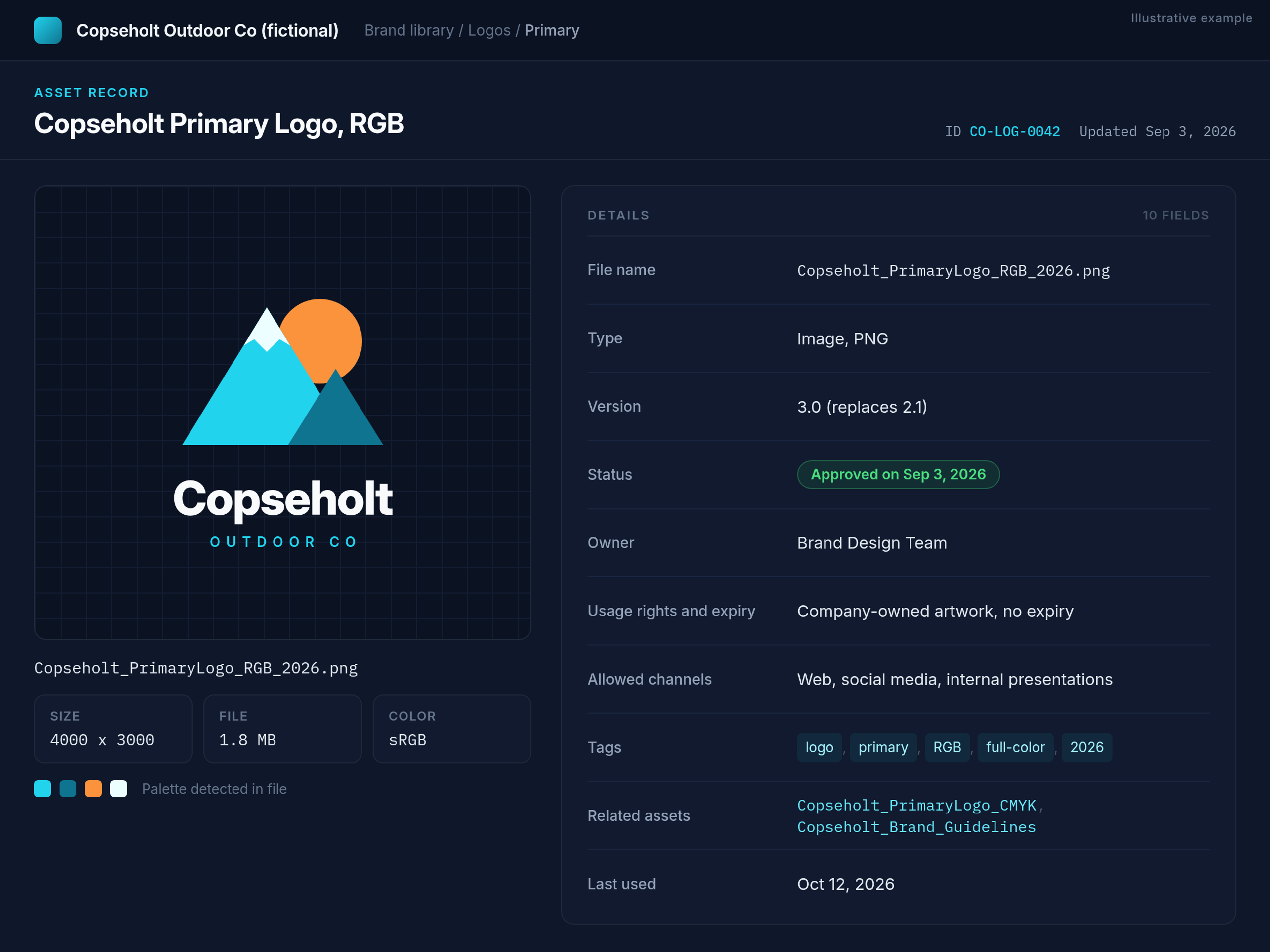
Illustrative example: one asset record for the fictional company Copseholt Outdoor Co, with a note on why each field exists.
DAM, a CMS and cloud storage: what each is for
A DAM governs approved files, a CMS publishes pages, and cloud storage holds files. They overlap, but each answers a different question.
A DAM stores and governs approved assets and attaches context and usage rules to each one. IBM puts the contrast this way: a CMS is primarily for managing and publishing content on websites and other online platforms, while a DAM houses a wider variety of file types.
A CMS builds and publishes web pages and other online content. It typically pulls in approved images and documents rather than acting as the home for every file a team owns.
Cloud storage shares files and folders quickly, with little metadata and little governance of rights or versions. Acquia answers its own question, "Is Google Drive or Dropbox a DAM?", with "No," and notes that many organizations start with cloud storage and move to a DAM once the library outgrows folders. Deeper comparisons are not covered here.
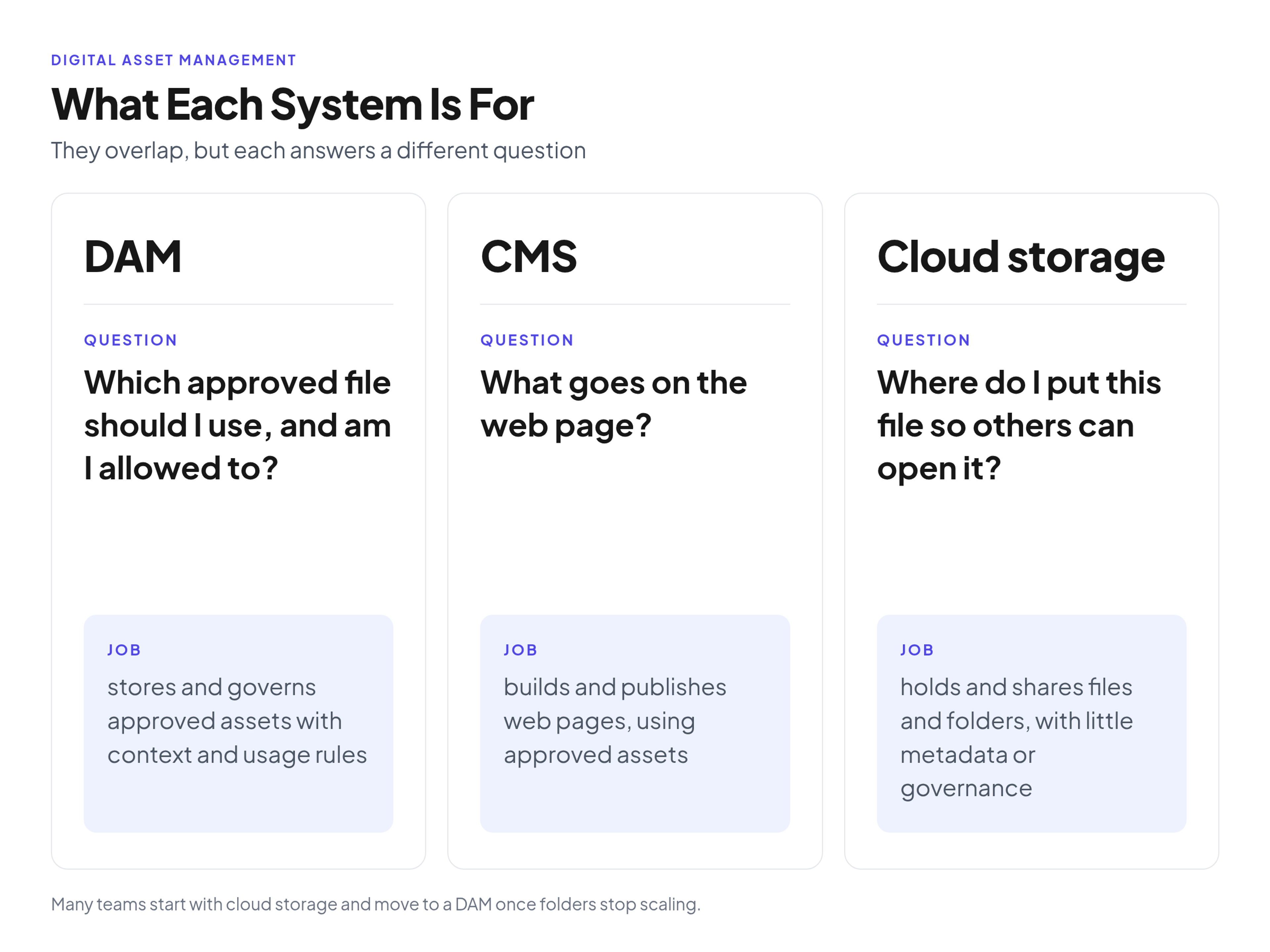
What each is for: a DAM governs approved assets, a CMS publishes pages, cloud storage holds files.
Which kind of DAM do you need
Most brand teams need the brand management type, or something lighter, not a media archive. Decide which kind fits before you look at any vendor.
Google's AI Overview for this query (Nov 23, 2026) lists four types: brand management, library or archive, media asset management, and production (including 3D). Wikipedia says the term media asset management (MAM) may be used when DAM is applied to the subset of media: audio recordings, photos and videos.
Acquia's use cases include brand management, creative operations, sales enablement, ecommerce, video and multichannel work. The pattern across them is that the more raw media and production work you handle, the more specialized the system gets. I'd start with the brand management type and only move to the heavier ones if your files demand it.
Do you need a full DAM? An eight-question self-check
Answer the eight questions below with yes or no for your own team. Mostly "no" suggests a lighter library or portal may be enough, and several "yes" answers on volume, rights and workflows suggest evaluating a full DAM. This scoring is my own judgment, not a benchmark.
- Do people regularly ask where the current logo is?
- Do several folders hold a file called "final" logo?
- Do external partners often request files from you?
- Do you need a public place to share brand guidelines?
- Do you hold very large photo libraries or raw video archives?
- Do your assets carry licenses or usage rights that expire?
- Do you need multi-step approvals before assets are published?
- Do you need an audit-level record of who downloaded which file?
How I'd read it: questions 1 to 4 are findability and sharing problems, which a lighter brand library or portal often solves. Questions 5 to 8 are about volume, rights and workflow. If several of those are "yes," a full DAM is worth evaluating.
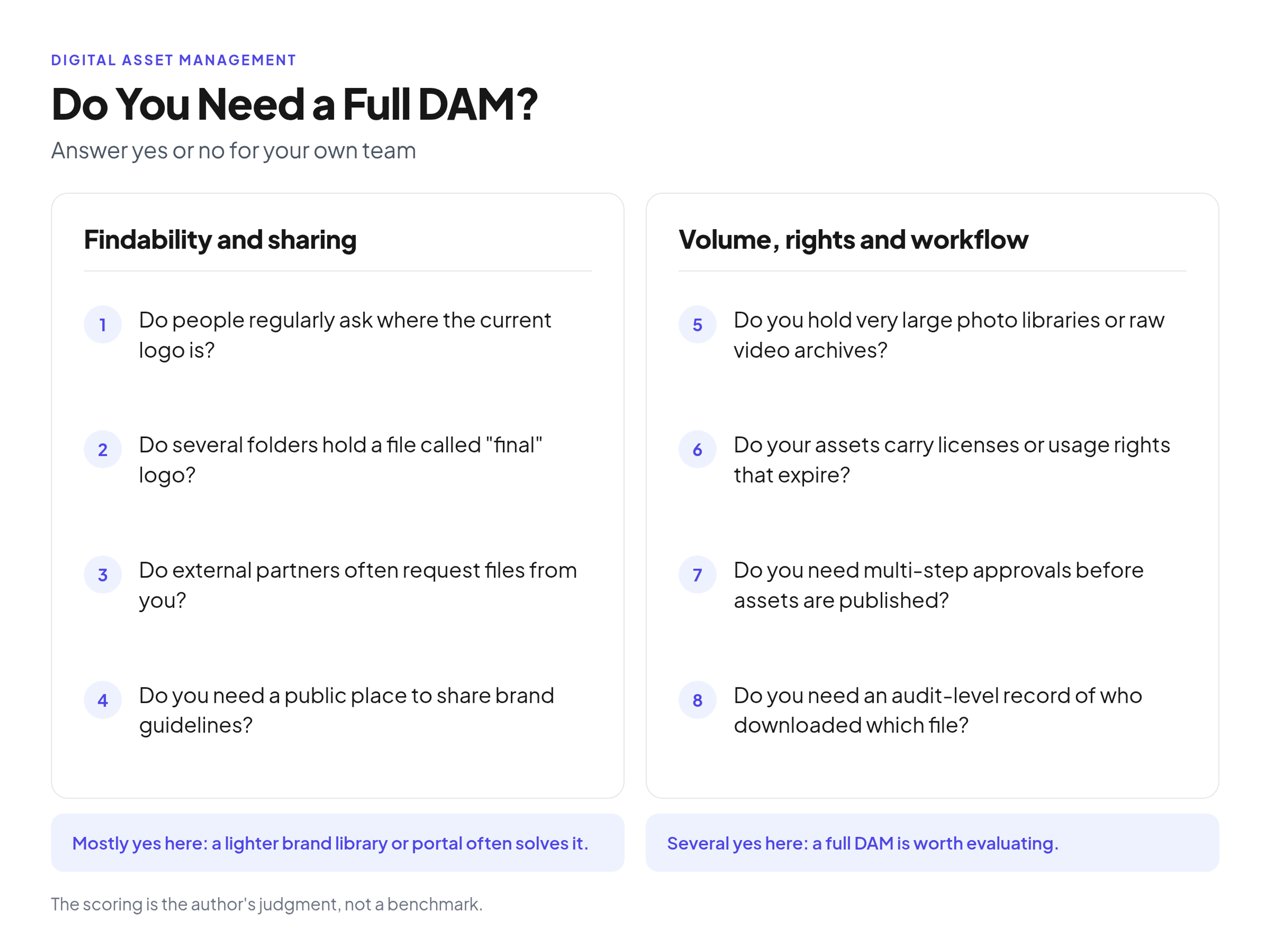
The eight-question self-check and how to read the answers.
Where a brand portal fits
A brand portal is a lighter, narrower relative of a DAM: online brand guidelines plus the approved brand files (logos, colors, typography, templates) in one place. Acquia describes brand portals as a curated, permissioned view of approved brand assets for external partners. If that matches your problem, you may not need the full system.
On our own homepage, the product lists Digital Asset Management as a feature: folders, metadata, version tracking and search. Our online brand guidelines and asset library offers public or password-protected portals, share links, roles (Admin, Editor, Viewer), unlimited free viewers, analytics, and metadata and tagging. For plans, see pricing and the 14-day free trial on paid plans. For a definition of the category, read what a brand portal is and what it keeps in one place.
Plainly: if your library is mostly raw photo and video archives at large scale, or needs deep workflow and integrations, a full DAM is the better fit.
How to start without buying anything
You can get most of the benefit of a DAM before you buy one: take stock, set rules, and name an owner. These five steps also make any later system easier to adopt.
- Inventory. List what you have across shared drives, laptops and email.
- Naming rule. Pick one pattern, like the one in the Copseholt example, and apply it to every final file.
- Required tags. Choose a short set that every final asset must carry. See which tag fields make a library searchable.
- One owner. One person approves what goes into the final location.
- A review date. Set a recurring date to archive outdated files and check expiring rights.
For the library itself, here is an inventory-first way to set up the library.
Common mistakes
The most common mistake is keeping drafts and final files in the same place, and most of the others follow from having no owner. Here are the patterns I'd watch for.
- Treating local drives or personal folders as the official archive.
- Building deeply nested folders instead of relying on search and tags.
- Mixing drafts and approved files in one location.
- Forgetting to remove access when employees or agency partners leave.
- Not recording usage rights, so an expired stock license ends up in a live campaign.
- Buying a full system before you have a naming rule and an owner.
FAQ
What does a digital asset management system do?
It stores, organizes, governs and distributes digital files from one central library. In practice that means files are tagged, searchable, permissioned and versioned, so people can find the approved one.
How do you make money with digital assets?
In the DAM sense, you don't make money directly. A DAM is not a revenue source: it cuts search and rework time and helps protect licensing by keeping rights information with the file. "Digital assets" in the crypto sense are a different subject. IBM's page notes that crypto and NFTs are not managed in DAM systems, and the Congressional Research Service's 2018 In Focus on crypto assets describes them as digital representations of value made possible by cryptography and blockchain. That is not covered here, and nothing in this article is investment advice.
What is the average salary for a digital asset manager in the United States?
It varies by job title and company, and no figure is quoted here because no primary source for DAM manager pay was found. Current job listings are the better guide for your market.
What is a digital asset management job?
It is a role around the health of the library. In general it covers taxonomy and metadata, permissions, governance (keeping files current and rights accurate) and training people to use the system. The exact duties depend on the employer and the title.
Is a DAM the same as cloud storage?
No. Cloud storage holds files and folders, while a DAM adds metadata, permissions, version control and usage rights for approved assets. Acquia answers "Is Google Drive or Dropbox a DAM?" with a plain "No."
What is the difference between a DAM and a brand portal?
A brand portal is a lighter, narrower relative of a DAM, focused on brand guidelines and approved brand files. A full DAM is built for larger libraries, deeper workflows and integrations. The self-check above is a quick way to see which side you are on.
Conclusion
Digital asset management is a routine plus a system: files are stored once, described, governed and shared from one place. You can start the routine today with an inventory, a naming rule, required tags, an owner and a review date. Then use the self-check to decide whether a lighter library or portal is enough or whether a full DAM is worth evaluating.