Brand assets are the elements people use to recognize your brand without reading the name: the logo, brand name, colors, typefaces, imagery style, icons and graphic shapes, tagline, voice, and sometimes a sound, a character or a piece of packaging. For a marketing or brand team, each of those ideas only becomes usable when it exists as an approved file with a rule attached, such as a logo pack, a color code sheet, a font file and a set of templates.
That second half is where most companies struggle. Almost every team can name its brand assets. Far fewer can hand a new freelancer the current version of each one in under five minutes. This guide covers the types of brand assets with examples, how they differ from brand identity and marketing collateral, a short test for what counts, and an inventory you can run on your own brand this week.
What are brand assets, in plain terms?
A brand asset is anything that makes people think of your company before they see the name. Kantar describes a brand asset as "a mental shortcut to a brand that activates existing memories related to communications or previous brand experience," and its examples are deliberately broad: a logo, a unique pack, a tagline, or a celebrity. That is the marketing meaning of the term, and it is about memory.
Inside a company, the same words usually mean something more practical: the files. When a sales rep asks for "the brand assets," they want the logo in a format that works in a slide, the right blue, and a deck template. Both meanings are correct, and a brand team needs both. The recognition is what gives an asset value. The approved file is what keeps that value from leaking every time someone recreates the logo from a screenshot.
I find it useful to keep the two meanings side by side:
- The asset: the recognizable element, for example a teal accent color
- The asset file set: what people need to use it correctly, for example HEX, RGB and CMYK values, approved text pairings and a swatch file for design apps
When the file set is missing, people improvise. That is how a brand ends up with three slightly different teals.
Types of brand assets, with examples
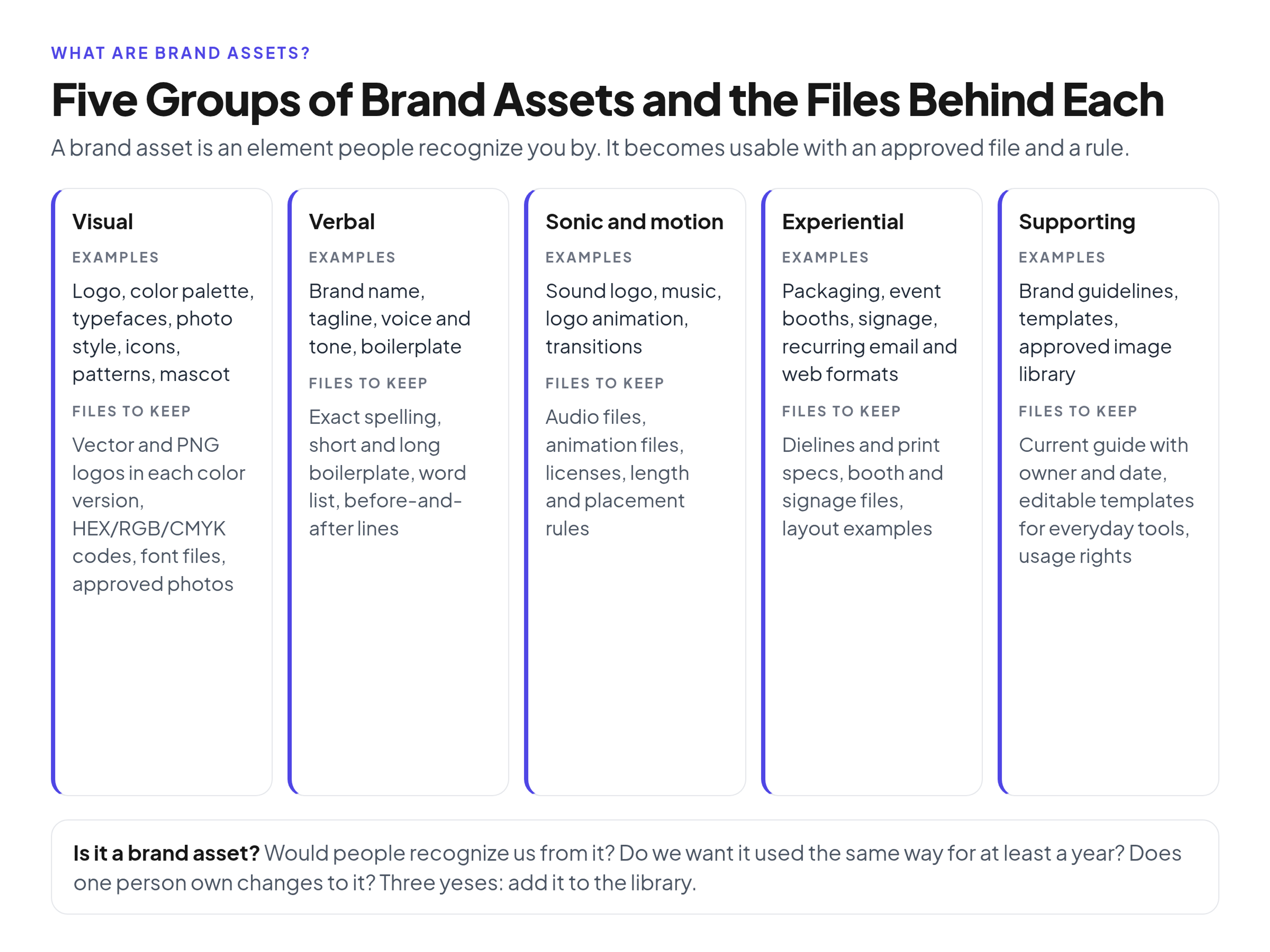
Most lists online run to 15 or 20 items. They are easier to manage in five groups, because each group needs different files and a different owner.
Visual assets
These are the ones people think of first.
- Logo: primary logo, symbol or icon mark, wordmark, and approved color versions (full color, one color, reversed on dark)
- Color palette: primary, secondary and neutral colors with codes for screen and print
- Typography: the typefaces, the weights you actually use, and the hierarchy for headlines and body text
- Imagery style: what your photography looks like (subjects, lighting, crop, color grade) and any illustration style
- Icons and graphic elements: an icon set in one style, patterns, shapes or frames derived from the logo
- Characters or mascots: if you have one, with approved poses and expressions
Verbal assets
- Brand name: the exact spelling, capitalization and how to write it in a sentence
- Tagline or slogan: the approved wording and where it may appear
- Voice and tone: how the brand writes, with words you use and words you avoid
- Boilerplate: the approved company description for press releases, partner pages and event listings
Sonic and motion assets
- Sound logo or audio signature: a short sound at the start or end of videos and ads
- Music: licensed tracks or a house track used consistently
- Motion: how the logo animates, how slides and posts transition, and how fast things move
Many small and mid-size companies have none of these yet, and that is fine. Add them when you produce enough video or audio to need them.
Experiential assets
- Packaging: shape, structure, color blocking or unboxing details
- Spaces and events: booth design, signage and printed materials at events
- Digital touchpoints: the way your product, website and emails look and feel, and recurring formats such as a newsletter layout
Supporting assets
These are not recognition elements on their own, but they are how every other asset gets used correctly.
- Brand guidelines: the rules for using each asset
- Templates: slides, social posts, documents, email signatures and one-pagers built on the approved elements
- Approved photo and video library: the actual images people can use, with usage rights recorded
If you are deciding what a guide should cover, our walkthrough of which sections a complete brand guide covers goes section by section.
Brand assets vs brand identity, collateral and digital assets
These terms get mixed up in briefs and budget requests, so it helps to be precise.
- Brand identity is the whole system: how the logo, color, type, imagery and voice work together. Brand assets are the individual parts of that system.
- Brand guidelines are the rulebook for the assets. They are a supporting asset, not a recognition element.
- Marketing collateral is what you make with the assets: a brochure, a case study PDF, a trade show banner. Collateral is temporary and campaign-specific. The assets inside it are meant to last for years.
- Digital assets is the broader file category used in digital asset management: any file a company stores and reuses. A stock photo bought for one blog post is a digital asset. It is not a brand asset unless it represents your brand's approved style.
- Brand equity is the value the market attaches to your brand over time. Strong, consistent assets help build it, but equity lives in people's heads, not in a folder.
The practical reason to separate these: brand assets need stricter control than collateral. A campaign banner can be thrown away next quarter. If the logo file changes, every future banner changes with it.
Is it a brand asset? A three-question test
Teams often ask whether something belongs in the brand library or in a campaign folder. I use three questions:
- Would someone recognize us from it, or will they after repeated use? A specific shade, a shape, a phrase or a sound can pass. A generic stock photo of a handshake will not.
- Do we want it used the same way every time, for at least a year? If the answer is "only for this campaign," it is collateral.
- Can we name one owner who approves changes to it? If nobody owns it, it will drift, and it is not really being managed as an asset yet.
Three yeses: it goes in the brand asset library with a rule and an owner. Two yeses: usually a candidate asset; decide who owns it before you promote it. One or none: keep it in the campaign or working folder.
The first question matters more than people expect. Consistency alone does not make an asset distinctive. A teal button used everywhere is consistent. It only becomes a brand asset when people link that teal to you rather than to the category.
The files behind each brand asset
Most lists stop at the names of the assets. This section covers what a team should actually have on hand for each one. It is the checklist I use when someone says "we have all our brand assets," because it shows quickly which ones exist only as an idea.
- Logo: vector master files (SVG, EPS or PDF), PNGs with transparent backgrounds in a few sizes, each approved color version, a favicon or app icon, clear space and minimum size rules
- Color palette: HEX and RGB for screens, CMYK and a spot color reference if you print, text and background pairs that pass contrast, a swatch file for design apps
- Typography: font files or links to the font service, a note on license terms, fallback fonts for email and documents, a type scale with sizes and weights
- Imagery: an approved library of real photos, a short style description, five to ten do and don't examples, recorded usage rights for each image
- Icons and graphic elements: the icon set in SVG, pattern files, rules for scale and color
- Brand name, tagline and boilerplate: the exact text in a copyable format, approved short and long versions, when the tagline is used
- Voice and tone: three to five principles, a list of preferred and banned words, rewritten before and after examples
- Sound and motion: audio files in common formats, logo animation files, length and placement rules
- Templates: editable source files for the tools people actually use (slides, documents, social formats), not only design-app files
- Guidelines: the current version, with a last-updated date and an owner's name
Two notes from experience. First, many of the support requests a brand team gets ("can you send me the logo," "which blue is ours") come from a missing file format, not a missing asset. The logo exists; the PNG with a transparent background for slides does not. Second, templates for everyday tools prevent more off-brand work than any rule in the guidelines, because they make the right choice the easy one.
A worked example: inventorying the assets of a 60-person company
Here is a composite example, built from a pattern I see often rather than from a real client. Call the company Fernhill, a 60-person B2B software business with one brand manager and a part-time designer.
The brand manager asks a simple question: "What are our brand assets, and where is each one?" She lists every element from the five groups above, then answers three columns for each: does an approved file exist, where does it live, and who owns it. In a company like this, the inventory often looks like this:
- Logo: exists, but there are several versions across a shared drive, a sales folder and old event folders. Nobody can say which PNG is current.
- Colors: the primary color is clear. The secondary palette was extended by the web team and never added to the guide, so two greens are in use.
- Typography: the web font is licensed for the website. Sales decks use a system font because nobody gave sales the font files or a fallback rule.
- Imagery: a folder of stock photos with no record of where they came from or what the license allows.
- Voice: a single paragraph in a PDF that nobody reads.
- Boilerplate: three different company descriptions on partner sites.
- Templates: a slide template from two years ago with the old logo.
Fernhill does not need a rebrand. Its assets are fine. What it lacks is the file set and the ownership. The fix is mostly cleanup: pick the current logo files and archive the rest, add the second green to the palette or retire it, give sales the font fallback rule, record rights for the photos it keeps, write one boilerplate in short and long versions, and rebuild the slide template.
The lesson I take from this pattern: the first brand asset project for most teams is not designing new assets. It is deciding which existing versions are approved and making them easy to find. For the sorting itself, here is an eight-step system for sorting, naming and tagging those files.
How to protect brand assets
Protection has a legal side and an everyday side.
On the legal side, trademarks cover more than logos and names. WIPO notes that trademarks can also include three-dimensional features such as shape and packaging, sounds, and color shades used as distinguishing features. Copyright is separate: the U.S. Copyright Office explains that it protects original works of authorship, including artistic works such as photographs and artwork, but not ideas or methods. In practice, that means your photos, illustrations and written materials may be protected by copyright, while your name, logo and tagline are trademark questions. Talk to a trademark attorney before relying on either; this guide is not legal advice.
The everyday side matters more for most brand teams:
- Keep one current version of each asset and archive the rest so they cannot be downloaded by mistake
- Record usage rights and expiry dates next to licensed photos, fonts and music
- Decide who can download, who can edit and who can only view
- Give partners and agencies a curated set instead of the whole library; this guide covers packaging assets for agencies, freelancers and partners
Where to keep brand assets
Shared drives work while one person controls them. They break when the number of people who need assets grows faster than the person who maintains them. The usual symptoms are duplicate logo files, old templates still in circulation and repeated "can you send me" requests.
A brand portal keeps the guidelines and the approved files in one place, so the rule and the file travel together. Brandportal is built for this: you can publish public or password-protected portals with folders, version history, metadata and tagging, and share links, and assign Admin, Editor and Viewer roles. Viewers are free and unlimited, so sales, partners and agencies can get access without paid seats. If you want to try it with your own assets, see plans and the 14-day free trial.
The tool matters less than the inventory. Run the file checklist above first, and any system you choose will work better.
FAQ
What are examples of brand assets?
Common examples are the logo, brand name, color palette, typefaces, photography style, icon set, tagline, voice and tone, boilerplate text, sound logo, packaging and templates. Brand guidelines and an approved image library are supporting assets that help people use the rest correctly.
What is the difference between brand assets and brand identity?
Brand identity is the complete system of how your brand looks, sounds and behaves. Brand assets are the individual parts of that system, such as the logo, colors and voice. You can change one asset without changing the identity, but a change to several core assets usually amounts to a rebrand.
Are templates brand assets?
Templates are supporting assets. They are not what people recognize you by, but they carry the logo, colors and type into everyday work. For most companies, good templates for slides, documents and social posts prevent more off-brand material than any written rule.
How many brand assets does a company need?
There is no fixed number. A small company can start with a logo pack, a color palette, typography, a few photos, a voice paragraph, boilerplate and a slide template. Add icons, motion, sound and packaging when you produce enough work that needs them.
Who should own brand assets?
One person, usually the brand manager or the marketing lead, should own the approved versions and decide on changes. Designers create and update the files, but a single owner prevents the slow drift that happens when anyone can upload a new version.
Are brand assets the same as digital assets?
No. Digital assets are any files a company stores and reuses, including one-off stock photos, campaign files and recordings. Brand assets are the subset that represents your brand's approved, lasting look and voice, and they need stricter version control.
Conclusion
Brand assets are the parts of your brand people recognize you by, and for a working team they are also the approved files and rules behind each one. Group them into visual, verbal, sonic and motion, experiential and supporting assets, use the three-question test to decide what belongs in the library, and run the file checklist to see which assets exist only as an idea. Most teams do not need new assets. They need one current version of each, one owner, and one place where people can find them.